
截图
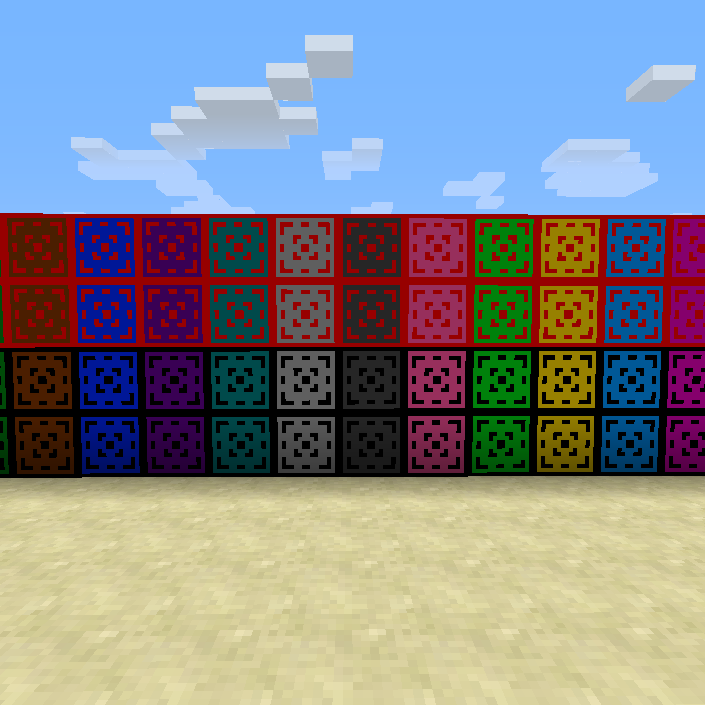
介绍
THIS MOD IS A WIP! MORE BLOCKS ARE SOON TO COME. LEAVE SUGGESTIONS IN THE COMMENTS.
Crafting Recipes (as of version 1.1a)
The Blocks

Just replace the ink sack with a dye for the border colour (color) (black and red only done as of version 1.0) and replace the bone meal with a dye for the background colour (color)
The Dying Stone

All of the blocks that are finished (as of version 1.1a):

Installation:
1. Download the mod
2. Download and install forge
3. Locate your .minecraft folder
4. Put the mod in your mods folder
5. Run minecraft and play
Remember to leave suggestions for new decoration blocks (a image would be nice) and that this is a WIP mod so be nice.
常见问题
Colour (Color) Blocks 支持哪些 Minecraft 版本?
Colour (Color) Blocks 支持 Minecraft Java 版 1.7.10,可用的加载器:Forge。下载时注意选择和你游戏版本一致的文件。
Colour (Color) Blocks 怎么安装?
先用 PCL2 或 HMCL 启动器安装对应版本的 Forge,再把下载的 .jar 文件放进游戏目录的 mods 文件夹,重新启动游戏即可。开启了版本隔离的,mods 文件夹在 versions/版本名 下面。
surfie007 的其他作品
查看全部 →
Minecraft: Your Quest Begins
这是一款以任务为核心的整合包,围绕魔法、科技及其他类型的模组打造。

Essential Vanilla
This pack adds in mods that should be in vanilla minecraft but aren't

Making Life Easier – Extended Edition
The extended edition adds more mods making the game easier to play that add new features, blocks and items into the game.

Making Life Easier
This makes the vanilla game easier to play by adding just a few mods.
评论
登录后评论和评分