
Essential Core – Inspect Blocks/Entities/Chunks/Players
Essential Core is an effective mod for server security. Restore inventories, chunks, inspect blocks, entities, etc., and enjoy advanced logs.
截图
介绍
Essential Core
Our multi-threaded processing allows you to get the best performance when using the mod.
Overview
• Records player actions (block breaking/placement, interactions, containers, etc.)
• Open Inventories, Ender Chests, and offline player ender chests.
• Performs periodic backups of player inventories and chunks
• Allows for rollback/restore of chunks and inventories
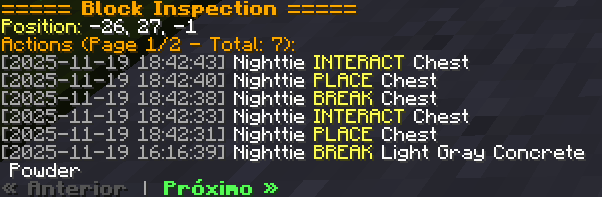
• Has an interactive inspector (with pagination) for consulting history
• Uses background processing (multithreaded) to avoid lagging the server
Core Features
• Fast and efficient data logging for various categories (blocks, containers, interactions, chat, commands, etc.).
• Rollbacks and restores (player/chunk) via commands.
• Multi-threaded
• Logs in files by category → player → date: essential-core /logs/<category>/<player>/<dd-MM-yyyy>.log.
Configurable via config.toml (enable/disable logs, command filter, and thread count).
• Inspector with pagination and clickable buttons for navigation.
• Undo to revert the last rollback.
#BISECTHOSTING
Want to play with your friends?
If you are looking for a server to play any mod or modpack with your friends, Bisect Hosting is the way to go! They offer Minecraft servers with the best value for your money. Click [this link] and use code “Night” to get 25% off!
What does it log?
• NEW: inventory — Player inventory log
• NEW: enderchest — Player enderchest log
• The implemented log categories (FileLogger.java file) include — each log goes to essential-core/events/<category>/<player>/<date>.log:• block_break — block breaking by player
• block_place — block placement
• interactions — interactions with blocks/entities (right-click)
• containers — container opening with summarized content
• chat — chat messages
• commands — commands executed by players (filterable)
• sessions — player login/logout
• item_pickups — picking up items from the ground
• item_drops — dropped items (Event: EntityJoinLevel detects ItemEntity)
• item_transactions — (method exists in FileLogger; see note below)
• dimensions — dimension change
• game_mode — gamemode change
• entity_death — entity death (new)
• entity_kills — entity killed by player
• console_commands — commands executed on the console
• server_events — server start/stop
• Observation: some logs are recorded with the player as “SERVER” or “CONSOLE” when applicable (e.g., entity_death records in entity_death/SERVER/<date>.log).
Commands
Alias: essentialcore, ecore and core
• /ecore status — Shows mod status: queues, threads, latest backups, processing time, memory usage.
• /ecore inspect — Toggles inspector mode: toggleInspect.
* Subcommands (while in /nc inspect mode):
* /ecore inspect block <x> <y> <z> [page] — Inspects the block’s history (actions + interactions).
* /ecore inspect player <target> [page] — Player’s action history.
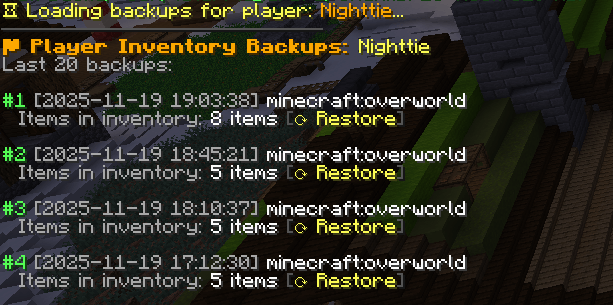
• /ecore player <player> — Displays the player’s last backups.
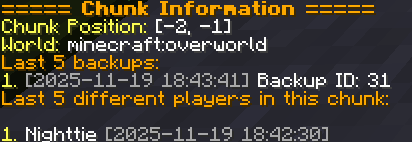
• /ecore chunk — Shows information about the current chunk (last backup, last players to enter, etc.).
• /ecore backup all | player | chunks — Forces a backup.
• /ecore rollback chunk <radius> <backup_number> — Restores the chunks in an area around the player to the state of the indicated backup number.
• /ecore rollback player <player> <backup_number> — Restores the player’s inventory (player must be online).
• /ecore inventory — Open the inventory of an online or offline player.
• /ecore enderchest — Open the enderchest from an online or offline player.
• /ecore reload — Reloads the config.toml configuration.
• /ecore pause — Pause Mod.
Future updates
• MySQL support
• Curios inventory support
Mod inspired by coreprotect!
常见问题
Essential Core – Inspect Blocks/Entities/Chunks/Players 支持哪些 Minecraft 版本?
Essential Core – Inspect Blocks/Entities/Chunks/Players 支持 Minecraft Java 版 1.21–26.2,共 6 个版本,可用的加载器:NeoForge。下载时注意选择和你游戏版本一致的文件。
Essential Core – Inspect Blocks/Entities/Chunks/Players 怎么安装?
先用 PCL2 或 HMCL 启动器安装对应版本的 NeoForge,再把下载的 .jar 文件放进游戏目录的 mods 文件夹,重新启动游戏即可。开启了版本隔离的,mods 文件夹在 versions/版本名 下面。
Nighttie 的其他作品
查看全部 →
Better Pickaxe Trims
新增锻造模板纹饰,可个性化定制并升级你的镐。探索耐久提升、额外经验、更快挖掘等效果。

Multi Arrow Effects [Multiple Effects on One Arrow]
将箭与药水效果结合,在一支箭上携带多种效果。

Auto Pickup Filter [Loot Filter]
一键禁用对任何物品(原版或模组)的自动收集。

Better Swords Trims
新增专为个性化和强化你的剑与盔甲而设计的锻造纹饰。探索强大的战斗效果、范围伤害、发光探测等更多内容。
评论
登录后评论和评分