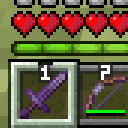
Native Numbered Hotbar
作者:grawl
Little keyboard numbers over hotbar slots, in containers hotbar like chest, anvil or horse, and F symbol for offhand slot
截图


介绍
中文介绍正在准备中,下面暂时显示原文。
Original hotbar textures with numbers over slots.

Numbers added to every place you see hotbar, and F letter is added for offhand slot.
- Hotbar
textures/gui/sprites/hud/hotbar - Hotbar Offhand Left
textures/gui/sprites/hud/hotbar_offhand_left - Hotbar Offhand Right
textures/gui/sprites/hud/hotbar_offhand_right - Hotbar Selection
textures/gui/sprites/hud/hotbar_selection
Creative Inventory
- Inventory Tab
textures/gui/container/creative_inventory/tab_inventory - Item Search Tab
textures/gui/container/creative_inventory/tab_item_search - Items Tab
textures/gui/container/creative_inventory/tab_items
Containers
- Anvil
textures/gui/container/anvil - Beacon
textures/gui/container/beacon - Furnace
textures/gui/container/furnace - Brewing Stand
textures/gui/container/brewing_stand - Cartography Table
textures/gui/container/cartography_table - Crafter
textures/gui/container/crafter - Crafting Table
textures/gui/container/crafting_table - Dispenser
textures/gui/container/dispenser - Enchanting Table
textures/gui/container/enchanting_table - Blast Furnace
textures/gui/container/blast_furnace - Double Chest
textures/gui/container/generic_54 - Grindstone
textures/gui/container/grindstone - Hopper
textures/gui/container/hopper - Horse
textures/gui/container/horse - Inventory
textures/gui/container/inventory - Loom
textures/gui/container/loom - Nautilus
textures/gui/container/nautilus - Shulker Box
textures/gui/container/shulker_box - Smithing
textures/gui/container/smithing - Stonecutter
textures/gui/container/stonecutter - Villager
textures/gui/container/villager
常见问题
Native Numbered Hotbar 支持哪些 Minecraft 版本?
Native Numbered Hotbar 支持 Minecraft Java 版 1.19–1.21.11,共 5 个版本。下载时注意选择和你游戏版本一致的文件。
Native Numbered Hotbar 怎么安装?
把下载的 .zip 文件(不用解压)放进游戏目录的 resourcepacks 文件夹,进游戏后在「选项 → 资源包」里把它移到右边启用。
评论
登录后评论和评分