
介绍
How to use it: Locate the item named “Recipe Editor” in the GTM Items tab, right-click on any machine, crafting table, or furnace to open an editing interface. Fill in the parameters, populate the items or fluids, and then export. The exported content can be found in logs/kubejs/server.log.
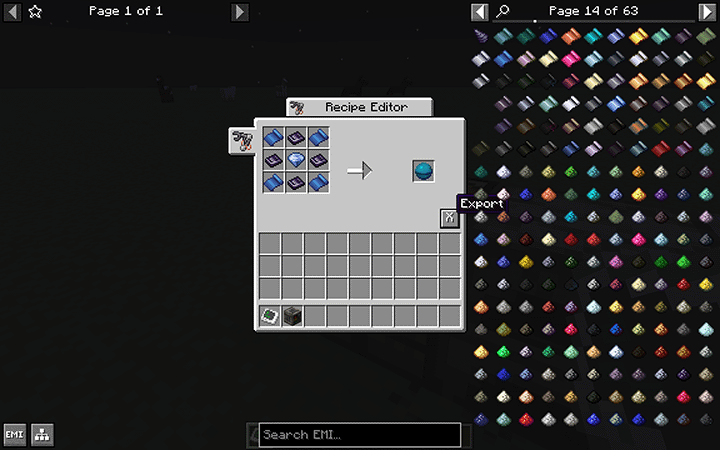
event.shaped(“minecraft:heart_of_the_sea”, [
“ABA”,
“BCB”,
“ABA”
], {
A: “gtceu:osmium_foil”,
B: “gtceu:dense_obsidian_plate”,
C: “gtceu:flawless_lapis_gem”
})
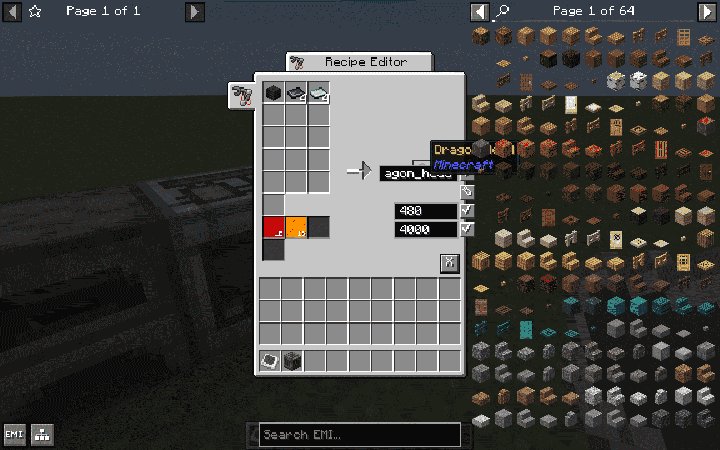
event.recipes.gtceu.assembly_line(“dragon_head”)
.itemInputs(“minecraft:wither_skeleton_skull”)
.itemInputs(“4x gtceu:obsidian_plate”)
.itemInputs(“4x gtceu:ender_pearl_plate”)
.itemOutputs(“minecraft:dragon_head”)
.inputFluids(“gtceu:redstone 1000”)
.inputFluids(“gtceu:blaze 1000”)
.EUt(480)
.duration(4000)
常见问题
GTM Visual Recipe Editor 支持哪些 Minecraft 版本?
GTM Visual Recipe Editor 支持 Minecraft Java 版 1.20.1,可用的加载器:Forge。下载时注意选择和你游戏版本一致的文件。
GTM Visual Recipe Editor 怎么安装?
先用 PCL2 或 HMCL 启动器安装对应版本的 Forge,再把下载的 .jar 文件放进游戏目录的 mods 文件夹,重新启动游戏即可。开启了版本隔离的,mods 文件夹在 versions/版本名 下面。




评论
登录后评论和评分