ChatManager
Chat Management mod that chat channels, chat formatting and chat styling, as well as message filtering and notifications
介绍
ChatManager

a highly configurable chat mod for modern Minecraft servers. It introduces powerful, customizable chat channels and advanced formatting, making community discussions clearer and easier to moderate. With deep placeholder and permission support, ChatManager is the perfect backbone for servers that want professionalism and flexibility in their chat experience.
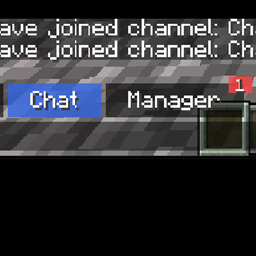
Before
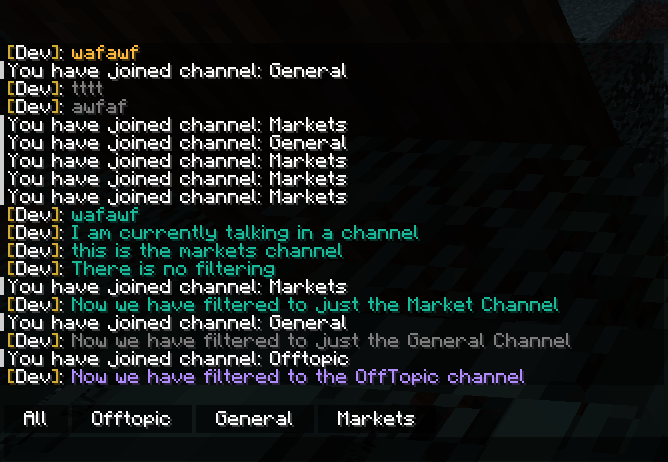
After
Message Notifications
Features
- Client-side Message Filtering: Players’ clients only display messages from the channels they join or select, reducing spam and making it easy to focus on relevant conversations.
- Configurable Chat Channels: Easily set up channels like General, Market, Help, and Offtopic, each with its own formatting and permissions. Channel colors and styles are fully customizable.
- Placeholder Support: Dynamically insert data such as player names, locations, world time, levels, health, server stats, and much more into chat messages with built-in placeholders.
- LuckPerms Integration: Seamlessly show player prefixes and suffixes using LuckPerms data (Servers Only, do not install luckperms in your singleplayer world).
- Rich Formatting: Style your chat using Minecraft’s component system, including colors, gradients, tags, and more for a modern look.
- Permissions Control: Restrict access and usage of channels based on permissions excellent for server moderation and specialized chat rooms.
- Command-based Channel Switching: Swap channels, send private or public messages, and more all through intuitive commands.
- Performance Friendly: Lightweight design ensures minimal impact on server performance.
- Compatibility: Compatible with ChatHeads and FTB Essentials Nicknames! Need more compatibility? Join the discord and let me know!
Existing Placeholders
- {chatmanager:player} – For getting the players display name
- {chatmanager:mspt} – For getting the MS per tick, a performance metric
- {chatmanager:level} – For getting the name of the level
- {chatmanager:motd} – For getting the MOTD on the server
- {chatmanager:player_count} – For returning the player count on the server
- {chatmanager:player_ping} – for returning the players ping
- {chatmanager:player_x} – get the player x
- {chatmanager:player_y} – get the player y
- {chatmanager:player_z} – get the player z
- {chatmanager:player_xyz} – get all three coordinates at once
- {chatmanager:player_max_health} – get the players max health
- {chatmanager:player_health} – get the players current health
- {chatmanager:player_hunger} – get the players current hunger
- {player_armor:defense,SLOT} — Shows defense amount of the armor in the given slot.
- {player_armor:color,COLOR,SLOT} — For dyed armor, gets the color component (CHOICES: red, green, blue, hex) in the slot.
- {player_armor:durability,MODE,SLOT} — Durability info: current or max for the slot. (choices are: “current” or “max”)
- {player_armor:material,SLOT} — Name of the armor material in the slot.
Modded Placeholders
FTB Ranks
- {ftbranks:rank} – For getting the highest priority rank on the player
LuckPerms
- {luckperms:suffix} – Get the suffix thats attached to the player
- {luckperms:prefix} – Get the prefix that’s attached to the player
常见问题
ChatManager 支持哪些 Minecraft 版本?
ChatManager 支持 Minecraft Java 版 1.21.1–1.21.8,共 3 个版本,可用的加载器:NeoForge。下载时注意选择和你游戏版本一致的文件。
ChatManager 怎么安装?
先用 PCL2 或 HMCL 启动器安装对应版本的 NeoForge,再把下载的 .jar 文件放进游戏目录的 mods 文件夹,重新启动游戏即可。开启了版本隔离的,mods 文件夹在 versions/版本名 下面。
thethonk 的其他作品
查看全部 →
EpheroLib
Fabric/Forge 前置库模组,让为两个平台开发模组稍微容易一些

作物拓展 Croptopia
Croptopia——一个农业模组,新增超过250种食物、58种作物和26种果树![Fabric/NeoForge/Forge]
Server Browser – In Game Server Listings
服务器浏览器是一个在多人游戏界面添加服务器列表的模组,如果配合整合包进行配置,可以让你更轻松地找到带模组的服务器游玩![Fabric/Forge/NeoForge]

Server Browser
在游戏内就能找到模组服务器,让寻找变得更轻松!
评论
登录后评论和评分