截图

介绍
Recall Coords
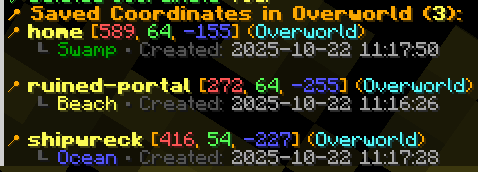
Recall Coords is a lightweight client-side coordinate saver and waypoint utility mod that helps you quickly save, organize, and recall important locations in your Minecraft worlds and multiplayer servers.
Perfect for:
- Bases
- Nether portals
- Villages
- Structures
- Death locations
- Exploration routes
✔ Client-side only
✔ Works on most multiplayer servers
✔ Automatic death coordinate saving
✔ Lightweight and fast
✔ Multi-dimension support
✔ Simple .rc commands
Features
Save Important Locations
Quickly store coordinates for:
- Bases
- Villages
- Strongholds
- Trial Chambers
- Ancient Cities
- Custom locations
Automatic Death Tracking
Died in lava? Lost your items in caves?
Recall Coords automatically saves your death location so you can quickly return and recover your gear.
Multi-Dimension Support
Supports:
- Overworld
- Nether
- End
Each saved coordinate remembers its dimension automatically.
A client-side coordinate manager that works on ANY server! Save and manage coordinates with .rc commands that never leave your client.
Features
- Save coordinates with custom names and descriptions
- World specific storage – each server/world maintains its own coordinate list
- Multi dimensional support (Overworld, Nether, End)
- Automatic biome detection – coordinates show the biome they were saved in
- Death location tracking – automatically saves where you died
- Persistent storage – coordinates are saved locally between game sessions
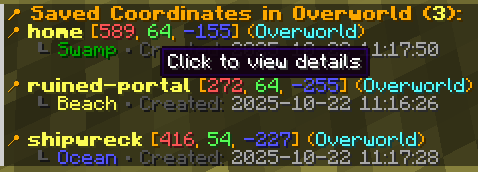
- Interactive UI with clickable coordinate names and hover tooltips
- Copy coordinates – click coordinates to copy them to clipboard
Dependencies
FABRIC API REQUIRED
This mod requires Fabric API to function properly. Make sure to install Fabric API alongside this mod. https://www.curseforge.com/minecraft/mc-mods/fabric-api
Commands
All commands use .rc (dot rc) instead of /rc
Adding Coordinates
.rc add auto <name> [description]– Auto detect current location & biome.rc add <x> <y> <z> <name> [description]– Manually specify coordinates
Managing Coordinates
.rc delete <name>– Delete a saved coordinate.rc view <name>– View detailed information about a coordinate.rc list– List all saved coordinates (clickable names!).rc death– View your last death location in current world.rc help– Show all available commands
Interactive Features
- Click coordinate names in
.rc listto view details - Click coordinates in
.rc viewand.rc deathto copy to clipboard - Hover over elements to see helpful tooltips
Examples


常见问题
Recall Coords – Coordinate Saver & Death Tracker 支持哪些 Minecraft 版本?
Recall Coords – Coordinate Saver & Death Tracker 支持 Minecraft Java 版 1.20–26.3,共 17 个版本,可用的加载器:Fabric / Quilt。下载时注意选择和你游戏版本一致的文件。
Recall Coords – Coordinate Saver & Death Tracker 怎么安装?
先用 PCL2 或 HMCL 启动器安装对应版本的 Fabric / Quilt,再把下载的 .jar 文件放进游戏目录的 mods 文件夹,重新启动游戏即可。开启了版本隔离的,mods 文件夹在 versions/版本名 下面。
Fu4th 的其他作品
查看全部 →
EntityXray – Find Any Mob/Players
透视墙壁查看实体,支持自定义 X 光效果、GUI 界面和筛选选项,可选择性高亮实体。

Smart Trading – Name villagers, favorite trades, search books and much more
Fabric上最好用的村民交易体验优化模组。为村民命名、收藏交易、按附魔搜索图书管理员,还能追踪僵尸村民的治愈进度。无需在服务器安装。

Auto Sprint Plus – Auto Sprint Without Holding CTRL
Auto Sprint Plus 让疾跑更轻松,无需按住 CTRL 键。还提供完整的免手动移动控制,方便旅行和探索。

Auto Sprint Plus
Auto Sprint Plus 让疾跑更轻松,无需一直按住 CTRL。还支持完全解放双手的移动控制,方便旅行与探索。
评论
登录后评论和评分