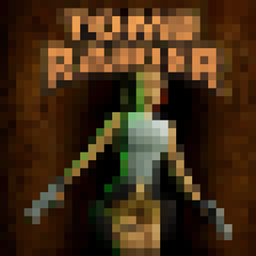
截图


介绍

Unleash your inner Tomb Raider with this Epic Fight Mod addon, bringing Lara Croft’s iconic dual pistols, pickaxe & the ancient Excalibur sword to Minecraft!
Experience fast-paced, acrobatic gunplay with smooth animations, rapid-fire shooting, and stylish combat mechanics.
Perfect for adventurers looking to add some cinematic action to their battles.
Lock, load, and raid some tombs!
Requires Epic Fight
The mod adds:
Custom Epic Fight Movesets & Weapons (3)
Music Discs (2)
Painting (1)
Curio Item (1)
Structure (1)
Because Lara Croft has so many unique skins, the perfect companion for this Tomb Raider mod is Quick Skin — a modern, lightweight mod that streamlines the entire skin-changing process. Changes are applied instantly on both the client and the server, making it easier than ever to swap between your favorite looks without reloads or delays. Click here for Lara Croft skins!

This was a commissioned mod for a private server and it may not be balanced enough for your worlds. I finally had some time to make some very minor tweaks and decided to share it with the community. There is a chance that I will release a small rework update but after that I will not be maintaining the mod aside from providing information. If you would like to backport or update, you may contact me and we can discuss it.
All rights to Tomb Raider and related properties remain with their respective copyright holders, including Crystal Dynamics. This content is produced in accordance with the Crystal Dynamics Fan Content Policy: https://www.crystaldynamics.com/legal/fancontent/
Thanks to Yesssssman, MetalKnight56 and the entire Epic Fight team for their great work and for creating a revolutionary combat system for Minecraft!
常见问题
Epic Fight – Tomb Raider 支持哪些 Minecraft 版本?
Epic Fight – Tomb Raider 支持 Minecraft Java 版 1.20.1,可用的加载器:Forge。下载时注意选择和你游戏版本一致的文件。
Epic Fight – Tomb Raider 怎么安装?
先用 PCL2 或 HMCL 启动器安装对应版本的 Forge,再把下载的 .jar 文件放进游戏目录的 mods 文件夹,重新启动游戏即可。开启了版本隔离的,mods 文件夹在 versions/版本名 下面。
Vancomb 的其他作品
查看全部 →
Epic Fight x Born in Chaos Weapon Compat Pack
Assigns Epic Fight capabilities to Born in Chaos weapons.
Curio Slot for Soulspring Lamp
Allows the Soulspring Lamp to work in a Curio slot.
Epic Fight x Iron’s Staves
Assigns Epic Fight capabilities to Staves from Iron's Spells 'n Spellbooks

Extractrooms Loot Blacklist
Loot chest blacklist datapack for Extractrooms
评论
登录后评论和评分