Drogstyle
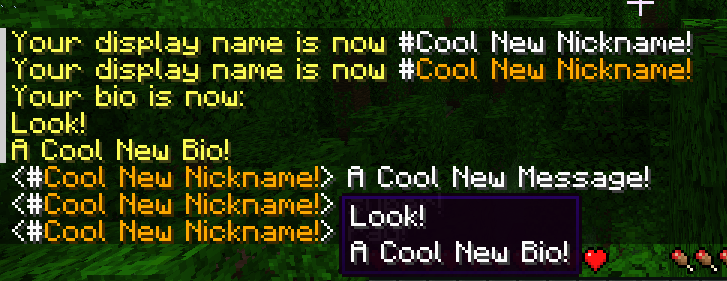
Simple, self-assigned player display names. A (drogtor-like) UX wrapper for Styled Nicknames.
截图


介绍
Simple, self-assignable display names.
Requires Styled Nicknames.
Requires Connector and FFAPI on (neo)forge.
Drogstyle adds the following commands:
/nick [name]: set your display name, with Placeholder Simplified Text Format available/color [color]: set your name color, vanilla colors or #RRGGBB/bio [bio]: set your name bio (tooltip), with\nfor newlines
All commands can be called on their own to clear the set value.
Limitations
None of the above commands offer any kind of permissions system, and won’t.
Drogstyle force-allows self-assignment permissions in styled nicknames using a mixin.
Drogstyle removes all original styled nicknames commands to avoid clashes.
Utility Commands
Player usernames can be checked via hovering over name formatting (e.g. #), or clicking.
/drogstyle username [name]: look up a player’s username via their display name/execute as [username] run nick: clear another player’s username/drogstyle reload: reload the styled nicknames configuration
Afterword
All mods are built on the work of many others.
This mod specifically exists out of respect for the design of Drogtor The Nickinator, and seeks to continue it with the power and flexibility of Styled Nicknames – over which drogstyle is only a thin wrapper! – please support the original mods, and don’t send them drogstyle-related issues.
This mod is included in Tinkerer’s Quilt – our modpack about rediscovering vanilla.
We’re open to better ways to implement our mods. If you see something odd and have an idea, let us know!
Tinkerer’s: Quilt – Smithing – Origins – Statures – HUD
Loveletters: Tabs – Atlas – Portable Crafting – Drogstyle
Others: Switchy – Crunchy – Starcaller
常见问题
Drogstyle 支持哪些 Minecraft 版本?
Drogstyle 支持 Minecraft Java 版 1.18.2–26.1,共 19 个版本,可用的加载器:Fabric / Forge / NeoForge / Quilt。下载时注意选择和你游戏版本一致的文件。
Drogstyle 怎么安装?
先用 PCL2 或 HMCL 启动器安装对应版本的 Fabric / Forge / NeoForge / Quilt,再把下载的 .jar 文件放进游戏目录的 mods 文件夹,重新启动游戏即可。开启了版本隔离的,mods 文件夹在 versions/版本名 下面。运行环境:仅服务端。
sleepingdragoninn 的其他作品
查看全部 →
Portable Crafting
直接从物品栏使用工作台、锻造台、铁砧、切石机等制作站。

SwingThrough
允许透过草、作物和花朵等透明方块锁定、生物交互并攻击生物。
Antique Atlas 4
一款手绘风格的客户端世界地图,支持地图分享、结构发现等功能! 基于 hunternif 的 Antique Atlas 制作的 Surveyor 地图前端。
Euphonium
基于生物群系和世界特征的环境音效——Charmonium 的分支版本。
评论
登录后评论和评分