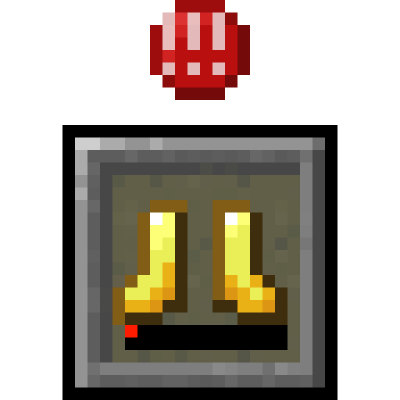
guy’s Armor HUD
Adds a vanilla-like widget that shows your armor items and a warning if durability is too low. Originally by BerdinskiyBear, then forked by uku made multiloader by AnAwesomGuy.
介绍
guy’s Armor HUD
Minecraft mod that adds a HUD widget that shows your current armor items.
Use the original mod from uku) for versions 26.1+!
This mod adds a minimalistic vanilla-like widget that shows your armor items and a warning if durability is low enough.
While other mods expect the player to look at numbers all over the screen, this mod allows to see your armor items in a
vanilla-style minimalistic widget without extra text or numbers.
Position and other parameters of the widget can be adjusted in the configuration file.
Features:
- Support for both NeoForge and Fabric
- Vertical mode
- Different anchors:
- Top
- Top center
- Bottom
- Hotbar
- Multiple styles
- Hotbar style
- Rounded
- Rounded corners
- No background
- A warning icon for when your armor has low durability
- Show durability numbers
- Highly configurable
Configuration
You can configure the mod using Mod Menu on Fabric and the mod list on NeoForge or by using the JSON file in the
config folder.
Powered by Cloth Config.
"enabled"
- Master switch for this mod.
- Type: boolean
- Default value:
true
"anchor"
- Place that the HUD widget is attached to.
- Type: enum
- Possible values:
"TOP_CENTER"– widget is placed at the top in the middle."TOP"– widget is placed at the upper corner on the preferred side."BOTTOM"– widget is placed at the bottom corner on the preferred side."HOTBAR"– widget is placed to the side from your hotbar.- Default value:
"HOTBAR"
"side"
- Side on which widget is shown. If widget is anchored at the top in the middle this setting does nothing.
- Type: enum
- Possible values:
"LEFT""RIGHT"- Default value:
"LEFT"
"offsetX"
- Offsets the widget on the horizontal axis. Positive numbers move it away from anchor point, while negative numbers move it toward the anchor point.
- Type: integer
- Default value:
0
"offsetY"
- Offsets widget on the vertical axis, otherwise the same as X offset.
- Default value:
0
"vertical"
- If the widget should display vertically.
- Type: boolean
- Default value:
false
"style"
- Widget slot style defines how slots are drawn on the screen. Try different styles to find ones that work and choose one that you prefer.
- Type: enum
- Possible values:
"HOTBAR""ROUNDED_CORNERS""ROUNDED""NONE"- Default value:
"HOTBAR"
"durabilitydisplay"
- The way durability is displayed in the HUD widget.
- Type: enum
- Possible values:
"BAR""NUMBERS""PERCENTAGE"
"widgetShown"
- This setting defines when slots of the HUD widget are shown.
- Type: enum
- Possible values:
"ALWAYS": slots are always shown."IF_ANY_PRESENT": all slots are shown if at least one of the armor slots is not empty."NOT_EMPTY": only not empty slots are shown- Default value:
"NOT_EMPTY"
"offhandSlotBehavior"
- This setting defines the way widget reacts to offhand slot and attack indicator if it is at the hotbar. Setting does nothing unless widget is anchored at the hotbar.
- Type: enum
- Possible values:
"ALWAYS_IGNORE": widget never moves away to make space for hotbar or attack indicator."ADHERE": widget moves away when offhand slot is shown or attack indicator is at hotbar."ALWAYS_LEAVE_SPACE": widget always leaves space for the offhand slot even if it is not shown.- Default value:
"ADHERE"
"pushBossbars"
- If widget is in the top middle bossbars will be pushed down by the widget.
- Type: boolean
- Default value:
true
"pushStatusEffectIcons"
- If widget is in the top right corner effect icons will be pushed down by the widget.
- Type: boolean
- Default value:
true
"pushSubtitles"
- If widget is in the bottom right corner subtitles will be pushed up by the widget.
- Type: boolean
- Default value:
true
"reversed"
- Reverses order of armor items in the slots of the widget.
- Type: boolean
- Default value:
true
"iconsShown"
- Shows special icons in empty slots.
- Type: boolean
- Default value:
true
"warningShown"
- If enabled, a small warning will appear at the slot of the item with low durability.
- Type: boolean
- Default value:
true
"minDurabilityValue"
- If durability value of a displayed item is equal or lower than this setting, a warning will be shown.
- Type: integer
- Default value:
10
"minDurabilityPercentage"
- If durability of a displayed item is equal or below this percentage, a warning will be shown.
- Type: integer
- Default value:
5
"warningBobIntensity"
- This parameter defines how quickly warning icon will move up and down when shown. Lower the number quicker the motion.
- Set to 0 if you want to disable the warning sign bobbing.
- Type: integer
- Default value:
3
Credits:
- Original mod by BerdinskiyBear
- Forked by uku
- Forked again and made multiloader by me!
常见问题
guy’s Armor HUD 支持哪些 Minecraft 版本?
guy’s Armor HUD 支持 Minecraft Java 版 1.21–1.21.1,共 2 个版本,可用的加载器:Fabric / NeoForge / Quilt。下载时注意选择和你游戏版本一致的文件。
guy’s Armor HUD 怎么安装?
先用 PCL2 或 HMCL 启动器安装对应版本的 Fabric / NeoForge / Quilt,再把下载的 .jar 文件放进游戏目录的 mods 文件夹,重新启动游戏即可。开启了版本隔离的,mods 文件夹在 versions/版本名 下面。运行环境:仅客户端。
AnAwesomGuy 的其他作品
查看全部 →
guy’s Armor HUD
Adds a vanilla-like widget that shows your armor items and a warning if durability is too low. Originally by BerdinskiyBear, then forked by uku made multiloader by AnAwesomGuy.

Fluid Void Fading
Renders fluids flowing into the void, seamlessly

Breaking Bedrock
Allow bedrock to be mined with a netherite pickaxe!

Breaking Bedrock
Allow bedrock to be mined with a netherite pickaxe!
评论
登录后评论和评分