
Cooling Boots
Adds the Cooling Boots, allowing players to walk on water/lava by creating ice/obsidian beneath their feet. New modes: Off/ Melt/ Permanent
介绍
❄️COOLING BOOTS -V4.0.3❄️
(NO MORE UPDATE ON THIS MOD last version is 26.2)
With these boots equipped, you can safely walk on water/lava as it instantly turns into blue ice/obsidian beneath your feet. Just walk like it’s solid ground.

🧊 Features
-Walk on water/lava by creating a blue ice/obsidian path under your feet
-Full fire and lava immunity while wearing the boots
-Jump height and movement speed increased (×1.33) when wearing the boots
-Negate fall damages when jumping from high in water/lava (or on blue ice/obsidian)
-Added 3 modes when boots are equipped:
-OFF: Liquids are not transformed (you got fire immunity)
-MELT: The blocks will melt into 15sc
-PERMANENT: The blocks will stay solid
-Use “V” key to switch modes, configurable in options>command
-ADMIN : You can block permanent mode on your server; Use /coolingboots permanent allowed true/false
-Return to MELT mode for all players on PERMANENT if this command was used
-Added some sound effects
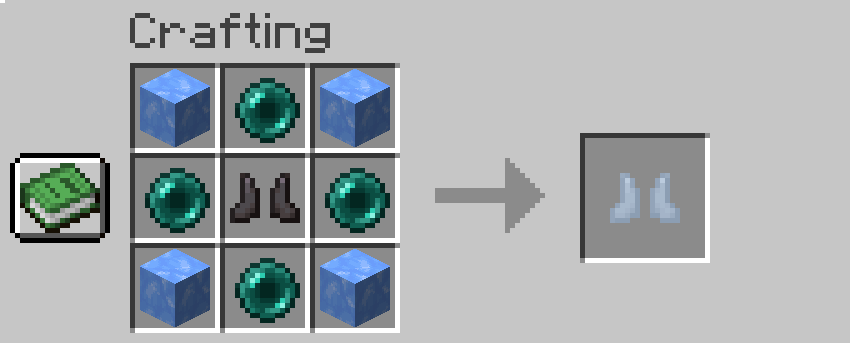
🛠 Crafting & Configuration
-1 netherite boots, 4 ender pearl, 4 blue ice
-The recipe is configurable in the instance /mods folder and directly inside coolingboots-xx-xx-xx.jar
-Edit the recipe file at data/coolingboots/recipe(s)/cooling_boots.json (7-Zip, WinRAR, etc.)
-Follow easy pattern explained in the code, LETTERS 3×3 are your crafting table
-Use only item ID’s, and don’t forget to save your change! (need save on notepad + confirm save with the pop up on 7zip)
Note:
-⚠️ Some functions may vary slightly depending on the version.
-⚠️ Use /recipe give @p coolingboots:cooling_boots if you did not obtain any résult on the crafting table.
Whether you’re exploring the Nether or just tired of dying in stupid lava accidents, Cooling Boots add a practical and fun gameplay mechanic without breaking multiplayer or protection systems.
常见问题
Cooling Boots 支持哪些 Minecraft 版本?
Cooling Boots 支持 Minecraft Java 版 1.20.1–26.2,共 7 个版本,可用的加载器:Fabric / Forge / NeoForge。下载时注意选择和你游戏版本一致的文件。
Cooling Boots 怎么安装?
先用 PCL2 或 HMCL 启动器安装对应版本的 Fabric / Forge / NeoForge,再把下载的 .jar 文件放进游戏目录的 mods 文件夹,重新启动游戏即可。开启了版本隔离的,mods 文件夹在 versions/版本名 下面。
Zamal974 的其他作品
查看全部 →
The Mountain Piercer
Adds drills of varying efficiency, with a chain of crafting recipes. Now you can dig the Nether with your hands on your head.

Chocobo whistles
This mod introduces 7 colorful chocobos into the Overworld! Summon them as flying mounts, explore the world with your loyal companions, and now with Minecraft 26.3, call them into battle!

The Market Board
This mod adds Market Boards (inspired by FinalFantasyXIV) that lets players trade items with each other on a server: buy, sell, remove listings, and collect currencies from your sales.

Enchanted Jump
This mod adds 3 enchanted books usable on vanilla boots: double jump | triple jump | quadruple jump with speed, jump height, and aerial maneuverability increase. Negates all falling damages.
评论
登录后评论和评分