
Wireless Redstone Lite
Wireless redstone for Minecraft 26.1.x. Pair transmitter and receiver blocks by channel + frequency — no wire, no spaghetti. Up to 128 blocks of range by default, configurable.
截图
介绍

Wireless Redstone
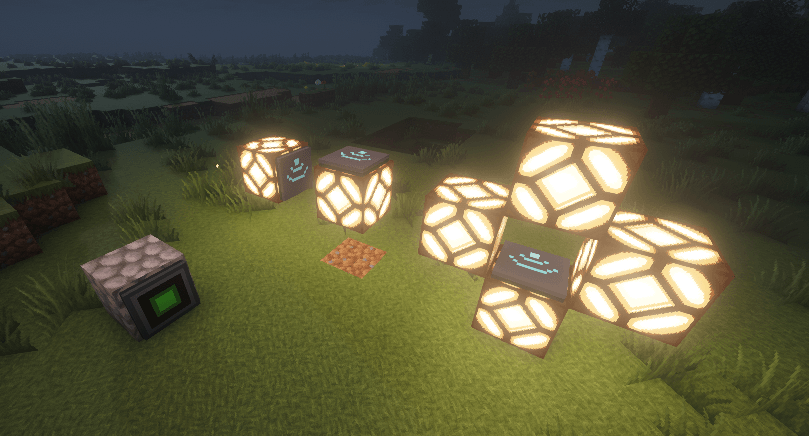
Tired of running redstone wire through your whole base just to flip one lamp? Drop a transmitter next to your switch, a receiver next to your lamp, match the channel — done. No wire. No floor‑tile mazes. No accidentally powering the wrong piston.
Features
- Transmitter — takes a redstone input from any side, broadcasts on its channel.
- Receiver — outputs the strongest signal it sees on its channel, like a redstone block.
- Channel (1–128) and Frequency (0–65535) — pick any pair to keep your networks separate. Over 8 million combinations per dimension.
- Lock toggle — freezes the channel/frequency so you can’t bump them by accident.
- Private toggle — binds the pair to your player, so two players can use the same channel without crossing wires on a multiplayer server.
- Item tooltips show the current config without placing the block — handy for sorting them in a chest.
- Configurable range — defaults to 128 blocks. Server admins can bump it up to 1024 or disable the limit entirely.
How it works
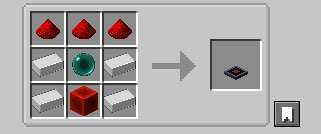
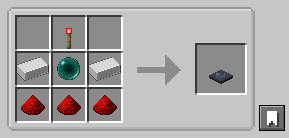
- Craft a transmitter and a receiver (recipes below).
- Place the transmitter and feed it redstone from any side — lever, button, comparator, whatever.
- Place the receiver anywhere in the same dimension within range.
- Right‑click either block to open the config screen. Match the channel + frequency.
- The receiver mirrors whatever signal strength the transmitter sees. Strength matters — comparator outputs travel intact.
Multiple transmitters on the same channel? The receiver picks the strongest. Multiple receivers? They all output the same. No cross‑dimension signalling (yet).
Configuration
Config file lives at config/wirelessredstone.json (created on first launch):
{
  "rangeLocked": true,
  "maxRange": 128
}| Key | Default | What it does |
|---|---|---|
rangeLocked |
true |
When true, receivers ignore transmitters farther than maxRange blocks. Set false for unlimited range within a dimension. |
maxRange |
128 |
Block distance. Clamped to [4, 1024]. |
Edit the file and restart Minecraft (or the dedicated server) for changes to take effect.
Requirements
- Minecraft 26.1.x
- Java 25
- Fabric Loader 0.18.4+ with Fabric API, or NeoForge 26.1+
Roadmap
Future versions may add: a “fixed strength” mode (transmitter always emits a chosen 1–15 instead of mirroring its input), Jade/WAILA tooltips for in‑world inspection, and an owner‑only Private gamerule.
Source
GitHub: kestalkayden/wireless-redstone — CC0‑1.0.
常见问题
Wireless Redstone Lite 支持哪些 Minecraft 版本?
Wireless Redstone Lite 支持 Minecraft Java 版 26.1–26.3,共 5 个版本,可用的加载器:Fabric / NeoForge。下载时注意选择和你游戏版本一致的文件。
Wireless Redstone Lite 怎么安装?
先用 PCL2 或 HMCL 启动器安装对应版本的 Fabric / NeoForge,再把下载的 .jar 文件放进游戏目录的 mods 文件夹,重新启动游戏即可。开启了版本隔离的,mods 文件夹在 versions/版本名 下面。
kestalkayden 的其他作品
查看全部 →
Lonsdaleite [ Tools/Armors/Weapons ] + Omnitool
为Minecraft(Fabric)(1.16+、1.17+和1.20+)添加蓝丝黛尔石等级

veinminer++
Vein Miner, Ore Harvester, Shovel Master, Tree Feller. Guided area. All rolled into one nice package!

Veinminer++
Vein Miner, Ore Harvester, Shovel Master, Tree Feller. Guided area. All rolled into one nice package!

Zombie Jerky
Turn Rotten Flesh into Zombie Jerky with the Smoker
评论
登录后评论和评分