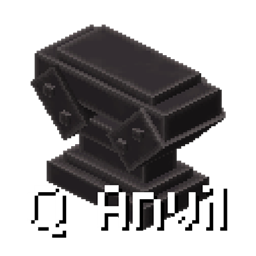
Q Anvil
Q Anvil replaces experience-based anvil costs with player health, optional QShop currency, and flexible KubeJS customization.
介绍
Q Anvil
Q Anvil adds a new anvil for Forge 1.20.1 that uses player health instead of experience levels.
It is designed for modpacks that want an anvil system based on survival resources rather than XP. The Q Anvil does not break during normal use, so players can use it repeatedly without losing the block.
Features
- Use player health to operate the anvil instead of experience levels.
- The Q Anvil does not break during normal use.
- Optional integration with Q Shop. When Q Shop is installed, the Q Anvil can use currency such as
coinsinstead of, or together with, health. - Configure the default payment mode, currency id, health cost, and currency cost in the common configuration file.
- Input slots support up to 9999 items when
max_input_stack_sizeis set to9999inconfig/qanvil-common.toml. The default remains 64. Items with a native stack limit of1, such as enchanted books, remain limited to one. - KubeJS integration lets you customize outputs, payment types, payment amounts, material consumption, prompt text, and other per-operation behavior.
- The original vanilla anvil recipes remain available; KubeJS can also replace the result for specific left and right inputs.
Configuration
The common configuration file is:
config/qanvil-common.tomlThe default payment mode is health. Available payment modes are health, currency, and both. Q Shop is optional; the Q Anvil still works in health mode when Q Shop is not installed. Currency mode requires Q Shop 1.1.0 or newer.
To allow stacks larger than 64 in the two input slots, change:
max_input_stack_size = 9999The allowed range is 1 to 9999. Items with a native stack limit of 1, such as enchanted books, cannot be stacked.
KubeJS Integration
KubeJS integration is optional. Put scripts in kubejs/server_scripts/ and listen for QAnvilEvents.update.
The event provides:
event.leftorevent.input: the left input item.event.rightorevent.addition: the right input item.event.originalOutput: the result calculated by the vanilla anvil.event.output: the final item displayed and produced by the Q Anvil.event.currencyId: the currency id used for this operation.event.currencyCost: the currency amount charged for this operation.event.healthCost: the player health amount charged for this operation.event.materialCost: the number of right-side items consumed after taking the result.event.playerorevent.getPlayer(): the player using the Q Anvil.- Calling
event.setText(...)replaces theQ Anviltitle at the top of the GUI. Passing an empty string restores the normal title. This is the only supported prompt-text API; callback return values are ignored and cannot be used as prompt text.
KubeJS values have higher priority than the configuration for that individual operation. This allows a script to use currency for one recipe and health for another, even when the default configuration uses a different payment mode.
Custom Output and Currency Payment
QAnvilEvents.update(event => {
  const left = event.left;
  const right = event.right;

  if (left.id != 'minecraft:diamond_sword') return;
  if (right.id != 'minecraft:netherite_ingot') return;

  event.output = Item.of('minecraft:netherite_sword');
  event.currencyId = 'coins';
  event.currencyCost = 25;
  event.healthCost = 0;
  event.materialCost = 1;
});
Prompt Text
QAnvilEvents.update(event => {
  if (event.left.id != 'minecraft:diamond_sword') return;
  if (event.right.id != 'minecraft:netherite_ingot') return;

  event.output = Item.of('minecraft:netherite_sword');
  event.setText('Requires one Netherite Ingot');
});
The text replaces the Q Anvil title at the top of the GUI. Keep it short enough to fit on one line.
Use only event.setText(...); assigning event.text and returning a string from the callback are not supported.
Custom Output with Health Payment
QAnvilEvents.update(event => {
  if (event.left.id != 'minecraft:diamond_sword') return;
  if (event.right.id != 'minecraft:stick') return;

  event.setOutput(Item.of('minecraft:iron_sword'));
  event.healthCost = 4;
  event.currencyCost = 0;
  event.setMaterialCost(1);
});
Preserve the Vanilla Result and Change the Payment
QAnvilEvents.update(event => {
  if (event.originalOutput.empty) return;
  if (event.left.id != 'minecraft:diamond_pickaxe') return;

  event.output = event.originalOutput.copy();
  event.currencyId = 'points';
  event.currencyCost = 30;
  event.healthCost = 0;
});
Forge-style Cost Methods
The event also supports familiar Forge-style methods:
QAnvilEvents.update(event => {
  if (event.left.id != 'minecraft:iron_sword') return;

  event.setOutput(event.left.copy());
  event.setCost(5);
  event.setMaterialCost(1);
});
setCost(5) uses the configured payment mode. Explicit currencyCost and healthCost values take priority over setCost(5). Set both explicit values when an operation should charge both currency and health.
To cancel an operation completely:
QAnvilEvents.update(event => {
  if (event.right.id == 'minecraft:bedrock') {
    event.cancel();
  }
});
The Forge-style event.setCanceled(true) method is also supported and returns
normally, so the script can continue calling event.setText(...) after canceling.
return only exits the current callback and skips the code below it. To show a
warning and reject the operation, call event.setText(...), call event.setCanceled(true),
and then return.
The Q Anvil is obtained by using a Netherite Upgrade Smithing Template, a vanilla anvil, and a netherite ingot in a vanilla smithing table. It can also be given with:
/give @s qanvil:q_anvil常见问题
Q Anvil 支持哪些 Minecraft 版本?
Q Anvil 支持 Minecraft Java 版 1.20.1,可用的加载器:Forge。下载时注意选择和你游戏版本一致的文件。
Q Anvil 怎么安装?
先用 PCL2 或 HMCL 启动器安装对应版本的 Forge,再把下载的 .jar 文件放进游戏目录的 mods 文件夹,重新启动游戏即可。开启了版本隔离的,mods 文件夹在 versions/版本名 下面。
DxEVIL 的其他作品
查看全部 →
puffish apothic attributes fix
Fixes Pufferfish’s dynamic attributes in the Apothic Attributes screen and displays Pufferfish’s Skills attribute modifiers with their corresponding skill icons.
Q Shop
A flexible server shop for Forge 1.20.1, NeoForge 1.21.1 and NeoForge 26.1.2, with buy, sell, barter and command trades, custom currencies, limits, in-game editing and a Builder-first KubeJS API.
Advanced Mob Leveling
An unofficial Auto Leveling continuation featuring formula-based attributes, KubeJS level controls, LootJS compatibility, and improved configuration formatting.
Q Backpack
A standalone Curios backpack mod with four upgrade tiers, an integrated inventory screen, automatic pickup, and Quark-inspired sorting.
评论
登录后评论和评分