
介绍
Minecraft ChatGPT Assistant
https://github.com/RIvance/minecraft-chatgpt-assistant
Please give me a star🌟 if you enjoy it. Thanks in advance!
“GPT Assistant” is a powerful Minecraft mod that connects to the ChatGPT API to make your gameplay experience easier and more intuitive. By simply typing your requests into the chatbox, the assistant will translates them into Minecraft commands without requiring you to learn complex commands or NBT tags. With “GPT Assistant”, you can build structures, navigate the game, and accomplish tasks with ease. Install the mod today and revolutionize the way you play Minecraft! — by ChatGPT

This mod is still at a very early stage of development and may have some bugs. If you find any bugs, please report them to GitHub Issues.
See the Github Repo for detailed information and instructions.
Usage
Press t to open the chat HUD. Type whatever you want prefixed with : in nature languages and press enter. For example:
:give me an apple
:give me a diamond sword with the best enchants
:kill all mobs
:kill the dragon
:easy mode
:disable mob spawning
:spawn a zombie with all enchanted diamond armors
or even something shorter:
:food
:hard
:day
:night
:stop rainning
:64 golden apples
:speed 2
Configuration
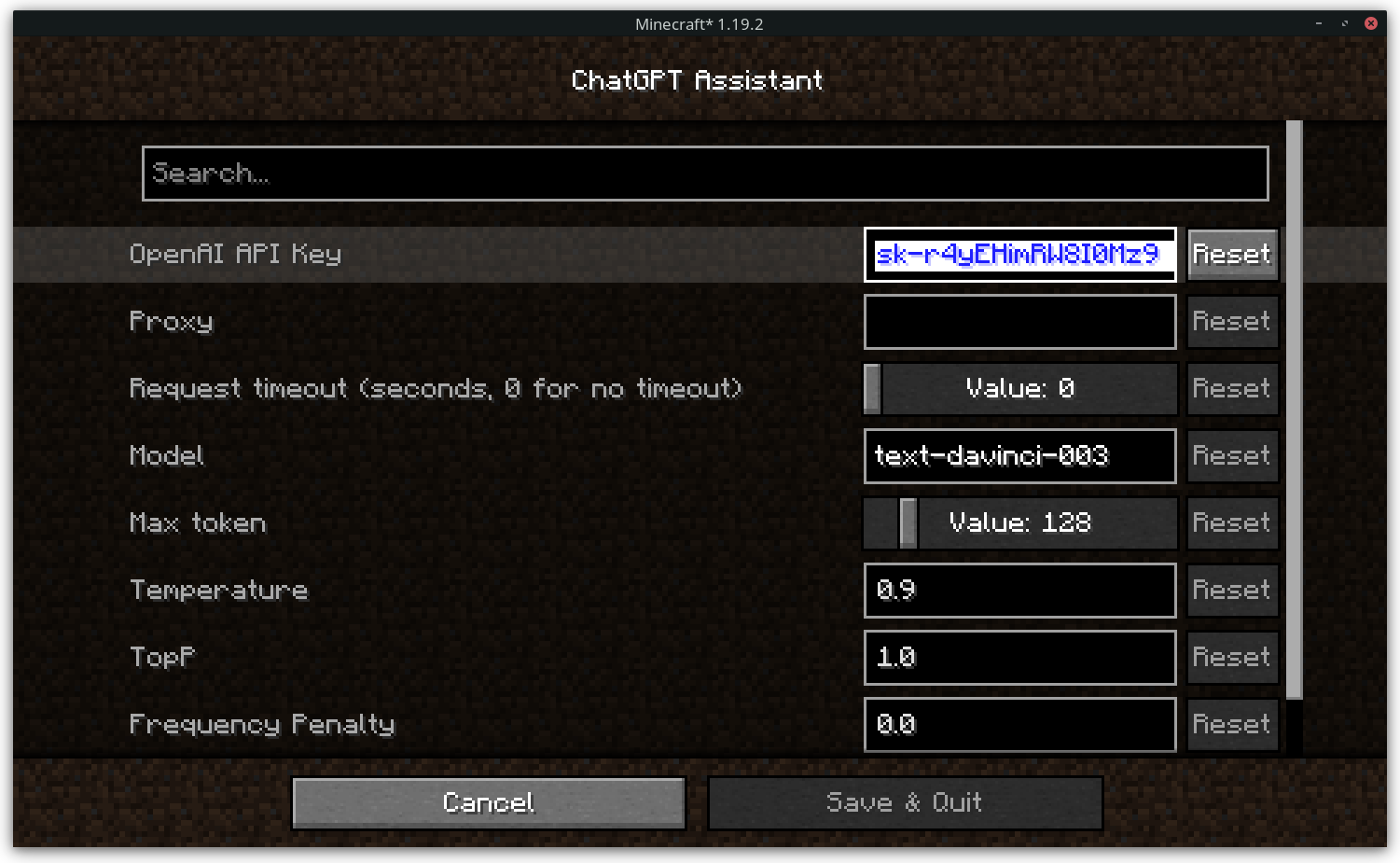
API Key
The API key is used to access the OpenAI API. Please set the API key in the configuration menu before using the mod. Otherwise, the mod will not work.
Proxy (Optional)
If you want to access the OpenAI API through a proxy, you can set the proxy in the configuration menu.
Response Timeout
The response timeout is used to set the timeout of the OpenAI API response. Set the value to 0 to disable the timeout.
Model
The model used by the OpenAI API. See OpenAI API Documentation for more information.
常见问题
GPT Assistant 支持哪些 Minecraft 版本?
GPT Assistant 支持 Minecraft Java 版 1.16.5–1.19.4,共 5 个版本,可用的加载器:Fabric。下载时注意选择和你游戏版本一致的文件。
GPT Assistant 怎么安装?
先用 PCL2 或 HMCL 启动器安装对应版本的 Fabric,再把下载的 .jar 文件放进游戏目录的 mods 文件夹,重新启动游戏即可。开启了版本隔离的,mods 文件夹在 versions/版本名 下面。
评论
登录后评论和评分