
截图
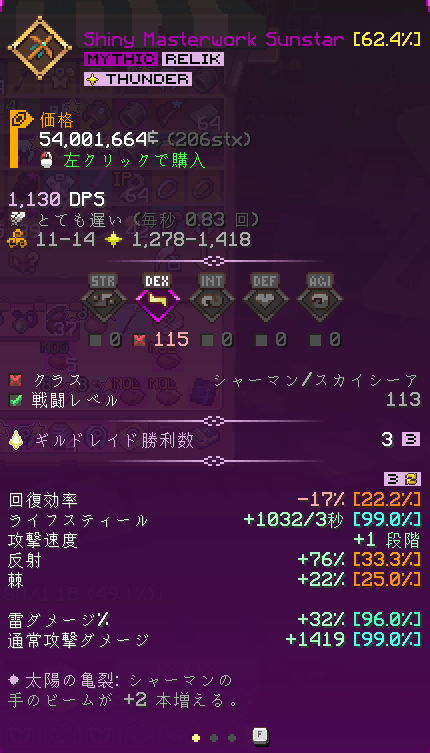
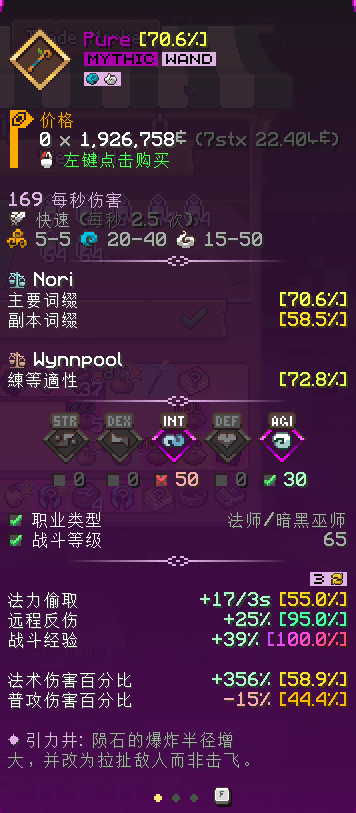
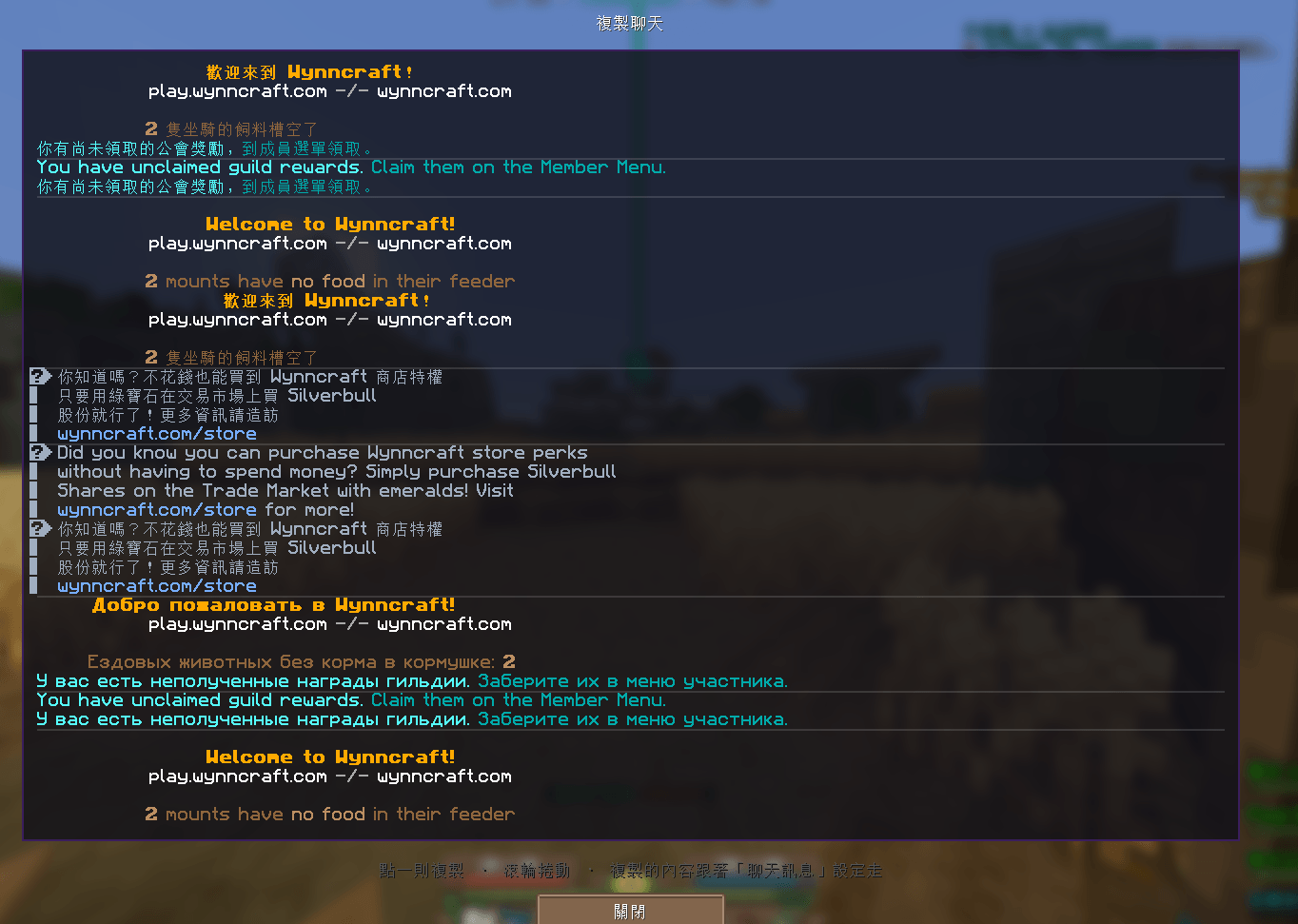
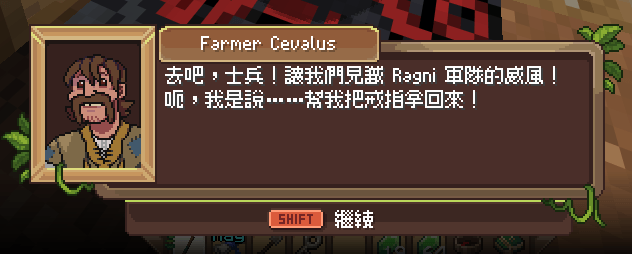

介绍
WynnChaYuan
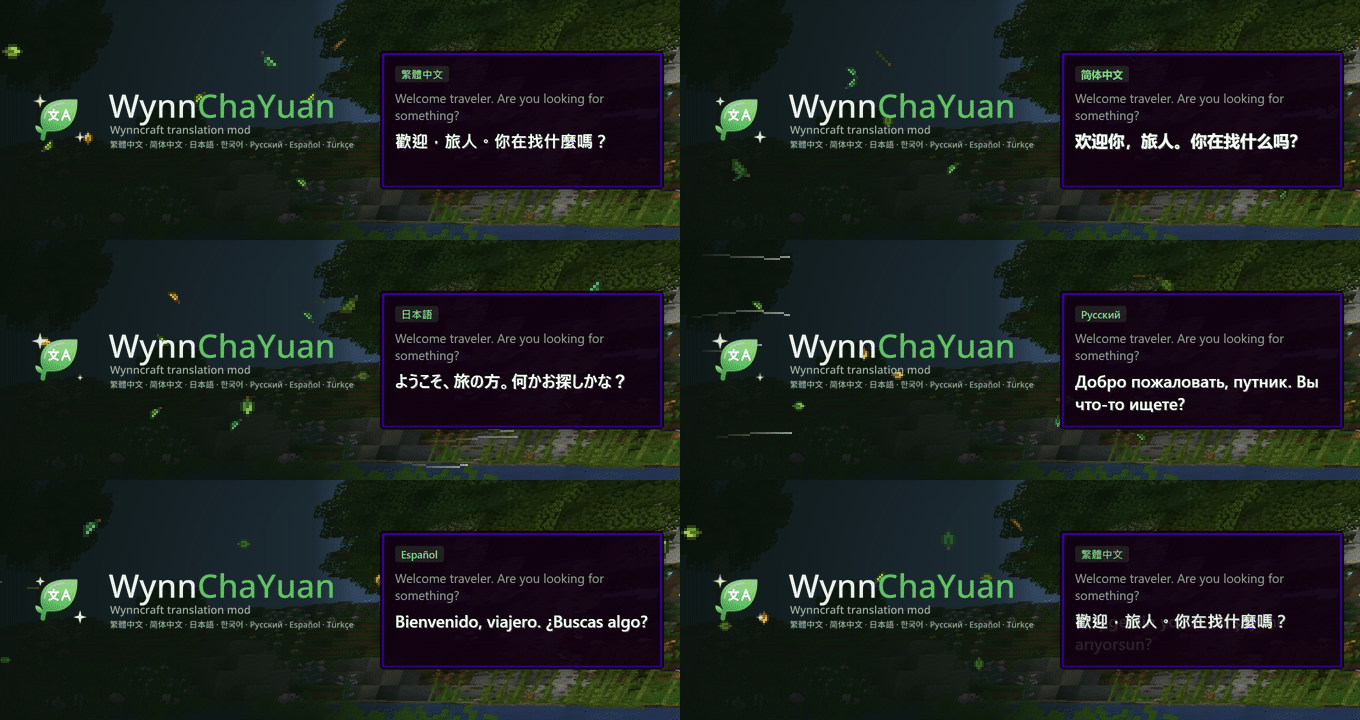
A multi-language translation mod for Wynncraft. The original text is kept; the translation is shown beside it or written in its place.
Wynncraft 多語言翻譯模組。 原文保留,譯文顯示在旁邊,或直接寫進原本的位置。
GitHub · Report a line / 回報 · Changelog / 更新日誌 · Discord: LyuChaCha
English
About the translations. Some translations are written by hand and then rendered by AI, a smaller part is translated by AI directly, and most of the core content has been proofread by a person. The other languages are AI-translated from the Traditional Chinese, so expect mistranslations and inconsistent terms.
What it translates
- Item tooltips: gear, ingredients, materials and gathering tools (lore, stats, Major IDs), in a panel beside the tooltip or written into the tooltip itself; the possible items list of an unidentified item shows the original names
- Ability trees: nodes, descriptions and archetypes for all five classes
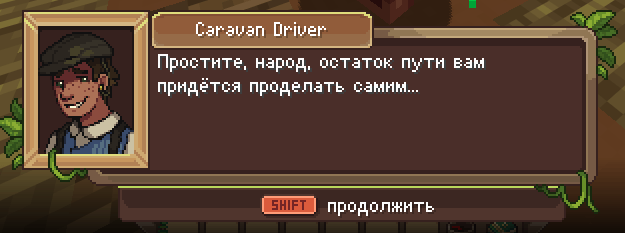
- Quest dialogue and choices: inside Wynncraft’s own dialogue box (frame, nameplate and portrait kept), typed out in step with the original, with lines too long for the box scrolling like a marquee; or a separate box
- Quest tracker and NPC nameplates and floating text (shop countdown boards included)
- Chat messages: server messages, with column layouts such as the Lootrun summary and beacons kept aligned; world event start notices, NPC lines in chat and the login welcome banner (colours kept); broadcasts that name another player, such as party buffs, death messages and bombs, with the name left as it is (player chat and the Tab player list are never translated)
- Scoreboard: the sidebar on the right with raid objectives, lootruns, party and guild war; rows too wide for it wrap
- Menus and interfaces: trade market, guild, store and other screens
- Lootruns, raids and dungeons: missions, boons, beacons, aspects, gambits, loot panels, dungeon names
- Discoveries and title text
Gear names stay in English by default; they can be turned on in the settings.
More
- Translations update themselves: new translations come from GitHub without a mod update; each launch checks, and chat shows a line where “Click here to update” applies them (turn on “Auto-update translations” under Settings → Data to skip the question)
- Market search in your language: type the translated name in the trade market, the English one is sent
- Hold Shift to see the original: names of ingredients, materials and gathering tools switch back to English while Shift is held
- Copy chat: copy recent chat lines for a report
- Screenshot of the translation panel (no key by default; bind one under Controls)
- Speed up Wynntils item rendering: smoother inventory, bank and market (F6 > Features, on by default)
- Wynnventory: its price box, reward screen and settings are translated; the price box is placed by the tooltip that is actually shown, and moves clear with “anchor tooltips” on
- Settings (Mod Menu,
/wcy, or a key you bind yourself): a mode for each kind of text; translation, fallback and interface language; draggable and resizable boxes - In-game update: when a new version is out, chat says so once; click “Click here to update now” (or
/wcy update) and it is downloaded from GitHub Releases and swapped in when you close the game
Client-side only. The server does not need it.
Capes, the grey leaf, and what the mod sends
- Capes: wear your own WynnChaYuan cape, visible to other players who have this mod. Upload and browse capes at https://wynnchayuan.com (F6 > Features > Cape gallery opens it signed in). Anyone can upload a PNG (up to 1 MB); GIFs and the 20 MB limit are for developers, sponsors and contributors. Draw it on a template from
capes/templates. - Leaves: every player who has this mod gets a leaf before their name (grey if you have no role), visible to each other. A developer’s rainbow mode and the roles you chose to show look the same to others as they do to you.
- These two features talk to our server (wynnchayuan.com). The mod checks in once when you join Wynncraft and sends: your Minecraft UUID, your Mojang-signed public profile (name and skin), a public key and signature that prove the account is yours, whether to show your cape, and your badge settings (rainbow leaf, which roles to show). Uploading a cape also sends the image you chose. Your private key and login credentials never leave the game; the mod does not send your world, chat or any game content, and the server does not store IP addresses. The public list holds hashed codes only, not UUIDs or names.
- There is no switch for this: the mod checks in whenever it is installed and you join Wynncraft, so every user has a leaf. If you do not want others to see your cape, turn off “Wear my cape” under F6 > Features.
- Site account (optional): register at wynnchayuan.com with Discord, then type
/wcy link <code>in game to link your game ID. We only read your Discord account ID and display name. - Update button: the release notes screen has an Update button. Only when you press it does the mod download the new version from GitHub Releases, and it is swapped in when you close the game.
Languages
- Traditional Chinese: main language, everything
- Simplified Chinese, Japanese, Russian, Korean, Spanish and Turkish: everything, quest dialogue included
Switch under Settings → Data, without changing the game’s language.
Progress
更新於 2026-10-19 / Updated 2026-10-19
翻了哪些:任務對話與任務書、物品(名稱、詞條、敘述、Major ID)、技能樹、介面(設定畫面、背包、交易市場、公會、地圖、追蹤欄)、NPC 與地區名稱、看板與聊天公告。
大概翻到哪:7 種語言目前都在 95% 以上,繁體中文最完整。剩下的多半是零星的名稱與半句話,而且遊戲還在更新——一定還有漏的。看到沒翻、翻錯或版面跑掉的,開個 issue 告訴我們就好。
What’s covered: quest dialogue and the quest book, items (names, stats, lore, Major IDs), the ability tree, the interface (settings, inventory, trade market, guild, map, tracker), NPC and place names, signs and chat announcements.
Roughly how far: every language is past 95%, Traditional Chinese being the most complete. What is left is mostly stray names and half-sentences, and the game keeps changing — there will be gaps. Found something untranslated, wrong, or laid out badly? Open an issue.
每一種語言還缺哪些檔案 / Per-language breakdown: PROGRESS.md
Install
- Minecraft 1.21.11, Fabric
- Wynntils 4.2+
- Fabric API
Put the jar in mods/. In game, open the settings from Mod Menu or by typing /wcy.
A line switches back to English halfway?
That is normal. The sentence is not in the corpus yet, so the original is shown. Export it and send it to us as described below; once it is added, everyone gets it on their next launch.
How to help
Open Settings → Data → Export untranslated strings. The folder with captured.json opens; look through the file, delete anything personal, then attach it to the issue form (Settings → Data → How to submit) or send it to LyuChaCha on Discord. You do not have to translate anything.
The mod never sends game text by itself. (What the mod does send for capes and leaves is listed under “Capes, the grey leaf, and what the mod sends” above.) The export already leaves out player names and guild, party, shout and private chat.
Sponsoring
The translations are free and will stay free – all of them are provided by the team at no cost, and nothing is locked behind payment. Sponsoring is entirely voluntary: not sponsoring never lowers translation quality; sponsors only get fun extras (the leaf, animated capes and a larger upload limit) and priority for their feedback. Ko-fi: a one-off 20 USD or 2 USD/month puts you on the sponsor list. No paid features.
Roles and badges
People on the credits list get a leaf before their name, visible to players running the mod: developers (gold) help develop and maintain the code; sponsors (cyan) give a one-off 20 USD or 2 USD/month; contributors (green) add translations for their own language, send correct fixes, or give real help with the code.
Licence
Code: GNU AGPLv3 or later. Translations and data: CC BY-NC-SA 4.0. Item and ability data come from the public CDN used by Wynntils. Dialogue-box glyphs use Fusion Pixel (SIL OFL 1.1).
Not affiliated with Wynncraft or the Wynntils team. A community translation project.
繁體中文
關於譯文。 部分譯文由人工輸入再經 AI 轉出,一小部分直接由 AI 翻譯,大部分基礎內容都經過人工校稿。其他語言目前基本上都是圍繞著繁體中文再做 AI 翻譯,可能會有錯譯與用詞不一致。
翻譯範圍
- 物品 tooltip:裝備、素材、材料與採集工具的敘述、屬性與 Major ID,旁邊另開面板,或寫進原本的 tooltip;未鑑定物品的可能性清單附原文
- 技能樹:五個職業的節點、說明與流派
- 任務對話與選項:寫進 Wynncraft 自己的對話框(框、名牌、頭像不動),逐字打出的節奏跟原文同步,太長塞不下的句子改用跑馬燈捲動;也可另開小框
- 任務追蹤與 NPC 名牌、漂浮字(含商店倒數看板)
- 聊天訊息:伺服器訊息,Lootrun 結算、信標這類分欄訊息保持對齊;世界事件開始公告、聊天欄的 NPC 台詞、登入歡迎訊息(保留顏色);隊友給的增益、死亡訊息、丟炸彈這類帶別人名字的公告也翻,名字原樣保留(玩家發言與 Tab 玩家清單不翻)
- 記分板:畫面右邊那一欄的討伐戰目標、Lootrun、隊伍與公會戰;太寬的譯文會換行
- 選單與介面:交易市場、公會、商城等畫面
- Lootrun、討伐戰、地城:使命、加持、信標、Aspect、Gambit、戰利品面板、地城名稱
- 探索點與畫面中央大字
裝備名稱預設保留原文,在設定裡可以打開。
其他功能
- 譯文自動更新:新的翻譯從 GitHub 下載,不必更新模組;每次開遊戲都會檢查,有新譯文就在聊天室提示一行,點「按這裡更新」馬上生效(到設定「資料」打開「自動更新翻譯」就不再詢問)
- 市集搜尋:在交易市集打譯名,送出前自動換回英文原名
- 按住 Shift 看原文:素材、材料與採集工具的名稱,按住 Shift 時變回英文
- 複製聊天:複製最近的聊天訊息,方便回報
- 截圖:譯文面板截圖(按鍵預設不綁,到「按鍵設定」自己綁)
- 加速 Wynntils 物品繪製:開背包、銀行、市集時更順(F6「功能」,預設開啟)
- Wynnventory:價格框、獎勵畫面與設定也翻;價格框照實際顯示的物品說明擺放,開了「固定在左側」時物品說明會讓開
- 設定(Mod Menu、
/wcy或自己綁的按鍵):每一類文字各自的模式;譯文、輔助、介面語言;小框可拖曳、可改大小 - 遊戲內更新:有新版時在聊天室提示一次,點「點這裡直接更新」(或輸入
/wcy update)就從 GitHub Releases 下載,關遊戲時換上
純客戶端,伺服器不需要裝。
披風、灰色葉子與會送出的資料
- 披風:可以穿上自己的 WynnChaYuan 披風,其他裝了本模組的玩家看得到。到 https://wynnchayuan.com 上傳與瀏覽(F6「功能」→「披風一覽」會順便替你登入)。PNG 大家都能傳(1 MB 以內);GIF 與 20 MB 的上限給開發者、贊助者、貢獻者。要照
capes/templates的範本畫。 - 葉子:裝了本模組的玩家,名字前面都有一片葉子(沒有身分的是灰色),彼此看得到。開發者的彩色模式、要展示哪幾個身分的葉子,別人看到的跟你設的一樣。
- 這兩項需要連到我們的伺服器(wynnchayuan.com)。模組在你進 Wynncraft 時報到一次,送出的是:你的 Minecraft UUID、Mojang 簽過的公開個人檔案(名字與外觀)、用來證明帳號是本人的公鑰與簽章、要不要顯示披風,以及徽章的設定(葉子要不要彩色、要展示哪幾個身分)。上傳披風時另外送出你選的那張圖。私鑰與登入憑證不會離開遊戲;不送所在的世界、聊天或任何遊戲內容,伺服器也不記 IP。 公開的名單上只有雜湊過的代碼,沒有 UUID 與名字。
- 這一項沒有開關:只要裝了模組、進了 Wynncraft 就會報到,所以每個使用者都有葉子。不想讓別人看到自己的披風,可以在 F6「功能」關掉「穿上我的披風」。
- 網站帳號(選用):在 wynnchayuan.com 用 Discord 註冊後,在遊戲裡輸入
/wcy link 綁定碼把遊戲 ID 綁上去。我們只讀 Discord 的帳號代號與顯示名稱。 - 直接更新:更新說明的畫面有一顆「直接更新」,只有你按了才會從 GitHub Releases 下載新版,關遊戲時換上。
支援語言
- 繁體中文:主要語言,所有內容
- 簡體中文、日文、俄文、韓文、西班牙文、土耳其文:所有內容,含任務對話
在設定 →「資料」切換,不必改遊戲語言。
翻譯進度
更新於 2026-10-19 / Updated 2026-10-19
翻了哪些:任務對話與任務書、物品(名稱、詞條、敘述、Major ID)、技能樹、介面(設定畫面、背包、交易市場、公會、地圖、追蹤欄)、NPC 與地區名稱、看板與聊天公告。
大概翻到哪:7 種語言目前都在 95% 以上,繁體中文最完整。剩下的多半是零星的名稱與半句話,而且遊戲還在更新——一定還有漏的。看到沒翻、翻錯或版面跑掉的,開個 issue 告訴我們就好。
What’s covered: quest dialogue and the quest book, items (names, stats, lore, Major IDs), the ability tree, the interface (settings, inventory, trade market, guild, map, tracker), NPC and place names, signs and chat announcements.
Roughly how far: every language is past 95%, Traditional Chinese being the most complete. What is left is mostly stray names and half-sentences, and the game keeps changing — there will be gaps. Found something untranslated, wrong, or laid out badly? Open an issue.
每一種語言還缺哪些檔案 / Per-language breakdown: PROGRESS.md
安裝
- Minecraft 1.21.11、Fabric
- Wynntils 4.2 以上
- Fabric API
jar 放進 mods/。進遊戲後從 Mod Menu、或在聊天輸入 /wcy 開設定。
翻到一半變回英文?
這是正常的,代表那一句還不在語料裡,所以顯示原文。照下面的方式匯出交給我們,補好之後所有人下次進遊戲就看得到。
怎麼幫忙
打開 設定 →「資料」→「匯出未翻譯字串」,會打開放著 captured.json 的資料夾。看過檔案、刪掉個人資訊之後,附到 Issue 表單(設定 →「資料」→「如何提交」),或在 Discord 傳給 LyuChaCha。不用翻任何東西。
模組不會自動送出遊戲裡的文字(披風與葉子會送出什麼,見上面「披風、灰色葉子與會送出的資料」。)匯出檔已經濾掉玩家名字與公會、隊伍、喊話、私訊。
贊助
翻譯免費,也會一直免費——所有譯文都由團隊無償提供,不存在付費才有翻譯的問題。贊助完全出於自願:不贊助翻譯品質也不會打折,贊助者多的只有趣味性的功能(葉子、動態披風與比較大的上傳上限),以及意見優先採納。Ko-fi:單次 20 USD 或每月 2 USD 以上列入贊助者名單。沒有付費功能。
身分與徽章
名單上的人名字前面會有一片葉子,裝了本模組的人看得到:開發者(金色)協助程式的開發與維護;贊助者(青藍色)單次 20 USD 或每月 2 USD 以上;貢獻者(綠色)為自己的語言貢獻譯文、提出正確的修正,或在程式上提供實質協助。
授權
程式碼:GNU AGPLv3 或之後的版本;翻譯與資料:CC BY-NC-SA 4.0。物品與技能資料取自 Wynntils 使用的公開 CDN;對話框字形使用 Fusion Pixel(SIL OFL 1.1)。
與 Wynncraft 官方及 Wynntils 團隊無隸屬關係,是社群自發的翻譯專案。
常见问题
WynnChaYuan 支持哪些 Minecraft 版本?
WynnChaYuan 支持 Minecraft Java 版 1.21.11,可用的加载器:Fabric。下载时注意选择和你游戏版本一致的文件。
WynnChaYuan 怎么安装?
先用 PCL2 或 HMCL 启动器安装对应版本的 Fabric,再把下载的 .jar 文件放进游戏目录的 mods 文件夹,重新启动游戏即可。开启了版本隔离的,mods 文件夹在 versions/版本名 下面。
评论
登录后评论和评分