
截图
介绍
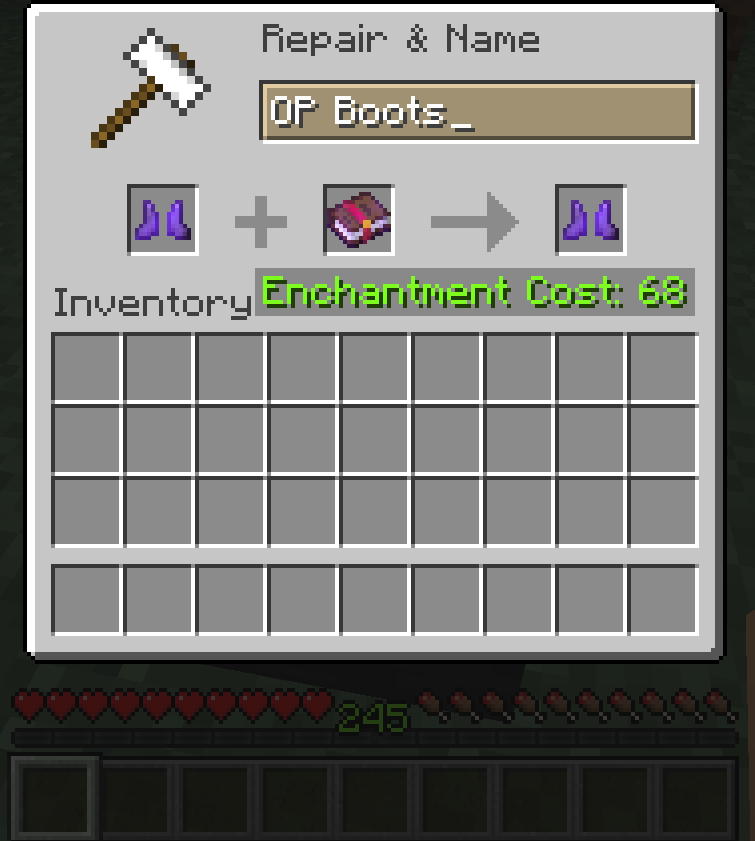
Tired of seeing “Too Expensive!” while forging the best items in the game? Then this mod is for you!
Forging Beyond mod allows you to change how expensive can forging items get before the anvil blocks you.
The mod features a config file in your minecraft directory, where you can set the number that’s going to be the upper limit of the anvil.
This mod needs to be installed on both client and server to work properly in multiplayer!
Since version 0.0.2, Fabric API must also be installed!
After installing the mod, you must launch the game with it at least once for a config file to generate in your minecraft/config directory.
By default the mod will keep the level limit on 40, so you will have to edit the said config file if you wish to have it higher (or lower, that’s possible too).
The mod was made using Fabric! The forge version is not planned, as I am unfamiliar with writting mods for Forge and the mod itself depends heavily on Fabric API as of 0.0.2.
GitHub page: https://github.com/Xtreme533/Forging-Beyond
常见问题
Forging Beyond 支持哪些 Minecraft 版本?
Forging Beyond 支持 Minecraft Java 版 1.14–1.18.1,共 18 个版本,可用的加载器:Fabric。下载时注意选择和你游戏版本一致的文件。
Forging Beyond 怎么安装?
先用 PCL2 或 HMCL 启动器安装对应版本的 Fabric,再把下载的 .jar 文件放进游戏目录的 mods 文件夹,重新启动游戏即可。开启了版本隔离的,mods 文件夹在 versions/版本名 下面。
评论
登录后评论和评分