
截图
介绍
中文介绍正在准备中,下面暂时显示原文。
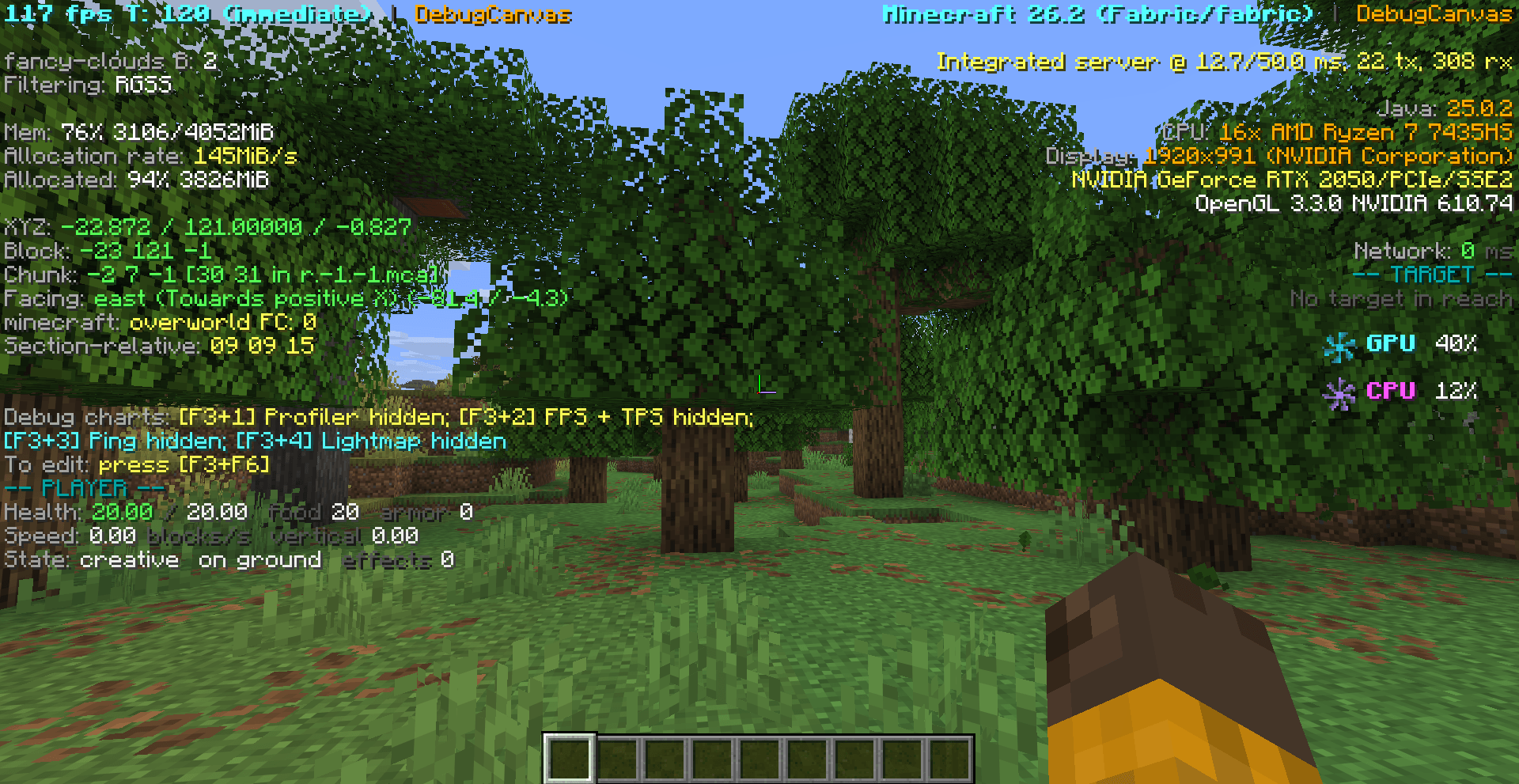
DebugCanvas

DebugCanvas improves Minecraft’s F3 debug screen while keeping its familiar layout.
- Cleaner colors and information groups
- Readable world, player, target, and performance details
- Compact CPU and GPU usage indicators on supported versions
- Smooth fan animations
- Client-side only
Press F3 to open the debug screen.
常见问题
F3 Clarity 支持哪些 Minecraft 版本?
F3 Clarity 支持 Minecraft Java 版 1.8–26.3,共 75 个版本,可用的加载器:Fabric / Forge / NeoForge。下载时注意选择和你游戏版本一致的文件。
F3 Clarity 怎么安装?
先用 PCL2 或 HMCL 启动器安装对应版本的 Fabric / Forge / NeoForge,再把下载的 .jar 文件放进游戏目录的 mods 文件夹,重新启动游戏即可。开启了版本隔离的,mods 文件夹在 versions/版本名 下面。
Haider_x 的其他作品
查看全部 →
Luna shader
by Haider_x
Luna 光影:优化了水面反射,呈现深蓝色调,并为末地传送门加入独特的旋转黑洞效果。
12.3万
1 个月前
CurseForge

Aetheria Shaders
by Haider_x
Aetheria Shaders 是 Complementary Reimagined 的一款华丽奇幻改版光影。拥有自定义维度氛围、发光的青绿色水体、银河主题的下界传送门、流动的熔岩,以及体积化的末地龙卷风。性能表现有保障。
11.8万
1 个月前
CurseForge

Quanta Shader
by Haider_x
快速呈现精美的《Minecraft》画面。柔和的阴影、动态云朵、波光粼粼的水面和绚丽天空,同时优化性能,畅玩高帧率游戏。
10.1万
1 个月前
CurseForge

Vanilla Rebuild
by Haider_x
保留 Minecraft 的经典风格,同时增强光照效果,呈现逼真的天空、体积云、柔和阴影,以及各维度独具特色的浓郁氛围。
10万
1 个月前
CurseForge
评论
登录后评论和评分