
Stuff for MC
This Mod adds different items that (as I think) are useful or cool to the game.
截图
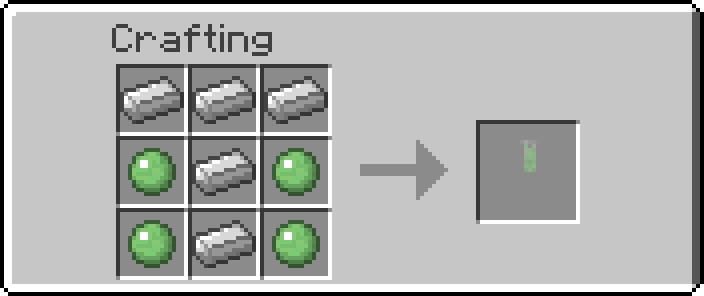


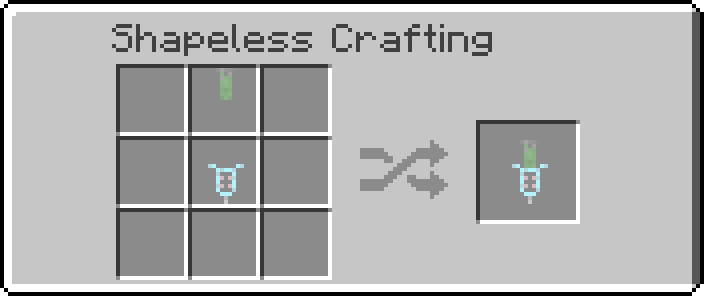

介绍
The Points of wisdom:
1) This mod is not done and it will never be! It’s (now) in version 1.0.1 and as i say in 2) there will be updates
2) I plan this mod to be an ongoing series. What does that mean? It means that I’ll keep adding more and more items whenever I get a new idea or I’ll take some from you. What? From me? Yes! You heard right, if you have an idea for something that would be cool to have in Minecraft then send it to me and I’ll add them in. How do I send the awesome ideas I have? Well it’s simple, just send your idea to: [email protected]. I’ll pick the ideas from the e-mails I get.
3) You want to support me? Well too bad. I don’t accept money from people I don’t personally know, but you can support me with an Mod-representation-Image because I suck at art as you can see. If there is anything else I’ll put it here.
What does the mod contain(by now)?
- Milk Syringes
- English and German language support
Which forge version do I need?
- Stuff for MC (Minecraft 1.7.10) ->Forge10.13.2.1230
What do I need to do?
- Download the forge installer
- Put the .jar in the “\AppData\Roaming\.minecraft\mods” folder
- Start Minecraft with the forge profile
Updates:
- [30.08.2015] Wow, it’s been a while, but I have finished almost all main features, so the new “ProtableVoid-Pack” will be out soon!
- [10.07.2015] Changed the name from “Work Scope” to “Portable Void” (the Item will come with several other items included)
- [22.06.2015] Decided about a new item and the name will be “Work Scope”
- [20.06.2015] If anything changes/updates I´ll put it here
That´s all for now, but there will be more!
License:
Feel free to use my mod for anything you like to do with it (Modpack, Let’s Play, Review….), as long as you give credit!
常见问题
Stuff for MC 支持哪些 Minecraft 版本?
Stuff for MC 支持 Minecraft Java 版 1.7.10,可用的加载器:Forge。下载时注意选择和你游戏版本一致的文件。
Stuff for MC 怎么安装?
先用 PCL2 或 HMCL 启动器安装对应版本的 Forge,再把下载的 .jar 文件放进游戏目录的 mods 文件夹,重新启动游戏即可。开启了版本隔离的,mods 文件夹在 versions/版本名 下面。
评论
登录后评论和评分