RankCapes
The RankCapes client mod is required for the player connecting to RankCapes servers to see their cape.
截图
介绍
The RankCapes client mod is required for the player connecting to RankCapes servers to see their cape. The plugin sends the cape textures and tells the client which capes it has access to, as well as the other players’ capes. Currently there is only a Minecraft Forge version available. Installation and use is simple.
Installation
To install the mod, first install Minecraft Forge to your client. There are multiple tutorials for doing this. I recommend this one. Next download the RankCapesForge mod from here and copy it to the .minecraft/mods/ folder. Thats it! Fire up Mincraft and join a RankCapes equipped server and enjoy!
Usage
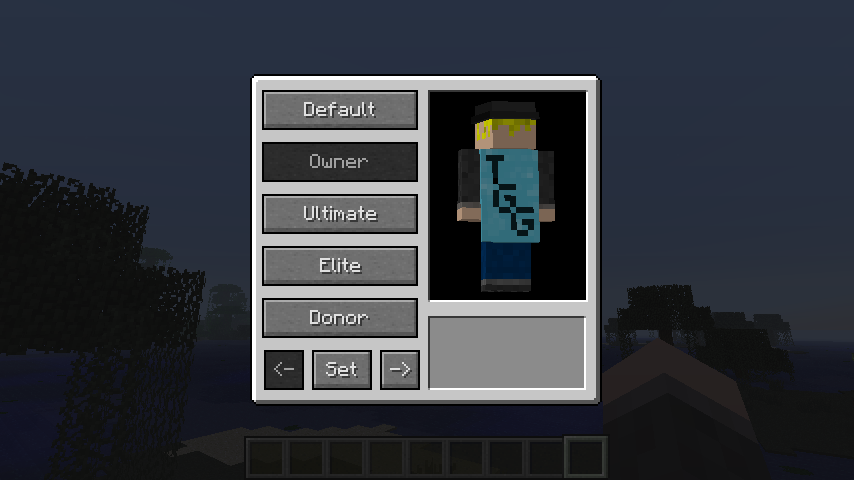
Once installed, connect to a server that has RankCapes installed. Once connected, if you previously had a cape, it will show up. Press F5 to go into 3rd person view. To change your cape, press ‘C’, and the cape change GUI will come up.

This GUI shows all the capes that are available to you. Clicking any cape button will show you a preview. If you close the GUI without pressing the “Set” button, your cape will revert back to the one you had on before you opened the GUI. Pressing “Set” will change your cape to the selected one in the GUI. Next to the “Set” button are the previous page and next page buttons. If you have more then 4 capes available to you, they will be on another page.
常见问题
RankCapes 支持哪些 Minecraft 版本?
RankCapes 支持 Minecraft Java 版 1.7.4,可用的加载器:Forge。下载时注意选择和你游戏版本一致的文件。
RankCapes 怎么安装?
先用 PCL2 或 HMCL 启动器安装对应版本的 Forge,再把下载的 .jar 文件放进游戏目录的 mods 文件夹,重新启动游戏即可。开启了版本隔离的,mods 文件夹在 versions/版本名 下面。
评论
登录后评论和评分