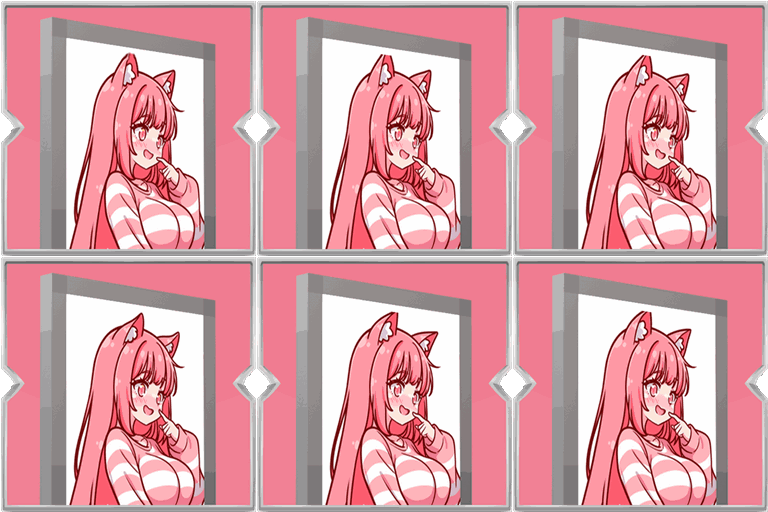
Animated Shields
Bring your shield to life with your own animated GIF. Pick an image from a simple in-game gallery, adjust the speed, and show it off in singleplayer or with friends.
介绍
Animated Shields lets you put a moving picture on your shield. Instead of a plain shield, you can show a GIF or image that plays while you hold or block.

Open the mod menu with the default key K, or change that key in Controls under Animated Shields. From there you can browse a gallery of images, clear your current design, change how fast the animation runs, turn the effect on or off, and reload after you add new files.

To add images, place GIF or picture files in the animatedshields folder inside your game folder. The menu tells you where that folder is, and the gallery can open it for you. Choose a file in the gallery and it appears on the red face of the shield.

In multiplayer, your design is shared with other players who also have the mod installed, so everyone sees each shield the way its owner chose it. The mod must be on the server and on each player’s game for that to work. You will also need Architectury API installed.

Simple to set up, fun to customize, and made for showing a bit of personality on the battlefield.
常见问题
Animated Shields 支持哪些 Minecraft 版本?
Animated Shields 支持 Minecraft Java 版 1.20.1–26.3,共 4 个版本,可用的加载器:Fabric / Forge / NeoForge。下载时注意选择和你游戏版本一致的文件。
Animated Shields 怎么安装?
先用 PCL2 或 HMCL 启动器安装对应版本的 Fabric / Forge / NeoForge,再把下载的 .jar 文件放进游戏目录的 mods 文件夹,重新启动游戏即可。开启了版本隔离的,mods 文件夹在 versions/版本名 下面。
Zerw 的其他作品
查看全部 →
No Totem Pop Animation & Particles
图腾触发时保持屏幕清爽。适合PvP、硬核模式和追求干净画面的创作者。

No Rain & Particles
This resource pack removes rain visuals and completely mutes the rain sound.
Better Nether Portals
Build Nether portals in any shape or orientation, closed obsidian frame, light with flint and steel, and walk through.
The Sift: Backport
The Sift is the new dimension that will be introduced in the upcoming release, and this mod is a backport for older versions.
评论
登录后评论和评分