Block/ItemFinder
ItemFinder is a mod that allows you to find items/blocks in your world.
介绍
The mod works like this:
Click “P” or another button assigned in keybinds to open the item search gui.
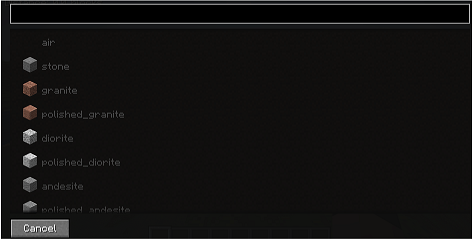
You can search for items/blocks or scroll through the list of blocks/items. When you select a block/item, the scanning process begins.To select block/item simply click on it.
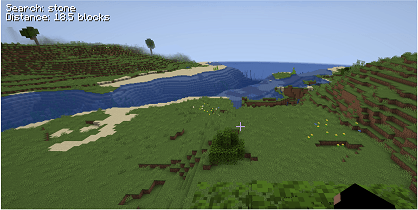
Then information about the block/item being searched for and the player’s distance from the item
being searched for is displayed, the distance is refreshed
If you search for an item and it is not visible, simply use the scroll bar on your mouse to make it appear.
The item and the blocks the scanner is looking for must be within the render distance, if you increase the render distance the scanning area will also increase
You can exclude items/blocks that you are looking for in the configuration file
If you click cancel searching stops
常见问题
Block/ItemFinder 支持哪些 Minecraft 版本?
Block/ItemFinder 支持 Minecraft Java 版 1.18–1.20.4,共 11 个版本,可用的加载器:Forge。下载时注意选择和你游戏版本一致的文件。
Block/ItemFinder 怎么安装?
先用 PCL2 或 HMCL 启动器安装对应版本的 Forge,再把下载的 .jar 文件放进游戏目录的 mods 文件夹,重新启动游戏即可。开启了版本隔离的,mods 文件夹在 versions/版本名 下面。
评论
登录后评论和评分