
截图


介绍
⚡ Instant Villager Trade Reroller (Librarian Filter) – QOL Mod


Say goodbye to breaking and replacing lecterns 500 times!
Instant, hassle-free villager trade rerolling using simple signs on workstations. Filter enchantments, items, and levels in seconds.
🌟 Why You Need This Mod
Tired of the endless loop of placing a lectern, checking for Mending, breaking the lectern, and repeating for 45 minutes?
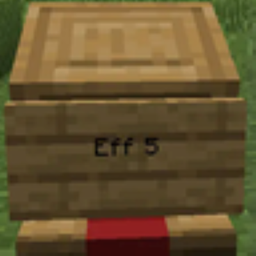
Librarian Filter lets you simply write the trade or enchantment book you want on a sign attached to the workstation, right-click, and instantly refresh/reroll until the villager gives you that exact trade.
- ⏱️ Instant Reroll — Get Mending, Efficiency V, Unbreaking III, or any item in seconds.
- 🏷️ Sign-Based Filtering — Write what you want directly on the workstation.
- 🎯 Smart Shorthand — Type abbreviations (
eff,prot,unbr) or full names (white_wool). - 🔝 Automatic Max Level — Omitting the level automatically targets the maximum enchantment level!
- 🔓 Allows reroll at any level — Allows locked villager trade on next level!
- ✨ Visual Feedback — Happy green villager particles on success, angry clouds on failure, plus villager glowing so you know who claimed it!
- 🧩 Universal Multi-Loader — Runs seamlessly on Fabric, NeoForge, Forge, and Quilt!
🚀 How It Works (Quick 3-Step Guide)
- Place a Sign on or against the villager’s workstation (Lectern, Loom, Composter, etc.).
- Write the Trade/Enchantment on the sign (short abbreviation or full item name).
- Right-Click the Workstation to trigger the instant reroll!
- 🟢 Green Particles: Successful reroll! The villager has your exact requested trade.
- 🔴 Angry Particles: Villager could not roll this trade (e.g., locked trade or invalid item).
📝 What to Type on the Sign?
📚 Enchantment Books (Librarians)
Type full name or starting partial letters, optionally followed by level. If level is omitted, the mod defaults to Max Level!
| Sign Text | Resulting Enchantment | Notes |
| :— | :— | :— |
| mending | Mending I | Single tier enchantments auto-match |
| eff | Efficiency V | Defaults to max tier |
| eff 3 | Efficiency III | Specific requested tier |
| unbr | Unbreaking III | Defaults to max tier |
| fortune | Fortune III | Defaults to max tier |
| sharp | Sharpness V | Defaults to max tier |
| silk | Silk Touch I | Instant match |
🥖 Normal Items (Any Profession)
For normal item trades, type the item registry name. Use underscores _ for spaces:
| Sign Text | Resulting Trade |
| :— | :— |
| bread | Bread |
| white_wool | White Wool |
| iron_pickaxe | Iron Pickaxe |
| golden_carrot | Golden Carrot |
(💡 Interactive in-game suggestion auto-complete available in MC 26.1 and later!)
🤔 Frequently Asked Questions
Why use a Sign?
Because you cannot speak fluent “Hmmmmmm” to villagers! Writing it on a sign bridges the communication gap. Plus, once your trading hall is built, the signs double as permanent labels so you never forget who sells what!
Why the particles & glowing?
Villagers love to wander around. When a reroll succeeds, green particles pop and the villager briefly glows so you can spot them in a crowd.
What if I need the full list of keywords?
📖 Check the full comprehensive keyword list on our Official Wiki.
🛠️ Helpful Commands
/reroll setup//reroll setup creative— (Creative / Testing) Spawns a ready-to-test glass trading booth with a Librarian, Lectern, Sign, plus 3 stacks of emeralds & books!/reroll find <book name>— Highlights and gives a glowing outline to nearby villagers offering that enchantment book./reroll clear— Clears glowing outlines from highlighted villagers.
🐛 Need Help or Found a Bug?
- 💬 Discord Community: Join our Discord Server
- 📖 Wiki & Docs: GitHub Wiki
- 🐞 Issue Tracker: Report bugs on GitHub
🏷️ SEO & Search Keywords
villager reroll • instant reroll • trade refresh • villager trade filter • easy trading • mending book • fast librarian trades • trading hall setup • enchantment reroller • minecraft villager trading • fabric • neoforge • forge • quilt
常见问题
Villager Trade Reroll 支持哪些 Minecraft 版本?
Villager Trade Reroll 支持 Minecraft Java 版 1.20.1–26.3,共 12 个版本,可用的加载器:Fabric / Forge / NeoForge / Paper / Purpur / Quilt / Spigot。下载时注意选择和你游戏版本一致的文件。
Villager Trade Reroll 怎么安装?
先用 PCL2 或 HMCL 启动器安装对应版本的 Fabric / Forge / NeoForge / Paper / Purpur / Quilt / Spigot,再把下载的 .jar 文件放进游戏目录的 mods 文件夹,重新启动游戏即可。开启了版本隔离的,mods 文件夹在 versions/版本名 下面。运行环境:仅服务端。

评论
登录后评论和评分