介绍
Unified
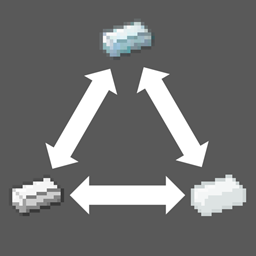
Annoying for a lot of same items from different mods cannot use mutually? This mod can help you.
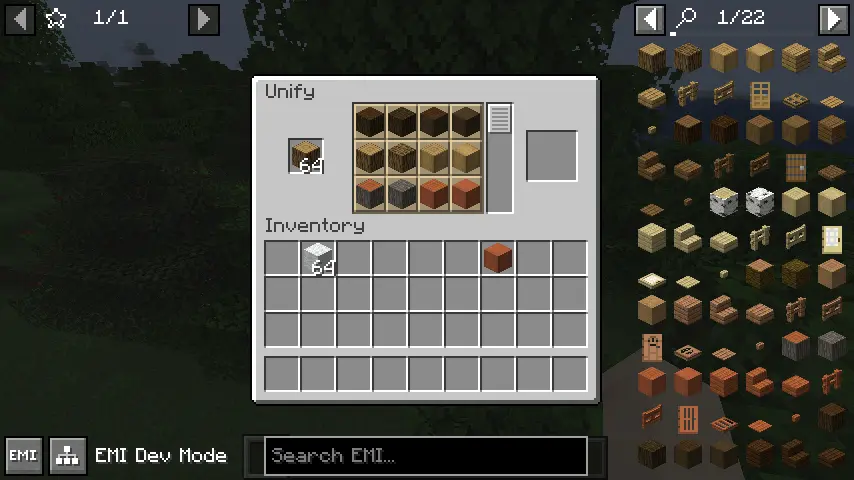
This mod add a command /unify, which you can open a unify screen. You can exchange items with same tag.
How to use
By default, this mod don’t provide any exchange in the screen. You need to configure first.
Open file .minecraft/config/unified.json. If file don’t exist, create it.
[
  "Write item tag here",
  "More tag",
  "You can write as much as you want to add"
]
Then, when you put items which has one of these tags into the unify screen, you can select other items which have the same tag to exchange.
I recommend to use EMI for tag checking.
Example
You want to let all logs can exchange.
First, find the tag id.

Then write following contents into config file.
[
  "minecraft:logs"
]
Open game (or /reload), and you can exchange now.
常见问题
Unified 支持哪些 Minecraft 版本?
Unified 支持 Minecraft Java 版 1.20.1,可用的加载器:Fabric / Forge / NeoForge。下载时注意选择和你游戏版本一致的文件。
Unified 怎么安装?
先用 PCL2 或 HMCL 启动器安装对应版本的 Fabric / Forge / NeoForge,再把下载的 .jar 文件放进游戏目录的 mods 文件夹,重新启动游戏即可。开启了版本隔离的,mods 文件夹在 versions/版本名 下面。
IAFEnvoy 的其他作品
查看全部 →
Jupiter
一个强大的自动同步配置前置库。

Uranus
一个前置库,包含动画引擎、对象辅助工具等功能。部分基于 LLibrary 和 Citadel。

IceAndFire Community Edition
Ice and Fire 的社区版
Ice And Fire Patcher
一个简单的 Ice And Fire 补丁
评论
登录后评论和评分