
enhanced F3
A Minecraft Fabric mod that provides a clean and organized alternative to the default F3 debug screen.
介绍
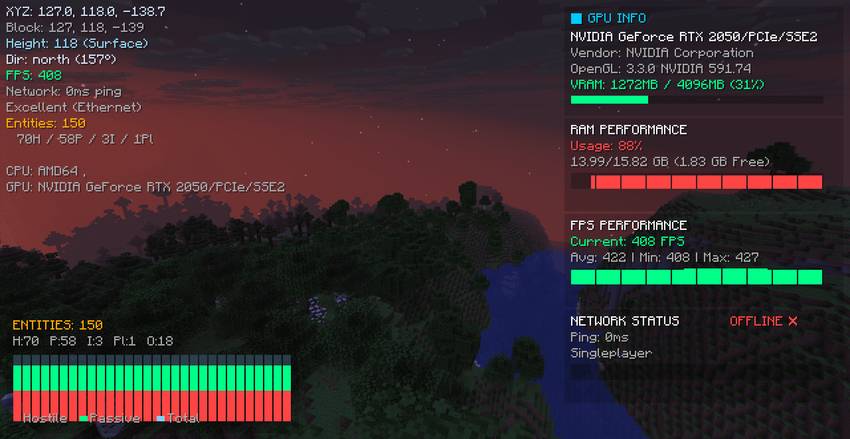
A Minecraft Fabric mod that provides a clean and organized alternative to the default F3 debug screen.
Features
– Clean Interface: Organized performance panels with essential information
– Real-time Monitoring: Live RAM and Network statistics
– Right-side Layout: Performance panels positioned on the right side of the screen
– Performance Graphs: Visual graphs for RAM and Network data
– Toggle Control: Press F3 to enable/disable the enhanced display
Explore More Projects
– [Mob Health Bars]
– [Your Land]
– [NPC Teleport]
– [AutoMine]
– [SkillsTree]
– [mobs Despawn]
Panel Information
RAM Performance Panel
– Shows current memory usage percentage
– Displays total system RAM information
– Real-time memory usage graph
Network Status Panel
– Shows connection status (Online/Offline)
– Displays ping and connection quality
– Shows packet loss and connection type
– Real-time ping graph
Hardware Information Panel
– Displays CPU name and model in left info panel
– Shows GPU name and specifications
– Integrated with system information display
Usage
– Press **F3** to toggle the enhanced display
– Press **F5** to cycle through different display modes
– Press **F6** to toggle performance panels on/off
– RAM and Network panels appear on the right side of the screen
– Hardware information appears in the left info panel
– The mod is disabled by default – user must activate it manually
常见问题
enhanced F3 支持哪些 Minecraft 版本?
enhanced F3 支持 Minecraft Java 版 1.21–26.1.2,共 15 个版本,可用的加载器:Fabric / Forge / NeoForge / Quilt。下载时注意选择和你游戏版本一致的文件。
enhanced F3 怎么安装?
先用 PCL2 或 HMCL 启动器安装对应版本的 Fabric / Forge / NeoForge / Quilt,再把下载的 .jar 文件放进游戏目录的 mods 文件夹,重新启动游戏即可。开启了版本隔离的,mods 文件夹在 versions/版本名 下面。
IXSG 的其他作品
查看全部 →
Luminara Shader
用空灵之美与电影级光照,彻底改变你的 Minecraft 世界。支持体积云、金色氛围色调、清晰通透的下界画面,以及充满魔法感的末地效果。

Luminara Shader – Rebuilt
体验增强视觉效果之美,惊艳的云层系统与令人叹为观止的光照效果,将你的 Minecraft 世界化为杰作。

Luminara Shader spooky
把你的Minecraft世界变成令人毛骨悚然的万圣节噩梦。包含诡异雾气、低饱和度的恐怖色调、压抑的阴影和阴森的特效。
Reflexa
Reflexa:一款进阶版 Minecraft 光影,拥有动态体积云、逼真的水体效果、更出色的光照、阴影与反射、大气效果、圆形太阳与月亮、泛光、动态模糊和可自定义色彩,并针对性能进行了优化。
评论
登录后评论和评分