
截图
介绍

Introduction
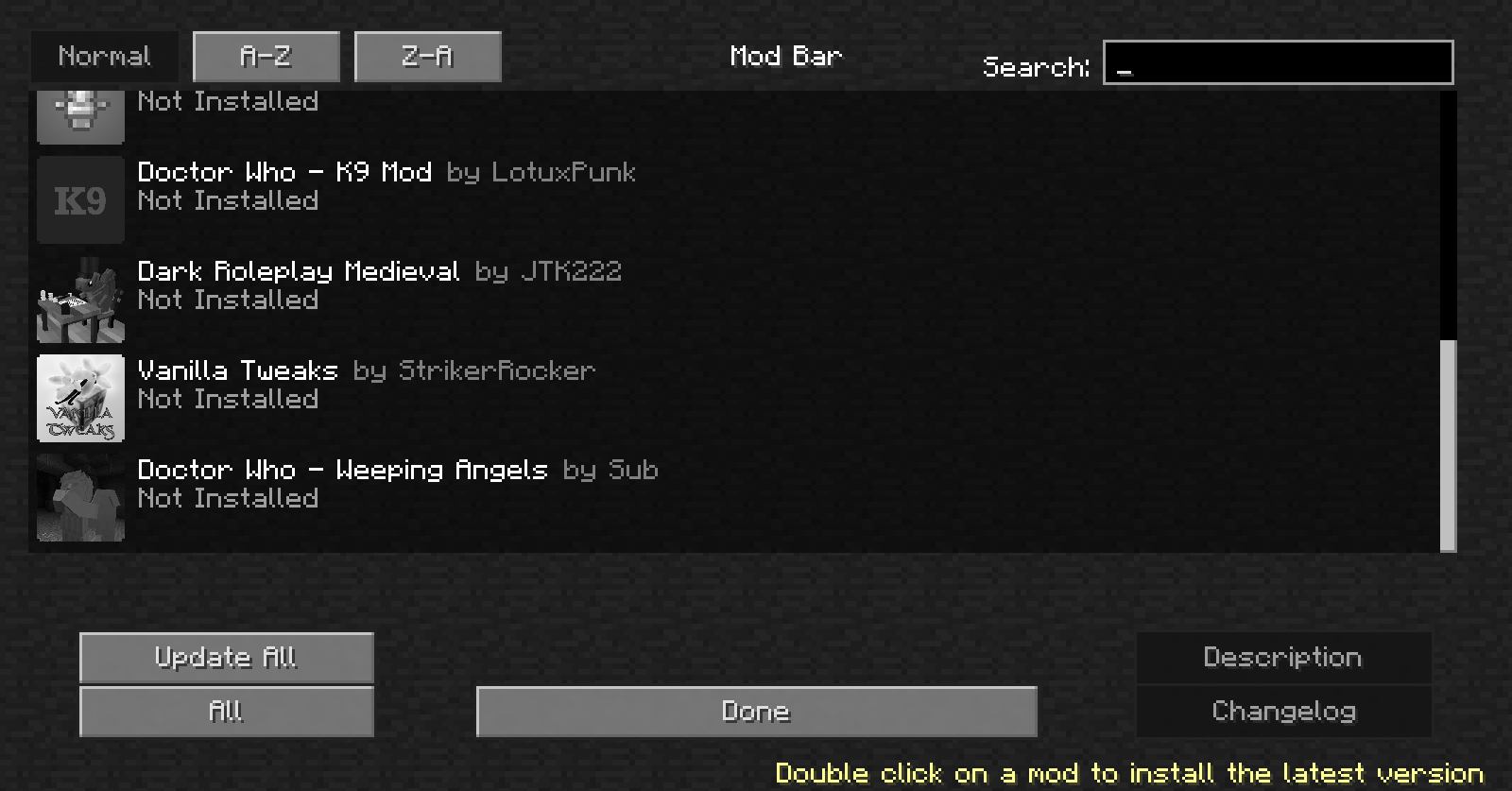
If you wanted to install, update or remove Minecraft mods directly from the game, Milksnake is for you. It is a powerful integrated mod installer that lets you download mods directly from inside the game menu. If we were to advertise it like Discord, we’d say it’s time to ditch the Twitch launcher and manual mod downloading, but let’s try not to get kicked out of Curse Forge shall we?
Note: The mod also comes with LadyLib, Ladysnake’s library necessary to run most if not all Ladysnake mods, and a special menu re-texture (you can disable this re-texture or choose another flavour / theme in the configuration options).
Demonstration:

Installation Note
Milksnake’s mod bar requires a Java version higher than the one shipped with Minecraft in order to work. If you use a launcher that lets you choose the Java version, choose the latest. If you are using MultiMC, you should already be fine. If not, you need to install Java from this page and set your launcher to use it.
Vanilla launcher instructions:
1- Go into “Launch Options” and enable “Advanced settings”.

2- Click on your profile of choice, check “Java executable” and input the path to your Java binary. If you are using Windows, it should be in C:\Program Files\Java\<installed_version>\bin\javaw.exe. If you are using Linux or Mac, you should be able to use the command whereis java to obtain that path.

3- Hit “save”.
Frequently asked questions
What mods are we talking about?
As of now, Milksnake’s mod bar only allows the installation of Ladysnake mods, as well as Ladysnake partner mods. To see the full list, please check it down below. If you wish to see a mod in Milksnake, please look at the Propose a Ladysnake partner mod section further down below.
Mod repost or…?
Milksnake downloads directly from the mod’s author official download source, may that be Curse Forge or any other download link. It will always be from a safe and secure source, as mod links are verified by Ladysnake.
Propose your Mod for the bar
Do you wish to see your mod or a specific mod on Milksnake’s mod list? If you are the mod author, please tell us about your mod in our discord server and we will be glad to add it! If you are not the mod author, you will have to convince the mod’s author to propose their mod. Please note that we don’t accept low effort mods, as we want to keep an interesting selection. However, if your mod fits our style, it might even be featured in the Ladysnake favorites category!
If you have any questions, propositions or ideas, please submit them in the Minecraft Curse Forge Project page comment section! Or, you could…
Join us on Discord!

常见问题
Milksnake 支持哪些 Minecraft 版本?
Milksnake 支持 Minecraft Java 版 1.12.2,可用的加载器:Forge。下载时注意选择和你游戏版本一致的文件。
Milksnake 怎么安装?
先用 PCL2 或 HMCL 启动器安装对应版本的 Forge,再把下载的 .jar 文件放进游戏目录的 mods 文件夹,重新启动游戏即可。开启了版本隔离的,mods 文件夹在 versions/版本名 下面。
doctor4t 的其他作品
查看全部 →
Illuminations 🔥
一款客户端模组,为你的世界增添萤火虫和各种夜光环境粒子。

Dead Man’s Abyss
Ladysnake 为 MMD 的 2018 年 Spookyjam 活动提交的作品

Illuminations Legacy 🔥
更新后的 Lumen 旧版,也就是适用于 Forge 1.12 的 Illuminations 版本。

Nomad Books 📗
把营地收进书里!专为热衷冒险的玩家打造。
评论
登录后评论和评分