
Insane AE2 Addons
Even crazier addons to ae2! Construct massive multiblocks, create black holes, store mobs in your ME nework and much more!
介绍

Ever wished you could store your dog inside your AE2 system? Now you can! Maybe wanted to make a black hole in Minecraft and use it to harvest unimaginable amounts of power? Maybe you are just want to filter things in your system based on their NBT data? Or maybe you just wanted to have 2,2T AE stored in one block? Insane AE2 Addons brings you features no one ever imagined.
Highlights:
- Massive multiblock structures capable of generating insane amounts of power, farming mobs, and much more.
- Entity Ticker – speed up processing like never before (comes with a great electricity bill).
- Mob Storage Cells – store thousands of living entities in your ME Network. Pair them with digital mob farm multiblocks for maximum chaos. They also work with pattern providers now!
- Automatic Enchanting – turn all that extra liquid XP into guaranteed enchantments. Full automation supported!
Prefer the technical side of things?
All features are simple to use, but if you want, you can go deep. Crazy AE2 Addons includes:
- An automatic builder – write your own scripts, or copy entire structures.
- NBT view cells, NBT Storage Bus with advanced matching logic.
Everything is documented in-game
No wikis required – the AE2 Guide has it all. Recipes are fully integrated into JEI/EMI with detailed previews. Multiblock controllers even include a preview for easy building, and there is also multiblock builder item to make things even easier. And if you ever need more help, just join my Discord.
Compatibility
Insane AE2 Addons plays nicely with many AE2 expansions and popular mods:
- Advanced AE
- Extended AE
- Expanded AE
- Mega Cells
- Modern AE2 Additions
- Apotheosis (Auto Enchanter supports its enchantments)
Screenshots
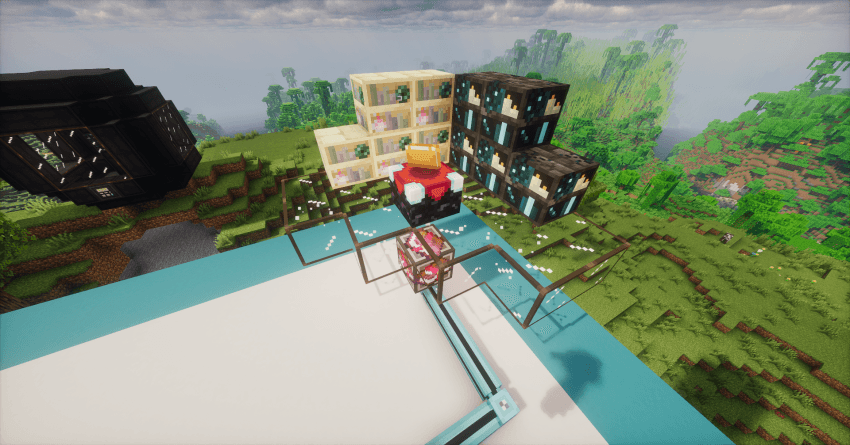
Penrose sphere

Automatic enchanting setup
常见问题
Insane AE2 Addons 支持哪些 Minecraft 版本?
Insane AE2 Addons 支持 Minecraft Java 版 1.20.1,可用的加载器:Forge。下载时注意选择和你游戏版本一致的文件。
Insane AE2 Addons 怎么安装?
先用 PCL2 或 HMCL 启动器安装对应版本的 Forge,再把下载的 .jar 文件放进游戏目录的 mods 文件夹,重新启动游戏即可。开启了版本隔离的,mods 文件夹在 versions/版本名 下面。
OktawiazRivi 的其他作品
查看全部 →
Crazy AE2 Addons
打造史上最大的样板供应器,在AE2中存储生物,以前所未有的疯狂方式管理你的世界
Spatial Tools Compatible
一款独立的建筑工具模组,可复制、剪切、预览、变换并粘贴复杂建筑,内置支持 AE2、GTCEu、通用机械和 FramedBlocks。

KubeJS aisle tool
在游戏中复制建筑,然后粘贴到 KubeJS 文件里。就这么简单。

Crazy AE2 Addons
为应用能源2添加实用增强功能,包括取消自动合成、基于 NBT 的导出以及附魔自动化。目前仍处于早期 Beta 阶段。
评论
登录后评论和评分