Better Beyond Dimensions
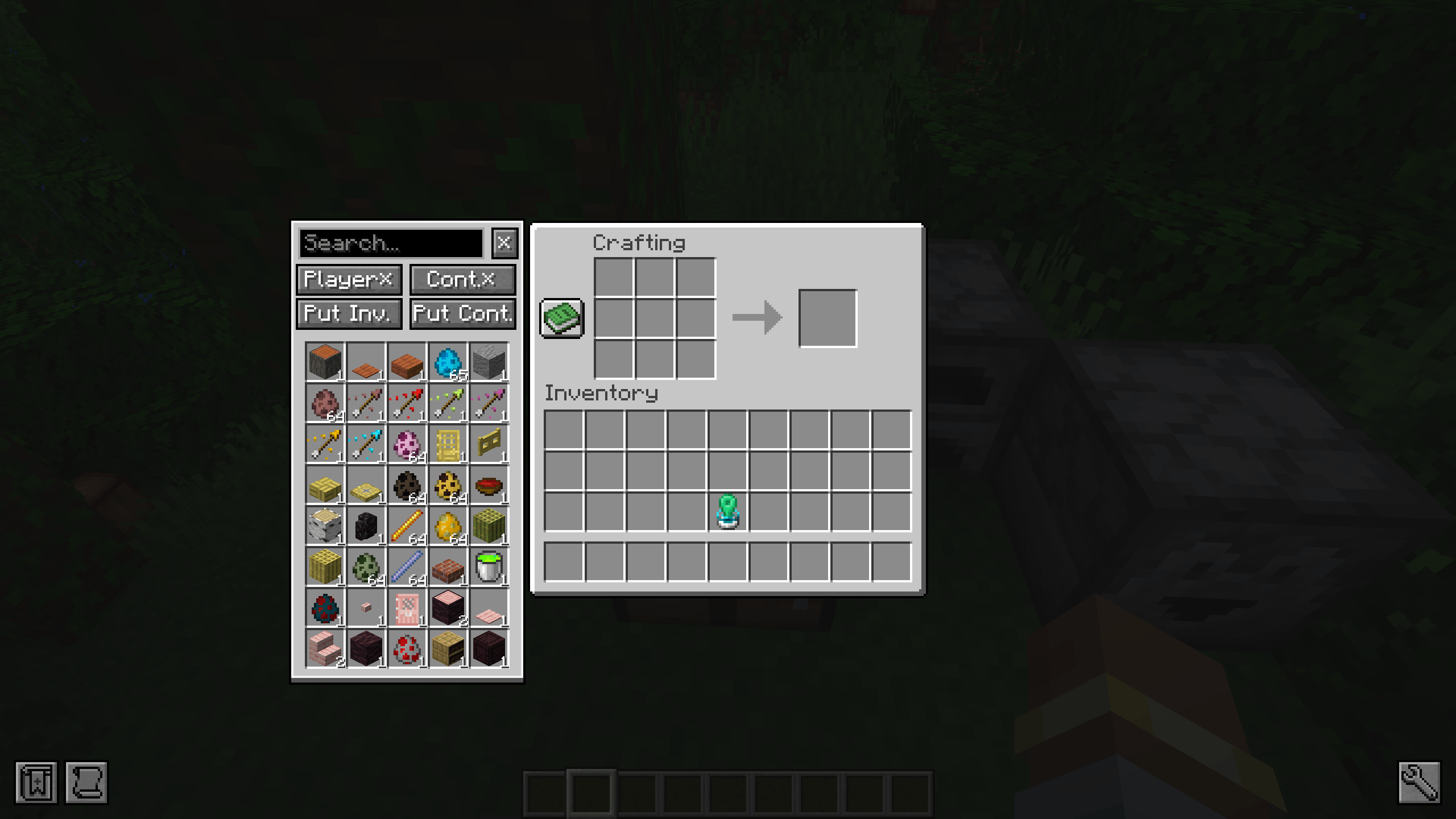
Adds a searchable Beyond Dimensions network sidebar to every container.
截图
介绍
Features
- Displays a searchable Beyond Dimensions network sidebar on the left side of all
AbstractContainerScreenscreens. - The sidebar is shown only when the server confirms that the player has an available Beyond Dimensions network.
- Left-click extracts one stack from the network; right-click extracts one item. Search supports both display names and registry names.
- “Move Player Items” and “Move Container Items” independently control Shift-click behavior.
- “Deposit Container” stores items from the currently open container into the network. “Deposit Inventory” only processes the player’s main inventory; the hotbar is excluded.
- Default shortcuts:
Ffor “Deposit Container” andGfor “Deposit Inventory`. They only work while the sidebar is visible and the search box is not focused. - Player and container Shift-transfer settings are saved to the client file
config/better_beyond_dimensions-settings.jsonand synchronized with the server when a new screen is opened. - All network storage operations and Shift-click interception are validated and executed server-side.
Sidebar Display Event
SidebarDisplayEvent is fired on the client after the sidebar has been created and before it is displayed. The event can access the current Screen, disable the functionality of individual buttons, override button text or tooltips, or completely disable the sidebar for the current screen. The event only affects the current screen instance and does not modify the server-side menu.
For example, to disable “Deposit Container” on the crafting screen and change its tooltip to “Disabled”:
private static void onSidebarDisplay(SidebarDisplayEvent event)
{
    if (event.getScreen() instanceof CraftingScreen)
    {
        event.disableButton(SidebarDisplayEvent.ButtonId.DEPOSIT_CONTAINER);
        event.setButtonTooltip(
                SidebarDisplayEvent.ButtonId.DEPOSIT_CONTAINER,
                Component.literal("Disabled")
        );
    }
}
常见问题
Better Beyond Dimensions 支持哪些 Minecraft 版本?
Better Beyond Dimensions 支持 Minecraft Java 版 1.20.1–1.21.1,共 2 个版本,可用的加载器:Forge / NeoForge。下载时注意选择和你游戏版本一致的文件。
Better Beyond Dimensions 怎么安装?
先用 PCL2 或 HMCL 启动器安装对应版本的 Forge / NeoForge,再把下载的 .jar 文件放进游戏目录的 mods 文件夹,重新启动游戏即可。开启了版本隔离的,mods 文件夹在 versions/版本名 下面。
lingmu 的其他作品
查看全部 →
Fix Attack Lag
修复玩家攻击时单次伤害过高导致的卡顿问题。

JEI++(JEI Plus)
这个模组为 JEI 添加了类似 EMI 的配方树、可折叠物品分组、滚轮翻页等实用改进。
Confluence Lootr
为 Confluence 的战利品箱添加 Lootr 兼容支持。

JEI Trade
为查看村民交易添加 JEI 支持,并自动兼容自定义村民交易以及其他实体的交易,例如 Goblin Traders。
评论
登录后评论和评分