
介绍
中文介绍正在准备中,下面暂时显示原文。
Minecraft Coordinates Mod
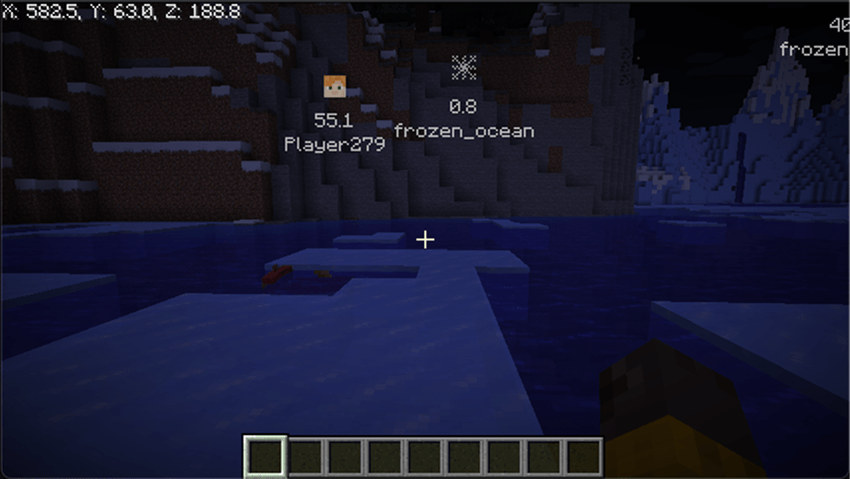
Minecraft Coordinates Mod is a Fabric mod that allows you to record your in-game coordinates easily and display them on your screen. It also shows the positions of players in the world, making it easier to know where everyone is.
Features
- Save Coordinates: Record your current position with a short description and an icon.
- HUD Display: Your current coordinates and the positions of other players are shown on your screen. Note: To display other players’ positions on the HUD, you must install this mod on the server as well.
- Coordinate List: Easily view and manage your saved coordinates.
Development Background
I created this mod to make playing Minecraft with my son even more fun!
In Survival Mode, a bunch of different monsters can appear, which can be scary for a kid. But with this mod, my son can instantly see where I am, and if anything happens, I can rush right over to help him.
Installation
- Install [Fabric Mod Loader](https://fabricmc.net/use/).
- Place the mod JAR file into your Minecraft mods folder.
- Launch Minecraft using the Fabric profile.
Usage
- Press G to save your current position.
- Press B to open the coordinates list screen.
- Change settings via the mod’s settings screen.
- The HUD will display real-time coordinate data and notifications as you play.
常见问题
mc-coordinates 支持哪些 Minecraft 版本?
mc-coordinates 支持 Minecraft Java 版 1.21.4–26.3,共 8 个版本,可用的加载器:Fabric。下载时注意选择和你游戏版本一致的文件。
mc-coordinates 怎么安装?
先用 PCL2 或 HMCL 启动器安装对应版本的 Fabric,再把下载的 .jar 文件放进游戏目录的 mods 文件夹,重新启动游戏即可。开启了版本隔离的,mods 文件夹在 versions/版本名 下面。
评论
登录后评论和评分