
Thermal Numismatics
Port the Trade Station from C:A&B to 1.20.1 as its own unique block
截图


介绍

DO NOT HEAD TO THE TEAM COFH DISCORD FOR HELP WITH THIS MOD, INSTEAD HEAD TO THE CREATE: GARNISHED (DakotaPride Central) DISCORD FOR ASSISTANCE
Team COFH Discord (credit for Thermal X mods)
Create Mod Discord (credit for C:A&B Trade Station)
Porting the Trade Station over from Create: Above And Beyond to 1.20.1, it takes on a new identity as more than just a redesigned Multiverso Press.
While there’s a guide linked above, here’s a guide on here, as well.
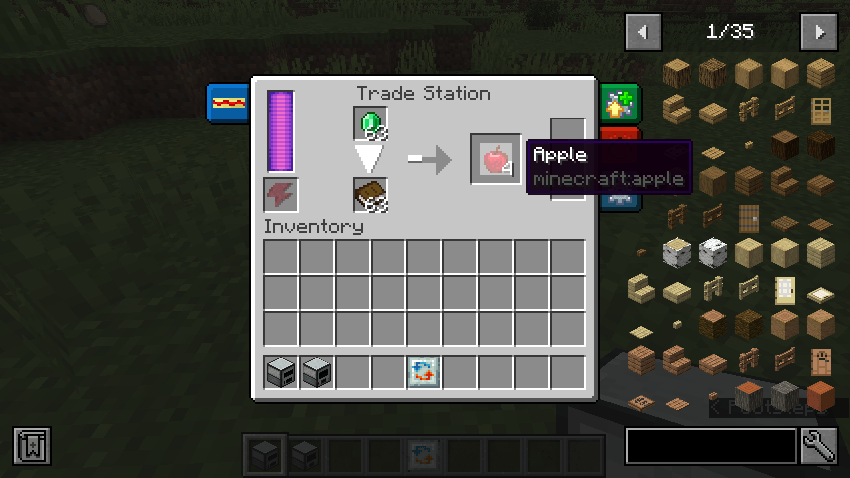
Understanding The GUI
There are two input slots – one for the item being sold/traded and another for the “catalyst” item. This catalyst can either be consumed in the recipe process, which is by default, or it can remain once the recipe has commenced. If you wish for this catalyst to remain at the end of the recipe, you’ll need to put the respective item into an item tag via the use of a datapack – which you’ll need anyway to utilize this mod or any of its functionality.
Additionally, it’s important to note that the Trade Station is not craftable by default as of right now and the right must be added by the player.
Setting up Your Datapack
- Create your base datapack files – data folder, pack.mcmeta, and pack.png
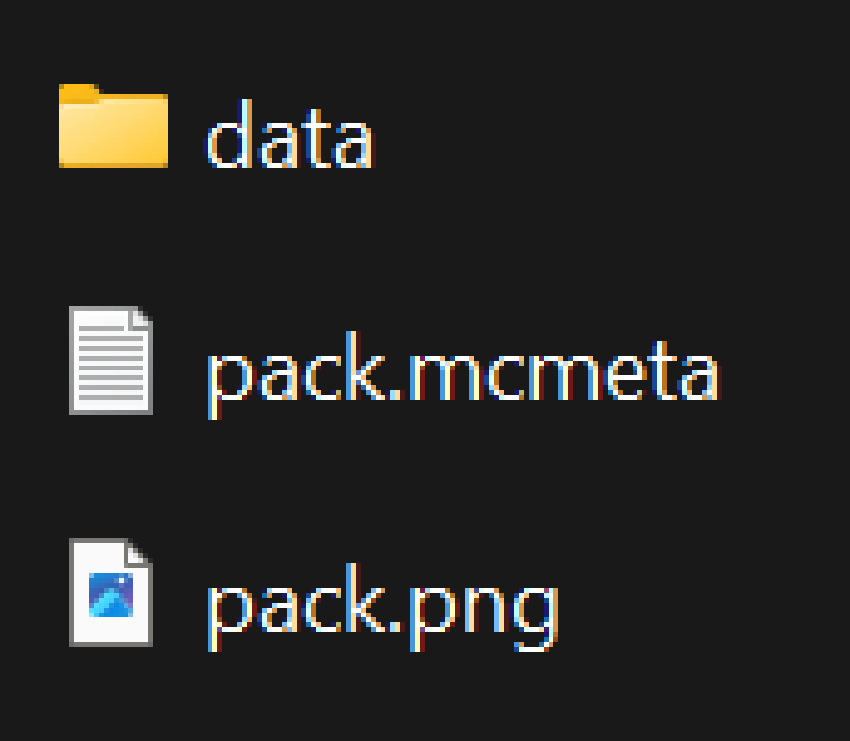
- Your data folder contains the functionality and content of the pack
- Your pack.mcmeta controls basic information such as the pack’s format (official version released by Mojang for functionality to work)
- Your pack.png simply controls the icon that your datapack uses. For this guide, the pack.png file can be ignored for now.
- Inside of your data folder, create the following directory – <modid>/recipes
- “modid” can be replaced with mostly any text, but this is going to be the name of your pack. Something to keep in mind is that there are limitations with folder/file names and common practices – Try to keep your modid lowercase, utilize underscores instead of spaces, etc.
- Inside of your new recipes folder, you can now create your recipe files. These are json files that follow a given format, which is shown below.
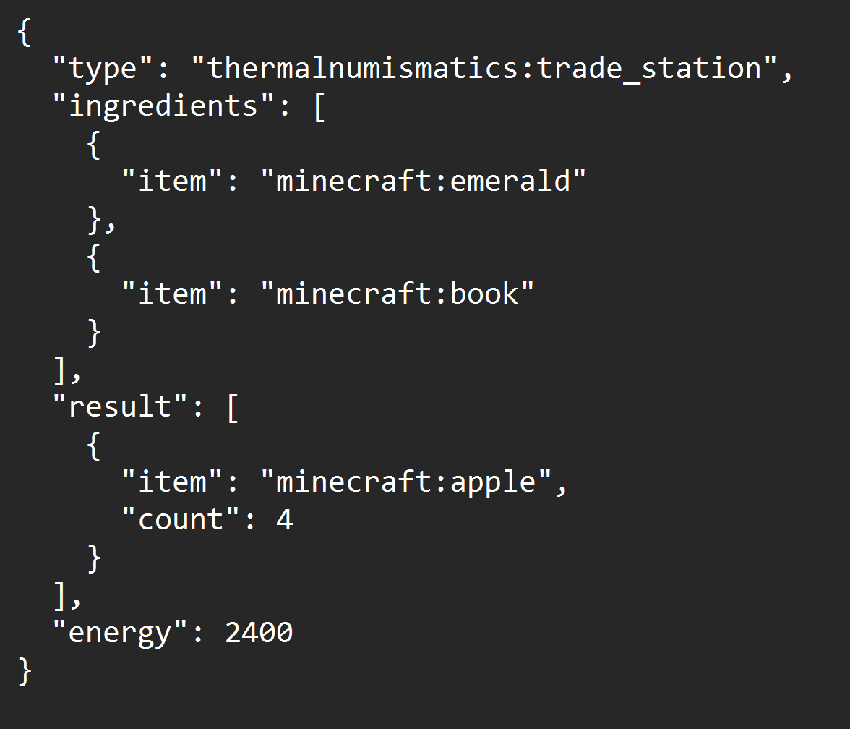
Utilize the information from “Understanding the GUI” to help you through creating similar recipes.
Leaving The Catalyst as a Remainder
- Follow the above steps just as normal, however, instead of using your “modid” folder, you must create a new folder called “thermalnumismatics”. Then, within that folder, create an additional directory – tags/item/trade_station
- Inside of your new tags/item/trade_station folder, create a json file titled “allowed_catalysts.”
- This holds any item that will be a remainder in the recipe. Leaving an item outside of this item tag will result in the item being consumed.
- There are two parameters to keep in mind for tags of any kind
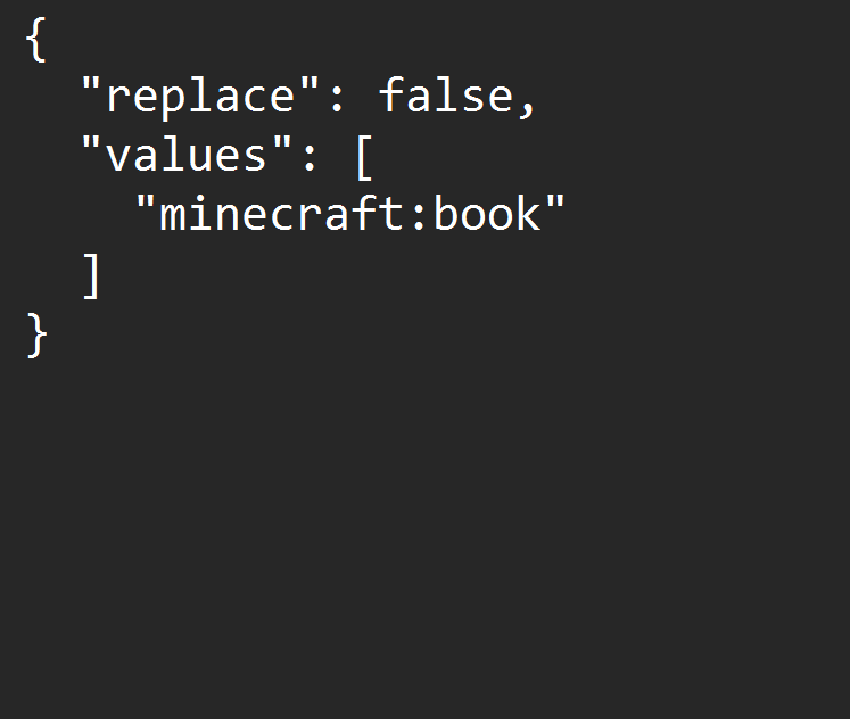
- replace – Determines if this specific tag replaces any other instance of the tag. Typically, you’d want to keep this as “replace: false,” which is recommended. However, since this mod is intended for modpacks, setting this to true will result in the default tag being ignored.
- values – Determines the items that are considered a part of the tag. By default, any item placed inside of this array will be under the id “minecraft” unless otherwise specified, which can be accomplished by simply adding the id of the item to the front of it, similar to how it’s shown below (adding minecraft to the beginning of the entry acts the same as if it wasn’t there). For example, putting “trade_station” in the tag will result in the game looking for an item under the name “minecraft:trade_station.” Instead, you’d want to put “thermalnumismatics:trade_station” for it to look for the correct item.
常见问题
Thermal Numismatics 支持哪些 Minecraft 版本?
Thermal Numismatics 支持 Minecraft Java 版 1.20–1.20.1,共 2 个版本,可用的加载器:Forge / NeoForge。下载时注意选择和你游戏版本一致的文件。
Thermal Numismatics 怎么安装?
先用 PCL2 或 HMCL 启动器安装对应版本的 Forge / NeoForge,再把下载的 .jar 文件放进游戏目录的 mods 文件夹,重新启动游戏即可。开启了版本隔离的,mods 文件夹在 versions/版本名 下面。
DakotaPrideModding 的其他作品
查看全部 →
Create: Framed
一个机械动力模组附属,添加了更多镶框玻璃变种。

Create: Garnished
一个机械动力附属模组,新增了多种食物,主要是坚果。

Create: Mechanical Botany
自动化采集植物

Create: Garnished Reworked
重新设计了 Create: Garnished,让它对新玩家更友好,不再那么令人眼花缭乱。
评论
登录后评论和评分