
截图
介绍
This mod simply deletes the server world when the server stops. I made it to help with testing achievements, world gen, etc.
NOTE: The mod will do nothing until it has been configured. Default configuration is set to disabled.
NOTE: There is a blacklist that will not allow the mod to delete certain folders/files.
Note: To delete single player worlds, you must exit to the main menu. Worlds will not delete if you do not do this. (Does not apply to builds 38 and higher)
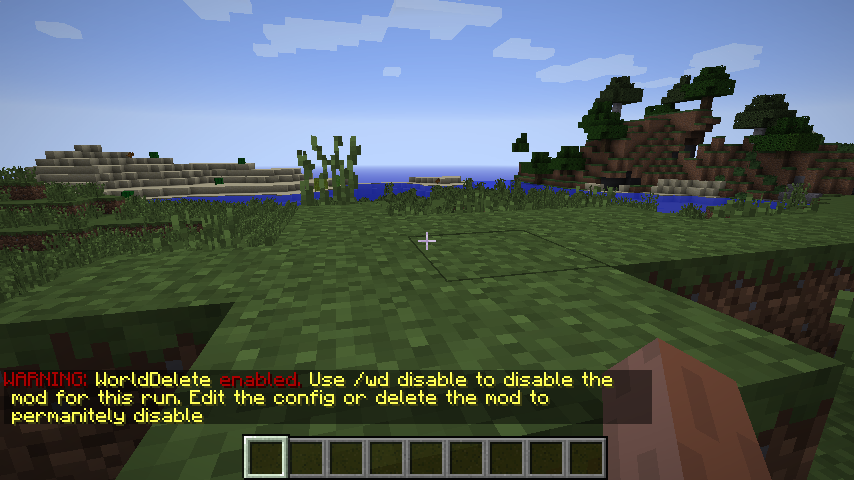
If the mod is set to delete the world, it will warn all players on login and instruct them how to disable it. All players can use the command to disable or enable.
The mod adds the following commands:
- /wd disable – If WorldDelete is enabled, this command prevents the mod from deleting the world.
- /wd enable – If WorldDelete is not enabled, this enables the mod to delete the world on server stop.
The commands do not change the config values. If enabled is set to true, then the mod will be active when the server starts again.
Planned/Possible Features:
- Backup deleted worlds
Mod Pack Permission: I will not give permission for mod packs. This is mod is intended for testing purposes and not in mod packs. If you choose to use this in a mod pack, then use at your own risk.
常见问题
WorldDelete 支持哪些 Minecraft 版本?
WorldDelete 支持 Minecraft Java 版 1.7.10–1.11,共 6 个版本,可用的加载器:Forge。下载时注意选择和你游戏版本一致的文件。
WorldDelete 怎么安装?
先用 PCL2 或 HMCL 启动器安装对应版本的 Forge,再把下载的 .jar 文件放进游戏目录的 mods 文件夹,重新启动游戏即可。开启了版本隔离的,mods 文件夹在 versions/版本名 下面。


评论
登录后评论和评分