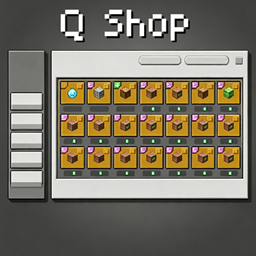
Q Shop
A flexible server shop for Forge 1.20.1, NeoForge 1.21.1 and NeoForge 26.1.2, with buy, sell, barter and command trades, custom currencies, limits, in-game editing and a Builder-first KubeJS API.
截图
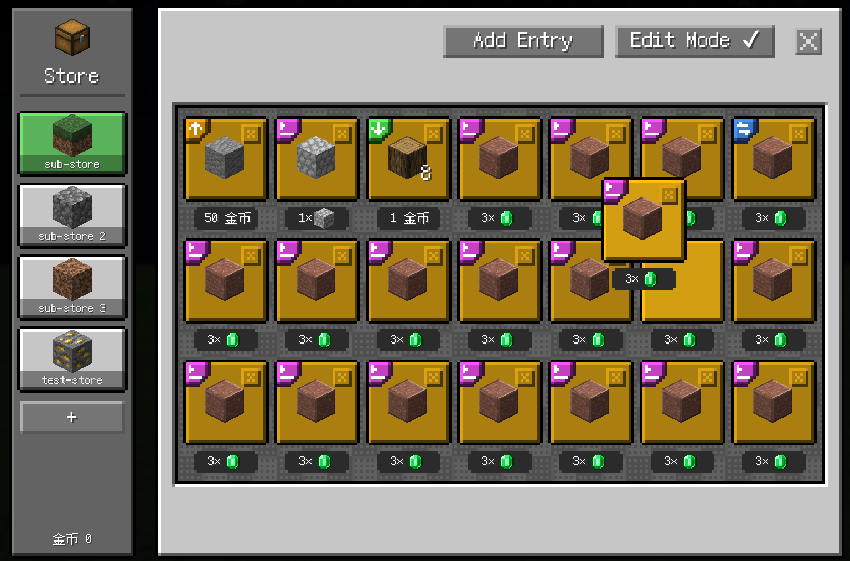
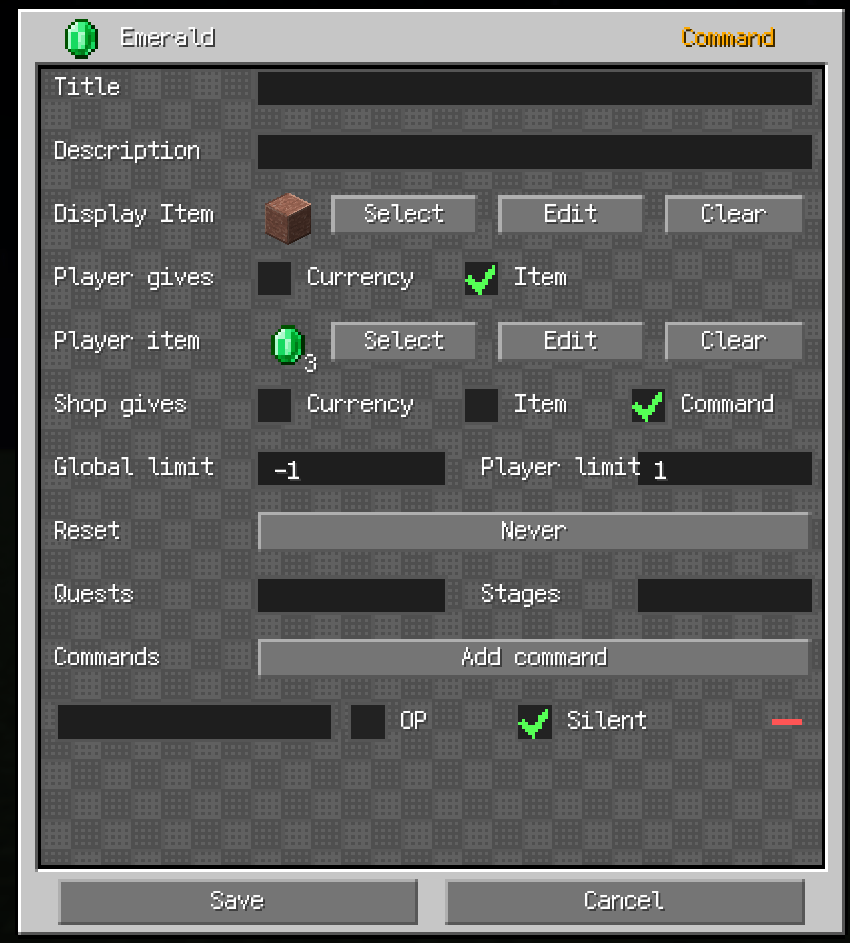
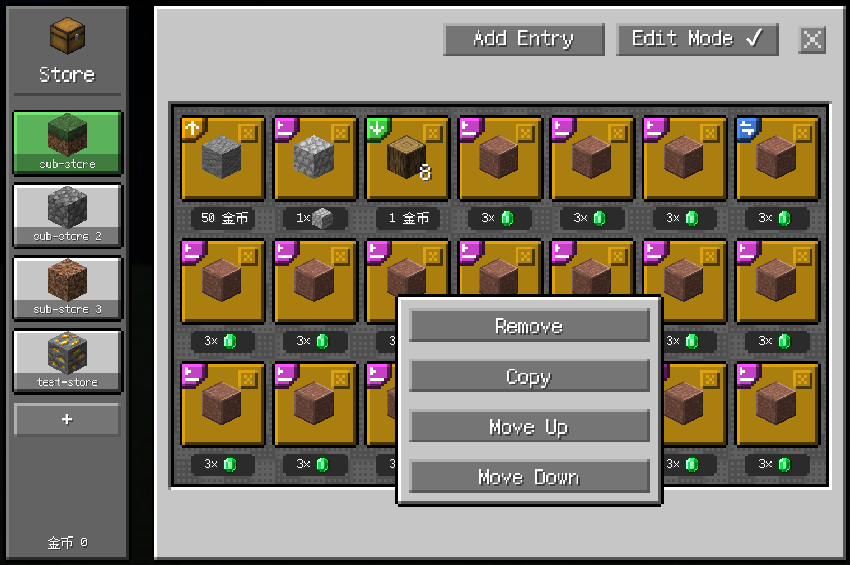
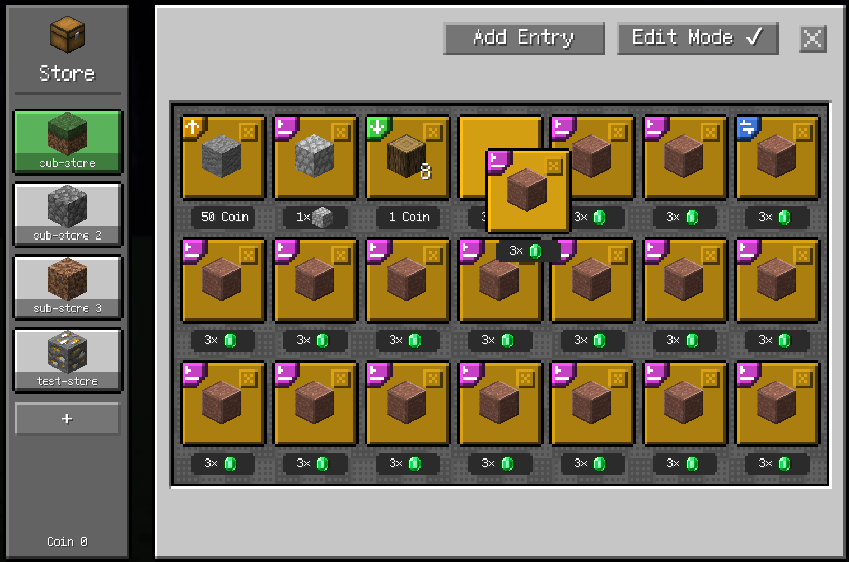
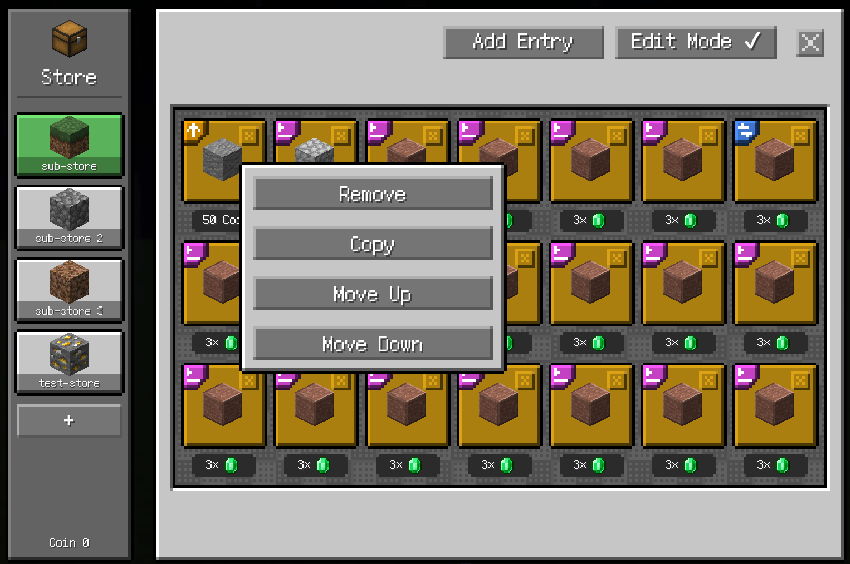
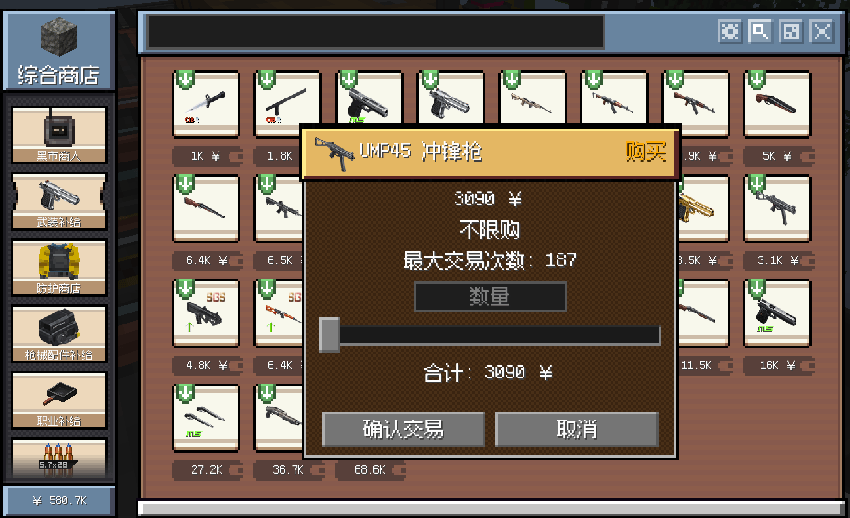
介绍
QShop
QShop is a configurable shop mod for Minecraft Forge 1.20.1, NeoForge 1.21.1 and NeoForge 26.1.2. Choose the loader-specific QShop file for your instance, then create multiple shops and sub-shops, edit them in game, use custom non-item currencies, and let players buy, sell, barter or trigger server commands.
All supported builds provide the same core shop features. The trade screen includes quick quantity-step buttons for x1, x10, x100 and x1000 purchases, mouse-wheel quantity control, and an optional F8 layout debugger for the shop, trade settings and item browser screens. Layout offsets are stored in config/qshop_layout.json, and resource packs can override them through assets/qshop/style.json.
QShop has no mandatory gameplay integration dependencies. KubeJS and FTB Quests are optional and only needed for their respective features. GameStages and AStages are available on the loader/version branches that support them; NeoForge 26.1.2 uses KubeJS PlayerStages because AStages does not currently provide a 26.1.2 build.
Official Addons
QShop and its addons are developed by the same author and published as separate CurseForge projects. Every addon depends on QShop and reuses QShop currencies, prices and player data, so they all act on the same wallet. Install only the addons you need.
| Project | Loaders / versions | What it adds |
|---|---|---|
| Q Shop Addon Sellbox | Forge 1.20.1, NeoForge 1.21.1, NeoForge 26.1.2 | Automatic selling container |
| Q Shop Addon Requester | Forge 1.20.1, NeoForge 1.21.1, NeoForge 26.1.2 | Automated shop purchases |
| Q Shop Addon Sell Upgrade | Forge 1.20.1, NeoForge 1.21.1, NeoForge 26.1.2 | Backpack auto-sell upgrades |
| Q Shop Addon Confluence Compat | Forge 1.20.1, NeoForge 1.21.1 | Confluence currency bridge |
| Create Currency Motor | Forge 1.20.1, NeoForge 1.21.1 | Create kinetic generator paid in QShop currency |
| Q Shop Create style Resourcepack | Forge 1.20.1, NeoForge 1.21.1, NeoForge 26.1.2 (client-side) | Create-style GUI resource pack |
Q Shop Sell Box
A 27-slot automatic selling container. Put items in, pick the owner from every player who has joined the server, and choose when the contents sell: on a configurable interval (seconds, minutes, hours or game days) or when the GUI is closed. Earnings are deposited into the owner’s QShop wallet, including while the owner is offline, and ownership is UUID-based so a name change never redirects income.
- Static price rules, NBT-specific exact prices, and generic NBT multipliers that stack multiplicatively.
- KubeJS dynamic pricing with access to item ID, stack count, durability, complete nested NBT and item tags.
- Server-side price calculation, so price tooltips always match the transaction price.
- Optional Action Bar and chat sale notifications, and optional price tooltips.
- EMI compatibility, wood-barrel block behaviour, and contents dropped when the block is broken.
Requires QShop 1.1.0 or newer, below 2.0. KubeJS and EMI are optional.
Q Shop Addon Requester
Reads shop entries and automatically completes selected purchases at a configured interval, even while the owner is offline.
- Supports currency purchases and barter entries; search, filter and select entries from the settings screen.
- Trade intervals in seconds, minutes, hours or game days.
- Two separate 4×3 containers: purchased items on the left, player-supplied items on the right. Hoppers and pipes can insert supplied items from the top and all four sides, and extract purchased items from the bottom.
- Offline trading reads currency balances and purchase-limit data from QShop player data, and checks currency, item availability and limits without re-evaluating FTB Quests or stage requirements.
- Optional Action Bar and chat notifications for completed or failed trades.
Requires QShop 1.1.0 or newer, below 2.0.
Q Shop Addon Sell Upgrade
Automatic selling upgrades for Sophisticated Backpacks. When the backpack picks up an item, the upgrade checks the price rules provided by QShop Sell Box; an item with a valid price that matches the filter mode is converted directly into QShop currency instead of occupying backpack space.
- Sell Upgrade provides a 3×3 filter grid; Advanced Sell Upgrade provides a 4×4 grid with 16 slots.
- Whitelist and blacklist modes; the default is blacklist, and an empty blacklist sells every priced item.
- Both upgrades appear in the Sophisticated Backpacks creative tab.
Requires QShop, QShop Sell Box, Sophisticated Backpacks and Sophisticated Core.
Q Shop Addon Confluence Compat
Connects a QShop currency to the coin system in Confluence: Otherworld. QShop shops, commands, quests and scripts share one balance, while players carry part of that money as physical Confluence coins.
- One shared balance: coins carried by the player count toward the linked QShop currency.
- Safe overflow: coins that do not fit in the inventory or Confluence coin slots stay in the QShop wallet and convert to physical coins when space is available.
- Inventory synchronization for picking up, dropping, using or moving coins through containers, plus offline balance reconciliation.
- Confluence Piggy Bank support, and optional Sell Box integration that formats prices and sale messages with Confluence denominations and colors.
/qshopconfluence statusand/qshopconfluence set <amount>for operators.
Requires QShop 1.8.0 or newer and Confluence: Otherworld 1.2.0 or newer. QShop Sell Box 1.5.0 or newer is optional.
Create Currency Motor
A Create kinetic generator that consumes the owning player’s QShop currency while running. Place the motor, set its speed, and it generates rotational power up to 256 RPM as long as the owner can pay the configured charge.
- Per-RPM currency cost configurable from 0.1 to 1000000000000; final payments round up to the next whole currency unit.
- Configurable charge interval, stress capacity and QShop currency ID.
- Player avatar display in the owner slot, with owner-only interaction.
Requires Create and QShop 1.8.1 or newer. Licensed under MIT.
Q Shop Create style Resourcepack
A 16x resource pack that restyles the QShop screens in a Create-inspired look. It is a resource pack rather than a mod: install it on the client only, and nothing needs to be added to the server.
- Packs for Minecraft Forge 1.20.1, NeoForge 1.21.1 and NeoForge 26.1.2.
- Optional — QShop is fully usable without it, and players who prefer the default look are unaffected.
- Purely visual, so servers can let players choose individually whether to enable it.
Features
Trade GUI
- Buy, sell, item-for-item barter and command entries in one interface.
- Barter entries can optionally charge an additional currency fee.
- Command entries execute configured server commands after a successful purchase.
- Custom display names, descriptions, display items and item NBT are supported.
- Quantity controls use a slider and input box with live limit, inventory and balance checks. The quantity field starts at 1 when the trade window opens.
- The mouse wheel adjusts the trade quantity over the quantity field or anywhere along the slider; each notch moves by the selected multiplier.
- When the available quantity is large, x1, x10, x100 and x1000 buttons change the slider step and range for faster bulk purchases.
- When a trade cannot be made at all — not enough currency, items, or purchase limit left — the quantity field, slider and confirm button are disabled.
- Smooth scrolling for entry grids and sub-shop tabs. The shop remembers the last selected sub-shop tab for each shop during the current game session.
- Sub-shop tabs can be hidden automatically when no trades are visible to the player (
hideWhenEmpty, enabled by default and configurable per sub-shop). Hidden tabs remain available in edit mode. - GUI scaling keeps item tooltips and button tooltips independent of the local QShop scale.
- Vanilla-style button interaction sounds and a custom sound effect after a successful trade.
- Optional F8 component-coordinate debugging for the shop, trade settings, and item browser GUIs, with offsets persisted in
config/qshop_layout.json. - Individual entries can optionally remain visible when their quest or stage requirements are not met.
- A visible locked FTB Quests entry opens its matching quest screen when clicked, and QShop closes first.
- FTB Quests tooltips show quest names when available and include a click-to-open hint.
- Trade entry editing supports stage descriptions. Descriptions follow the order of
requiredStages; blank descriptions fall back to the stage ID.
Shops and sub-shops
- Multiple shops identified by a stable ID or UUID.
- Every shop has one or more sub-shops with an icon, description and independent entries.
- Sub-shop icons support item data and NBT; descriptions are shown as hover tooltips.
- Creative-mode editing supports adding, removing, copying, reordering and editing entries.
- Shop and sub-shop changes are saved and synchronized to open clients.
Custom currencies
- Create any number of non-item currencies such as coins, points or tokens.
- Balances are stored per player and synchronized to the client.
- Manage currencies with commands or KubeJS.
Purchase limits
- Global server-wide and per-player limits for each entry.
- Limits are counted in trade units/purchase counts, not item quantities. One completed trade unit consumes one limit even when it contains multiple items.
- Reset periods:
NEVER,DAILY,WEEKLYandMONTHLY. - Timed limits follow the overworld clock: every 1, 7 or 30 Minecraft days, at the time configured by
server.limitReset.worldTimeinconfig/qshop-common.toml(default:18000, Minecraft midnight).
Requirements
- Gate complete sub-shops or individual entries behind FTB Quests tasks.
- Stage requirements use the available stage provider for the selected loader/version: GameStages, KubeJS PlayerStages or AStages where supported.
- If a configured requirement has no matching provider installed, it is treated as unmet and the content stays hidden from normal players.
- Enable an entry’s Show when requirements are not met option to keep it visible in normal mode. Clicking a visible unmet FTB Quests entry opens the first matching quest and closes QShop.
Stage descriptions are configured in the trade entry editor or the entry JSON. Each description matches the stage at the same position in requiredStages; an empty or missing description displays the stage ID instead:
"requiredStages": ["vip", "nether"],
"requiredStageDescriptions": ["VIP access", ""]
Commands
/qshop open <shop> [player]
/qshop list
/qshop balance
/qshop reload
/qshop overwrite
/qshop backup
/qshop currency list
/qshop currency create <id> <name> [color]
/qshop currency give|take|set <player> <currency> <amount> [true|false]
/qshop shop create <id> [displayName] [currency]
/qshop edit <shop> add <type> [price] [currency]
/qshop edit <shop> remove <index>
/qshop edit <shop> setitem <index>
/qshop edit <shop> set <index> <field> <value>
/qshop item
Shop editing requires permission level 2 and Creative mode. The final sub-shop cannot be removed.
Configuration
Supported loaders
- Minecraft Forge 1.20.1 (Forge 47.x)
- Minecraft NeoForge 1.21.1 (NeoForge 21.1.x)
- Minecraft NeoForge 26.1.2 (NeoForge 26.1.2.x)
Release files use the format modid-modloader-modloaderVersion-modVersion.jar:
qshop-forge-1.20.1-<version>.jarqshop-neoforge-1.21.1-<version>.jarqshop-neoforge-26.1.2-<version>.jar
<world>/serverconfig/qshop/currencies.json
<world>/serverconfig/qshop/shops/<shop-id>.json
Items accept an ID, an item object with count and nbt, a KubeJS ItemStack, or the Base64 format written by QShop.
The server-wide template is stored under config/qshop/:
config/qshop/
├── currencies.json
└── shops/
    ├── starter.json
    └── my_shop.json
QShop creates missing template files from its bundled defaults. A new world, or a world whose serverconfig/qshop/ has no QShop configuration, imports the template automatically without overwriting existing world files. Use /qshop overwrite with permission level 2 to force-replace matching world files from the template; extra world files are preserved. Use /qshop backup to save the current world’s QShop configuration back to the global template; the existing global configuration is backed up before matching files are replaced.
The common config config/qshop-common.toml is split into [server] and [client] sections. It can optionally reduce currencies on death. Set server.death.loseCurrencyOnDeath=true, then use entries such as server.death.currencyRetention=["coins=0.2"] to keep 20% of coins after death.
Server-side trade settings are also in config/qshop-common.toml. To allow a player to complete a purchase when the result exceeds the current inventory capacity, enable:
[server.inventory]
allowOverflowPurchases = true
Resource packs can customize QShop component positions and the tab-list fade-mask color with assets/qshop/style.json. The resource-pack style is applied before local layout-debug offsets, so pack authors can provide a complete default layout while players can still tune it locally.
KubeJS integration
Install KubeJS on the server to enable the global QShop binding. The public KubeJS API is Builder-first. JSON CRUD methods and direct JsonIO writes are not part of the public global API.
Create or update data
QShop.createShop('vip', 'VIP Shop', 'coins')

QShop.tab('vip')
  .name('Daily Offers')
  .icon({
    item: 'minecraft:paper',
    count: 1,
    nbt: '{display:{Name:"Daily Card"}}'
  })
  .description('Refreshes every day')
  .uuid('daily-offers')
  .stage('vip_unlocked')
  .hideWhenEmpty(true)
  .add()

QShop.entry('vip', 'daily-offers')
  .buy({ item: 'minecraft:oak_log', count: 8 })
  .price(2, 'coins')
  .playerLimit(20, 'DAILY')
  .uuid('oak-bundle')
  .add()
Calling add() with an existing entry UUID replaces that entry in place. Calling add() with an existing tab UUID updates tab metadata while preserving its entries. hideWhenEmpty defaults to true: the tab is hidden when its entries are all invisible because of requirements or purchase limits; entries shown in a locked state still count as content.
Read objects
const shop = QShop.getShop('vip')
const tab = QShop.getTab('vip', 'daily-offers')
const entry = QShop.getEntry('vip', 'daily-offers', 'oak-bundle')

console.log(shop.id, tab.uuid, entry.uuid)
console.log(entry.type.name(), entry.count, entry.getCount())getShop, getTab and getEntry return complete Java objects. Read fields directly from the returned object: entry.type, entry.item, entry.give, entry.receive, entry.price, entry.currencyId, entry.commands, entry.requiredQuests, entry.requiredStages, entry.requiredStageDescriptions and entry.showWhenRequirementsNotMet.
entry.count and entry.getCount() are equivalent. count is the item quantity represented by one entry unit, not the number of clicks. entry.type is an enum; compare it with entry.type.name(), for example entry.type.name() === 'BUY'.
Reference rules
| Reference | Accepted values |
|---|---|
shopRef |
Shop ID or shop UUID |
tabRef |
Zero-based index, tab UUID or null for the first tab |
entryRef |
Zero-based index or entry UUID |
Use UUIDs for long-lived scripts because indexes change when content is reordered or refreshed.
QShop.getEntryCount('vip')       // entries in tab 0
QShop.getEntryCount('vip', 1)    // entries in tab 1
QShop.removeEntry('vip', 'daily-offers', 'oak-bundle')
QShop.removeTab('vip', 'daily-offers')
Currencies and refresh
QShop.createCurrency('tokens', 'Tokens', '#55ff55')
QShop.giveCurrency(player, 'tokens', 100)
QShop.takeCurrency(player, 'tokens', 10)
QShop.setCurrency(player, 'tokens', 50)

QShop.refreshTab('vip', 'daily-offers', 10, [
  { item: 'minecraft:iron_ingot', price: 2, weight: 50 },
  { item: 'minecraft:gold_ingot', price: 5, weight: 10 }
])
The second argument is a zero-based tab index or the tab UUID (daily-offers in this example), not the tab display name. Every generated entry receives a new UUID and starts with empty limit counters. The limit-clearing methods accept tab/entry indexes or UUIDs (not names); the shop reference can be a shop ID or shop UUID. They clear the global counter and personal counters for both online and offline players; offline counters are edited directly in world/playerdata/<uuid>.dat.
Trade events
QShopEvents.beforeTrade(event => {
  const entry = event.getEntry()
  if (entry && entry.type.name() === 'COMMAND') {
    event.cancel()
    event.player.tell('This entry is temporarily unavailable.')
  }
})

QShopEvents.afterTrade(event => {
  const shop = event.getShop()
  const tab = event.getTab()
  const entry = event.getEntry()

  console.log(`${shop.id}/${tab.uuid}/${entry.uuid}`)
  console.log(`${entry.type.name()} x${event.tradedUnits}`)
  if (event.isPartial()) {
    event.player.tell(`Completed ${event.tradedUnits} unit(s).`)
  }
})

QShopEvents.currencyChanged(event => {
  console.log(`${event.getCurrency()}: ${event.getOldValue()} -> ${event.getNewValue()}`)
})
Read shop, tab and entry fields through getShop(), getTab() and getEntry(). Event-only data includes units for beforeTrade, and tradedUnits, totalItems, paidPrice and partial for afterTrade. currencyChanged provides getPlayer(), getCurrency(), getOldValue(), getNewValue(), getDelta(), getSource() and getSourcePos(). It fires for all effective currency changes, including trades, FTB money rewards/tasks, commands, KubeJS currency methods, configured death retention, and Java addon services. Append false to a command to suppress it.
Addon mods can use the official com.qshop.api.QShopAddonApi facade. Its currency() service centralizes wallet mutations, and its buy/sell methods accept loader IItemHandler inventories for server-side container integrations. Java addons can listen for com.qshop.api.CurrencyChangedEvent on the loader event bus.
Documentation
License
QShop and its assets are All Rights Reserved (ARR). See LICENSE for the full terms.
中文介绍
QShop 是一款可配置的服务器商店模组,支持 Minecraft Forge 1.20.1、NeoForge 1.21.1 与 NeoForge 26.1.2。按实例选择对应加载器的 QShop 文件,即可创建多个商店与子商店、在游戏中直接编辑、使用自定义的非物品货币,并让玩家购买、出售、以物换物或触发服务器指令。
所有受支持的版本提供相同的核心商店功能。交易界面包含 x1、x10、x100、x1000 快捷数量步进按钮,支持滚轮调节数量,并提供可选的 F8 组件坐标调试,可调整商店、交易设置与物品浏览界面。布局偏移保存在 config/qshop_layout.json,资源包可通过 assets/qshop/style.json 覆盖。
QShop 没有强制的游戏内容联动依赖。KubeJS 与 FTB Quests 均为可选,仅在需要对应功能时安装。GameStages 与 AStages 在支持它们的加载器/版本分支上可用;NeoForge 26.1.2 使用 KubeJS PlayerStages,因为 AStages 目前没有 26.1.2 版本。
官方附属模组
QShop 与这些附属模组由同一作者开发,各自是独立的 CurseForge 项目。所有附属都依赖 QShop,并复用 QShop 的货币、价格与玩家数据,因此操作的是同一套钱包。按需安装即可。
| 项目 | 加载器 / 版本 | 作用 |
|---|---|---|
| Q Shop Addon Sellbox(自动售货箱) | Forge 1.20.1、NeoForge 1.21.1、NeoForge 26.1.2 | 自动出售容器 |
| Q Shop Addon Requester(自动收购箱) | Forge 1.20.1、NeoForge 1.21.1、NeoForge 26.1.2 | 自动按间隔购买商店条目 |
| Q Shop Addon Sell Upgrade(背包自动出售升级) | Forge 1.20.1、NeoForge 1.21.1、NeoForge 26.1.2 | 背包拾取自动出售升级 |
| Q Shop Addon Confluence Compat(Confluence 货币桥接) | Forge 1.20.1、NeoForge 1.21.1 | 绑定 Confluence 钱币系统 |
| Create Currency Motor(货币动能马达) | Forge 1.20.1、NeoForge 1.21.1 | 消耗 QShop 货币的 Create 发电机 |
| Q Shop Create 风格资源包 | Forge 1.20.1、NeoForge 1.21.1、NeoForge 26.1.2(客户端) | Create 风格界面材质包 |
Q Shop Sell Box(自动售货箱)
27 格自动出售容器。放入物品,从所有进入过服务器的玩家中选择收益归属玩家,并选择出售时机:按配置的间隔(秒、分钟、小时或游戏日)自动出售,或在关闭容器 GUI 时立即出售。收益会存入所选玩家的 QShop 账户,玩家离线时同样入账;归属关系基于 UUID,玩家改名不会改变收益去向。
- 支持静态价格规则、NBT 精确价格规则,以及可叠加相乘的通用 NBT 倍率。
- 支持 KubeJS 动态定价,可读取物品 ID、堆数量、耐久、完整嵌套 NBT 与物品 tag。
- 价格由服务端计算,价格 tooltip 始终与实际交易价格一致。
- 可选的 Action Bar 与聊天栏出售提示,可选的物品价格 tooltip。
- EMI 兼容、木桶风格的方块属性与音效,破坏容器时掉落容器与其中的物品。
需要 QShop 1.1.0 或更新版本、低于 2.0。KubeJS 与 EMI 为可选。
Q Shop Addon Requester(自动收购箱)
读取商店交易条目,并按设定的时间间隔自动完成购买,即使所属玩家处于离线状态也会继续交易。
- 支持货币购买与以物换物条目;在设置界面搜索、筛选并选择商店交易项目。
- 交易间隔支持秒、分钟、小时与游戏日。
- 两个独立的 4×3 容器:左侧为购入物品,右侧为玩家提供物品。漏斗与管道可从顶部及四个侧面输入玩家提供的物品,并从底部输出购入物品。
- 离线时从 QShop 玩家数据读取货币余额与限购信息,并检查货币、提供物品与限购次数;离线交易不会重新检查 FTB Quests 与 Stage 条件。
- 可选的 Action Bar 与聊天栏交易成功/失败提示。
需要 QShop 1.1.0 或更新版本、低于 2.0。
Q Shop Addon Sell Upgrade(背包自动出售升级)
为 Sophisticated Backpacks 提供的自动出售升级。背包拾取物品时,升级会检查 QShop Sell Box 提供的价格规则:物品有有效价格且符合过滤模式时,会直接转换为 QShop 货币,而不是占用背包空间。
- 出售升级提供 3×3 过滤格;高级出售升级提供 4×4、共 16 格过滤。
- 支持白名单与黑名单模式;默认为黑名单,黑名单为空时所有有价格的物品都会自动出售。
- 两种升级都会出现在 Sophisticated Backpacks 的创造标签页中。
需要 QShop、QShop Sell Box、Sophisticated Backpacks 与 Sophisticated Core。
Q Shop Addon Confluence Compat(Confluence 货币桥接)
将一个 QShop 货币绑定到 Confluence: Otherworld 的钱币系统。QShop 商店、指令、任务与脚本共用同一余额,玩家则以 Confluence 钱币的形式随身携带其中一部分。
- 共用余额:玩家身上的 Confluence 钱币计入绑定的 QShop 货币。
- 安全处理溢出:背包或 Confluence 钱币栏装不下的钱保留在 QShop 钱包中,有空间时再转换为实体钱币。
- 同步钱币变动:拾取、丢弃、使用钱币或通过容器移动钱币时余额同步更新;支持离线余额对账。
- 支持 Confluence 存钱罐;可选的 Sell Box 联动,使用 Confluence 的面额与颜色显示价格和出售消息。
- 管理员可使用
/qshopconfluence status与/qshopconfluence set <amount>。
需要 QShop 1.8.0 或更新版本,以及 Confluence: Otherworld 1.2.0 或更新版本。QShop Sell Box 1.5.0 或更新版本为可选。
Create Currency Motor(货币动能马达)
一个 Create 动能发电机,运行时会消耗归属玩家的 QShop 货币。放置马达并设定转速后,只要归属玩家能支付设定的费用,它就会持续产生旋转动力,最高 256 RPM。
- 每 RPM 的货币费用可在 0.1 到 1000000000000 之间以小数配置;最终扣费向上取整到下一个整数货币单位。
- 可配置扣费间隔、应力上限与 QShop 货币 ID。
- 归属槽位显示玩家头像,且仅归属玩家可交互。
需要 Create 与 QShop 1.8.1 或更新版本。本附属采用 MIT 许可证。
Q Shop Create 风格资源包
一套 16x 材质包,把 QShop 的界面换成 Create 风格的外观。它是材质包而不是模组:只需装在客户端,服务端不需要添加任何东西。
- 提供 Minecraft Forge 1.20.1、NeoForge 1.21.1 与 NeoForge 26.1.2 的版本。
- 完全可选——不装也能正常使用 QShop,喜欢原版外观的玩家不受影响。
- 仅改变外观,服务器可以允许玩家自行决定是否启用。
功能
交易界面
- 同一界面内支持购买、出售、以物换物与指令条目。
- 以物换物条目可额外收取货币手续费。
- 指令条目在购买成功后执行配置的服务器指令。
- 支持自定义显示名称、描述、展示物品与物品 NBT。
- 数量控制使用滑条与输入框,并实时检查限购、背包与余额。交易窗口打开时数量默认为 1。
- 滚轮可在数量输入框上或滑条任意位置调节数量,每格按所选倍率(x1、x10、x100、x1000)变化。
- 可用数量较大时,x1、x10、x100、x1000 按钮会改变滑条的步进与范围,便于批量购买。
- 当交易完全无法完成时(货币、物品或限购不足),数量输入框、滑条与确认按钮会被禁用。
- 条目网格与子商店标签页支持平滑滚动。同一商店在当前游戏会话中会记住上次选中的子商店标签页。
- 子商店标签页可在没有任何可显示交易时自动隐藏(
hideWhenEmpty,默认开启,可逐子商店设置)。编辑模式下仍可查看被隐藏的标签页。 - 界面缩放保持物品 tooltip 与按钮 tooltip 不受 QShop 本地缩放影响。
- 原版风格的按钮交互音效,以及交易成功后的自定义音效。
- 可选的 F8 组件坐标调试,适用于商店、交易设置与物品浏览界面,偏移保存在
config/qshop_layout.json。 - 条目可选择在任务或阶段条件未满足时仍然显示。
- 点击可见但锁定的 FTB Quests 条目会先关闭 QShop,再打开对应的任务界面。
- FTB Quests tooltip 在可用时显示任务名称,并包含点击打开的提示。
- 交易条目编辑支持阶段描述。描述按
requiredStages的顺序对应;描述为空时回退显示阶段 ID。
商店与子商店
- 多个商店,使用稳定的 ID 或 UUID 标识。
- 每个商店包含一个或多个子商店,各有图标、描述与独立的交易条目。
- 子商店图标支持物品数据与 NBT;描述以悬浮 tooltip 显示。
- 创造模式编辑支持添加、删除、复制、排序与编辑条目。
- 商店与子商店的改动会保存并同步到已打开的客户端。
自定义货币
- 可创建任意数量的非物品货币,例如金币、点数或代币。
- 余额按玩家保存,并同步到客户端。
- 通过指令或 KubeJS 管理货币。
购买限购
- 每个条目都有全服与每位玩家的限购。
- 限购按交易单位/购买次数计数,而非物品数量。一次完成的交易单位消耗一次限购,即使其中包含多个物品。
- 重置周期:
NEVER、DAILY、WEEKLY、MONTHLY。 - 限时限购跟随主世界时钟:每 1、7 或 30 个 Minecraft 天,在
config/qshop-common.toml的server.limitReset.worldTime配置的时刻重置(默认18000,即 Minecraft 午夜)。
条件要求
- 可将整个子商店或单个条目锁定在 FTB Quests 任务之后。
- 阶段条件使用所选加载器/版本上可用的阶段提供方:GameStages、KubeJS PlayerStages 或受支持的 AStages。
- 若配置的条件没有对应的提供方已安装,则视为未满足,内容对普通玩家保持隐藏。
- 启用条目的「条件未满足时仍显示」选项可在普通模式下保持可见。点击可见但未满足条件的 FTB Quests 条目会打开第一个匹配任务并关闭 QShop。
阶段描述可在交易条目编辑器或条目 JSON 中配置。每条描述按位置对应 requiredStages 中的阶段;描述为空或缺失时显示阶段 ID:
"requiredStages": ["vip", "nether"],
"requiredStageDescriptions": ["VIP access", ""]
指令
/qshop open <shop> [player]
/qshop list
/qshop balance
/qshop reload
/qshop overwrite
/qshop backup
/qshop currency list
/qshop currency create <id> <name> [color]
/qshop currency give|take|set <player> <currency> <amount> [true|false]
/qshop shop create <id> [displayName] [currency]
/qshop edit <shop> add <type> [price] [currency]
/qshop edit <shop> remove <index>
/qshop edit <shop> setitem <index>
/qshop edit <shop> set <index> <field> <value>
/qshop item
商店编辑需要权限等级 2 与创造模式。最后一个子商店无法删除。
配置
支持的加载器
- Minecraft Forge 1.20.1(Forge 47.x)
- Minecraft NeoForge 1.21.1(NeoForge 21.1.x)
- Minecraft NeoForge 26.1.2(NeoForge 26.1.2.x)
发布文件名格式为 modid-modloader-modloaderVersion-modVersion.jar:
qshop-forge-1.20.1-<version>.jarqshop-neoforge-1.21.1-<version>.jarqshop-neoforge-26.1.2-<version>.jar
<world>/serverconfig/qshop/currencies.json
<world>/serverconfig/qshop/shops/<shop-id>.json
物品可写物品 ID、带 count 与 nbt 的物品对象、KubeJS ItemStack,或 QShop 写出的 Base64 格式。
全服模板保存在 config/qshop/:
config/qshop/
├── currencies.json
└── shops/
    ├── starter.json
    └── my_shop.json
QShop 会用内置默认值创建缺失的模板文件。新世界,或 serverconfig/qshop/ 中没有 QShop 配置的世界,会自动导入模板且不会覆盖已有的世界文件。使用权限等级 2 的 /qshop overwrite 可用模板强制替换匹配的世界文件;额外的世界文件会保留。使用 /qshop backup 可将当前世界的 QShop 配置保存回全服模板;替换匹配文件之前会先备份已有的全服配置。
通用配置 config/qshop-common.toml 分为 [server] 与 [client] 两节。它可以选择在死亡时减少货币。设置 server.death.loseCurrencyOnDeath=true,再使用 server.death.currencyRetention=["coins=0.2"] 之类的条目即可在死亡后保留 20% 的金币。
服务端交易设置同样在 config/qshop-common.toml。若要在购买结果超出当前背包容量时仍允许完成购买,请启用:
[server.inventory]
allowOverflowPurchases = true
资源包可通过 assets/qshop/style.json 自定义 QShop 组件位置与标签列表的渐隐遮罩颜色。资源包样式在本地布局调试偏移之前应用,因此资源包作者可以提供完整的默认布局,玩家仍可在本地微调。
KubeJS 集成
在服务端安装 KubeJS 即可启用全局 QShop 绑定。公开的 KubeJS API 以 Builder 优先。JSON CRUD 方法与直接的 JsonIO 写入不属于公开的全局 API。
创建或更新数据
QShop.createShop('vip', 'VIP Shop', 'coins')

QShop.tab('vip')
  .name('Daily Offers')
  .icon({
    item: 'minecraft:paper',
    count: 1,
    nbt: '{display:{Name:"Daily Card"}}'
  })
  .description('Refreshes every day')
  .uuid('daily-offers')
  .stage('vip_unlocked')
  .hideWhenEmpty(true)
  .add()

QShop.entry('vip', 'daily-offers')
  .buy({ item: 'minecraft:oak_log', count: 8 })
  .price(2, 'coins')
  .playerLimit(20, 'DAILY')
  .uuid('oak-bundle')
  .add()
使用已存在的条目 UUID 调用 add() 会原地替换该条目。使用已存在的子商店 UUID 调用 add() 会更新子商店元数据并保留其条目。hideWhenEmpty 默认为 true:当条目因条件或限购而全部不可见时隐藏该子商店;以锁定状态显示的条目仍算作有内容。
读取对象
const shop = QShop.getShop('vip')
const tab = QShop.getTab('vip', 'daily-offers')
const entry = QShop.getEntry('vip', 'daily-offers', 'oak-bundle')

console.log(shop.id, tab.uuid, entry.uuid)
console.log(entry.type.name(), entry.count, entry.getCount())getShop、getTab 与 getEntry 返回完整的 Java 对象。可直接读取返回对象的字段:entry.type、entry.item、entry.give、entry.receive、entry.price、entry.currencyId、entry.commands、entry.requiredQuests、entry.requiredStages、entry.requiredStageDescriptions 与 entry.showWhenRequirementsNotMet。
entry.count 与 entry.getCount() 等价。count 表示一个条目单位所代表的物品数量,而非点击次数。entry.type 是枚举;请用 entry.type.name() 比较,例如 entry.type.name() === 'BUY'。
引用规则
| 引用 | 可接受的值 |
|---|---|
shopRef |
商店 ID 或商店 UUID |
tabRef |
从 0 开始的索引、子商店 UUID,或 null 表示第一个子商店 |
entryRef |
从 0 开始的索引或条目 UUID |
长期使用的脚本请使用 UUID,因为内容重排或刷新后索引会变化。
QShop.getEntryCount('vip')       // 子商店 0 的条目数
QShop.getEntryCount('vip', 1)    // 子商店 1 的条目数
QShop.removeEntry('vip', 'daily-offers', 'oak-bundle')
QShop.removeTab('vip', 'daily-offers')
货币与刷新
QShop.createCurrency('tokens', 'Tokens', '#55ff55')
QShop.giveCurrency(player, 'tokens', 100)
QShop.takeCurrency(player, 'tokens', 10)
QShop.setCurrency(player, 'tokens', 50)

QShop.refreshTab('vip', 'daily-offers', 10, [
  { item: 'minecraft:iron_ingot', price: 2, weight: 50 },
  { item: 'minecraft:gold_ingot', price: 5, weight: 10 }
])
第二个参数是从 0 开始的子商店索引或子商店 UUID(本例中为 daily-offers),而非子商店显示名称。每个生成的条目都会获得新的 UUID,且限购计数器为空。清除限购的方法接受子商店/条目的索引或 UUID(不接受名称);商店引用可以是商店 ID 或商店 UUID。它们会清除全局计数器以及在线与离线玩家的个人计数器;离线计数器直接写入 world/playerdata/<uuid>.dat。
交易事件
QShopEvents.beforeTrade(event => {
  const entry = event.getEntry()
  if (entry && entry.type.name() === 'COMMAND') {
    event.cancel()
    event.player.tell('This entry is temporarily unavailable.')
  }
})

QShopEvents.afterTrade(event => {
  const shop = event.getShop()
  const tab = event.getTab()
  const entry = event.getEntry()

  console.log(`${shop.id}/${tab.uuid}/${entry.uuid}`)
  console.log(`${entry.type.name()} x${event.tradedUnits}`)
  if (event.isPartial()) {
    event.player.tell(`Completed ${event.tradedUnits} unit(s).`)
  }
})

QShopEvents.currencyChanged(event => {
  console.log(`${event.getCurrency()}: ${event.getOldValue()} -> ${event.getNewValue()}`)
})
通过 getShop()、getTab() 与 getEntry() 读取商店、子商店与条目字段。仅事件提供的数据包括 beforeTrade 的 units,以及 afterTrade 的 tradedUnits、totalItems、paidPrice 与 partial。currencyChanged 提供 getPlayer()、getCurrency()、getOldValue()、getNewValue()、getDelta()、getSource() 与 getSourcePos()。它对所有生效的货币变化触发,包括交易、FTB 金钱奖励/任务、指令、KubeJS 货币方法、配置的死亡保留,以及 Java 附属服务。在指令末尾追加 false 可抑制该事件。
附属模组可使用官方的 com.qshop.api.QShopAddonApi 门面。其 currency() 服务集中处理钱包变更,其 buy/sell 方法接受加载器的 IItemHandler 背包,用于服务端容器集成。Java 附属可在加载器事件总线上监听 com.qshop.api.CurrencyChangedEvent。
文档
许可证
QShop 及其资源均为 保留所有权利(ARR)。完整条款见 LICENSE。
常见问题
Q Shop 支持哪些 Minecraft 版本?
Q Shop 支持 Minecraft Java 版 1.20.1–26.1.2,共 3 个版本,可用的加载器:Forge / NeoForge。下载时注意选择和你游戏版本一致的文件。
Q Shop 怎么安装?
先用 PCL2 或 HMCL 启动器安装对应版本的 Forge / NeoForge,再把下载的 .jar 文件放进游戏目录的 mods 文件夹,重新启动游戏即可。开启了版本隔离的,mods 文件夹在 versions/版本名 下面。
DxEVIL 的其他作品
查看全部 →
puffish apothic attributes fix
Fixes Pufferfish’s dynamic attributes in the Apothic Attributes screen and displays Pufferfish’s Skills attribute modifiers with their corresponding skill icons.
Advanced Mob Leveling
An unofficial Auto Leveling continuation featuring formula-based attributes, KubeJS level controls, LootJS compatibility, and improved configuration formatting.

Q Backpack
A standalone Curios backpack mod with four upgrade tiers, an integrated inventory screen, automatic pickup, and Quark-inspired sorting.
Q Anvil
Q Anvil replaces experience-based anvil costs with player health, optional QShop currency, and flexible KubeJS customization.
评论
登录后评论和评分