介绍
ABOUT:
The modification is aimed at optimizing signs. By changing the text rendering, it is possible to double the FPS in some situations on large RP servers. (NOT COMPATIBLE WITH Enhanced Block Entities)

How it works:
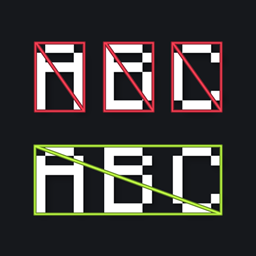
In vanilla Minecraft, at least two polygons (two triangles forming a rectangle) are used to render each symbol. The mod offers a new concept for rendering symbol. It creates a common surface onto which a texture with text is applied.
Demo:

Compatibility:
-
(NOT COMPATIBLE WITH Enhanced Block Entities)
-
I tested my mod using Sodium and some shaders. Everything seems to work and display correctly. Problems may arise with custom resource packs that change the font, as the font is built into the mod itself.
My thoughts:
I still don’t understand how some 50 triangles can reduce the fps so much on modern computers, which can handle various AAA games with 100k+ polygons for just one main character. In Minecraft, is each text character batch processed separately? Let’s leave that to the conscience of OpenGL and Mojang.
For those who are interested, the texture resolution used by the mod is 92×46. Why is that? I don’t know, I chose the smallest and most suitable one. This way, even with 1000+ signs, the RAM and VRAM of even the weakest computers from the 2010s won’t get clogged up.
My current solution is relatively inexpensive. Another option is to create a buffer with vanilla text and render it into a texture, but it’s not certain that this will be faster, since you still have to do the construction, albeit not in the main buffer. In theory, this will give complete vanilla, but I don’t know, I don’t know.
常见问题
Signs Faster 支持哪些 Minecraft 版本?
Signs Faster 支持 Minecraft Java 版 1.20.1–26.3,共 10 个版本,可用的加载器:Fabric / NeoForge / Quilt。下载时注意选择和你游戏版本一致的文件。
Signs Faster 怎么安装?
先用 PCL2 或 HMCL 启动器安装对应版本的 Fabric / NeoForge / Quilt,再把下载的 .jar 文件放进游戏目录的 mods 文件夹,重新启动游戏即可。开启了版本隔离的,mods 文件夹在 versions/版本名 下面。



评论
登录后评论和评分