Weather, Computers and Broadcast [OC + Weather2 Remastered]
为 Weather2 Remastered 和 OpenComputers 添加兼容支持。
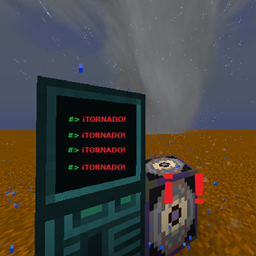
截图
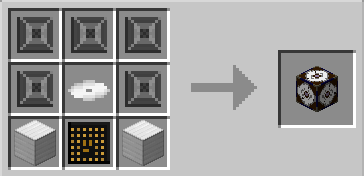
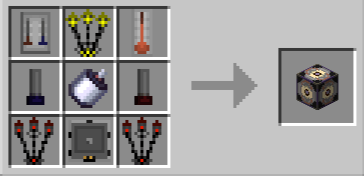
介绍
此模组会添加一处结构,其中可以找到一个充当OpenComputers 外设的方块,以及一些战利品。其中包括一张可安装的磁盘,内含示例程序,让你能更详细地查看天气,将OpenComputers 科技与Weather2 Remastered添加的混乱天气世界结合起来。
类型说明:
F = 浮点数
B = 布尔值
T = 键值对
S = 字符串
I = 整数
V = 无返回值
方法
方法(数字警报器):
V: PlaySound( F: frequency(20-2000), I: duration in seconds (1-600), I: interval in ticks (1-60) )
方法(数字雷达):
F: GetWindAngle() – 返回方块周围的风向
F: GetWindSpeed() – 返回方块周围的风速(乘以 9.65 可换算为英里/小时)
B: IsRaining() – 返回方块所在位置是否正在下雨
B: IsAStorm() – 返回 712 格半径内是否有风暴
F: GetHumidity() – 返回方块周围的湿度,范围为 0–1
F: GetPressure() – 返回方块周围以 kPa 为单位的大气压
F: GetDewpoint() – 返回方块周围以 °C 为单位的露点温度
F: GetFarenheitTemperature() – 返回方块周围以 °F 为单位的温度(原文如此)
F: GetCelsiusTemperature() – 返回方块周围以 °C 为单位的温度
T: ClosestStorm() – 返回多个键值对,描述 712 格半径内最近的风暴
S: .type – returns the storm type (TD1, EF1, C1, etc.)

F: .dist – returns the distance from the block to the storm (in blocks)

F: .angle – returns the direction angle of the storm

F: .speed – returns the movement speed of the storm

S: .name – returns the storm name (TROPICAL DEPRESSION IAN, etc.)

B: .danger – returns whether the storm is violent (increased size and health) (WIP)

B: .isDying – returns whether the storm is dissipating

I: .stage – returns the storm stage (higher stages mean stronger storms)

F: .Wspeed – returns the wind speed inside the storm (must be multiplied by 9.65 to obtain MPH)

I: .size – returns the storm size in blocks
示例:
-- Lua example code to test the peripheral

local component = require("component")
local term = require("term")

if not component.isAvailable("WindAdapter") then
  error("Component 'WindAdapter' not found")
end

local radar = component.WindAdapter

local function boolToText(v)
  if v then return "YES" else return "NO" end
end

while true do
  -- Basic readings
  local angle = radar.GetWindAngle()
  local speed = radar.GetWindSpeed() * 9.65

  local humidity = radar.GetHumidity() * 100
  local pressure = radar.GetPressure()
  local dew = radar.GetDewpoint()

  local tempC = radar.GetCelsiusTemperature()
  local tempF = radar.GetFarenheitTemperature()

  local isRaining = radar.IsRaining()
  local isStorm = radar.IsAStorm()

  -- Clear screen before printing
  term.clear()
  term.setCursor(1,1)

  print("=== METEOROLOGICAL RADAR ===\n")

  print("Wind:")
  print("  Angle:      " .. string.format("%.2f", angle))
  print("  Speed:      " .. string.format("%.2f", speed))
  print("")

  print("Atmosphere:")
  print("  Temperature: " .. string.format("%.2f", tempC) .. " °C / " .. string.format("%.2f", tempF) .. " °F")
  print("  Humidity:    " .. string.format("%.2f", humidity) .. " %")
  print("  Pressure:    " .. string.format("%.2f", pressure))
  print("  Dew point:   " .. string.format("%.2f", dew))
  print("")

  print("Conditions:")
  print("  Raining: " .. boolToText(isRaining))
  print("  Storm detected: " .. boolToText(isStorm))
  print("")

  -- Storm processing
  if isStorm then
    local data = { radar.ClosestStorm() }

    local storm = {}
    for i = 1, #data, 2 do
      storm[data[i]] = data[i+1]
    end

    -- Filter: ignore storms named "Cloud"
    if storm.name == "Cloud" or storm.name == "" then
      print("No active storms detected.")
    else
      print(">>> CLOSEST STORM <<<")
      print("  Type:      " .. tostring(storm.type))
      print("  Name:      " .. tostring(storm.name))
      print("  Distance:  " .. string.format("%.2f", storm.dist))
      print("  Angle:     " .. string.format("%.2f", storm.angle))
      print("  Speed:     " .. string.format("%.2f", storm.speed))
      print("  Wind:      " .. string.format("%.2f", storm.Wspeed * 9.65))
      print("  Size:      " .. tostring(storm.size))
      print("  Dangerous: " .. boolToText(storm.danger))
      print("  Dying:     " .. boolToText(storm.isDying))
      print("  Stage:     " .. tostring(storm.stage))
    end
  else
    print("No active storms detected.")
  end

  os.sleep(0.1)
end
更新 1.2 可能会破坏现有脚本(API 变更)– 请查看更新日志
与 Weather 2 Remastered 团队无关。
任何与基础模组相关的问题都必须通过其官方渠道报告,同样,特定于此模组的问题也应通过本项目的渠道报告。
常见问题
Weather, Computers and Broadcast [OC + Weather2 Remastered] 支持哪些 Minecraft 版本?
Weather, Computers and Broadcast [OC + Weather2 Remastered] 支持 Minecraft Java 版 1.12.2,可用的加载器:Forge。下载时注意选择和你游戏版本一致的文件。
Weather, Computers and Broadcast [OC + Weather2 Remastered] 怎么安装?
先用 PCL2 或 HMCL 启动器安装对应版本的 Forge,再把下载的 .jar 文件放进游戏目录的 mods 文件夹,重新启动游戏即可。开启了版本隔离的,mods 文件夹在 versions/版本名 下面。
评论
登录后评论和评分