介绍
MCGamepad is a small Forge mod that uses the LWJGL JInput bindings to provide gamepad controls to Minecraft. Currently the mod only correctly XInput-like controllers (including those provided by the ScpServer PS3 and PS4 bluetooth controller interface on Windows) and has no button reconfiguration options. The mod is being developed for the Forge beta for 1.8. Forge for 1.8 is required.
You can use the mod on any platform that JInput has modules for, but the mod is only tested for Windows. Future versions may alternatively use an XInput binding for rumble support on Windows.
Controls
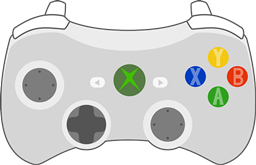
- Left stick to move, Right Stick to look. Looking is accelerated (acceleration curve will be configurable in future versions).
- A – Jump
- B – Sneak
- Y – Open inventory
- LB/RB – Cycle items on hotbar
- RT – Attack/dig
- LT – Place/use
- LS – Sprint (stick button)
- RS – Pick block (in Creative) (stick button)
Menus and GUI:
- Left stick: aim mouse (on acceleration curves, less than that of the view curve)
- A – Left Click
- B – Escape
- LT+A – Right Click (for splitting stacks in inventory)
Known Issues
- It is currently not possible to open horse inventories via the controller while riding them. Use the PC controls to do this.
- Not possible to drag sliders in GUIs with controller
- Not possible to click on list items in GUIs with controller (notably the World Select). Please use the mouse to select them for now.
- The viewmodel flickers a lot when panning the view.
- There may be some issues with mounted entities.
- The controller state is not zeroed out on startup and may present various issues i.e. uncloseable main menu, cursor locked to top left corner. Workaround: press all buttons and manipulate all analogs at the main menu.
常见问题
MCGamepad 支持哪些 Minecraft 版本?
MCGamepad 支持 Minecraft Java 版 1.8–1.8.1,共 2 个版本,可用的加载器:Forge。下载时注意选择和你游戏版本一致的文件。
MCGamepad 怎么安装?
先用 PCL2 或 HMCL 启动器安装对应版本的 Forge,再把下载的 .jar 文件放进游戏目录的 mods 文件夹,重新启动游戏即可。开启了版本隔离的,mods 文件夹在 versions/版本名 下面。
评论
登录后评论和评分