
截图
介绍
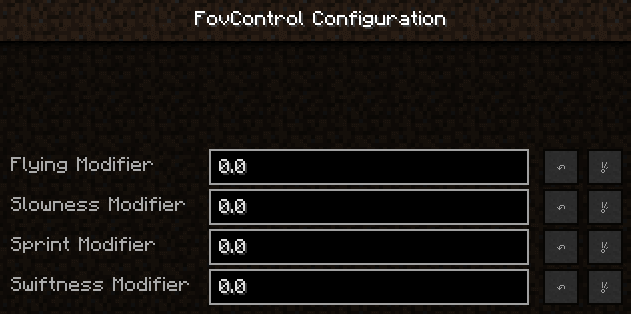
By default this will disable any fov change entirely. You can tweak 5 fov changing modifiers to your liking using the in-game config editor or by editing the config file.
Minecraft defaults / Config setting:
When flying 1.1 / 0.1
When sprinting 1.15 / 0.15
When using a bow at max draw 0.85 / 0.15
Under the effects of slowness 0.925 / 0.075
Under the effects of swiftness 1.1-1.2 / 0.1-0.2
The mod starts at 1.0, which is your normal fov, and cumulatively increases / decreases your fov based on player state and your desired config settings.
Minecraft is hard-coded to a max of 1.5 and min of 0.1 fov modifier.
Each config setting has a range from 0.0 to 0.5.
This should be a client-side only mod, but I haven’t setup a dedicated server instance to confirm it isn’t causing any problems.
常见问题
Fov Control 支持哪些 Minecraft 版本?
Fov Control 支持 Minecraft Java 版 1.7.10–1.9,共 2 个版本,可用的加载器:Forge。下载时注意选择和你游戏版本一致的文件。
Fov Control 怎么安装?
先用 PCL2 或 HMCL 启动器安装对应版本的 Forge,再把下载的 .jar 文件放进游戏目录的 mods 文件夹,重新启动游戏即可。开启了版本隔离的,mods 文件夹在 versions/版本名 下面。
评论
登录后评论和评分