介绍

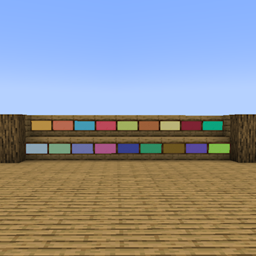
This mod contains additional resources, all resources are not craftable, they are only decorative and intended to be used in creative mode. This mod contains the following items:
– Amber colored sign
– Apricot colored sign
– Aqua colored sign
– Bubblegum colored sign
– Citrine colored sign
– Coral colored sign
– Cream colored sign
– Crimson colored sign
– Emerald colored sign
– Ice Blue colored sign
– Mint Green colored sign
– Periwinkle colored sign
– Rose colored sign
– Royal Blue colored sign
– Seagreen colored sign
– Sienna colored sign
– Slate Blue colored sign
– Spooky Green colored sign
All signs maintain the same properties of regular sign entities but come in a variety of colors you can choose from when you feel like the classic sign colors aren’t enough.

QFS3 – QSMPFanSrv
An unofficial, multilingual QSMP fan modpack + community server
🌐 Website: qsmpfansrv.com
💬 Discord: discord.gg/4k377rdSwN
🎮 Server IP: qfs3.qsmpfansrv.com
QSMPFanSrv is a community built around the QSMP-like experience for fans to enjoy alongside their favorite streamers. Our community has been running since August 1st, 2023. We follow QSMP2’s footsteps with a similar map, lore, and characters. You’re free to be part of the story or play your own way – this is a relaxed server that won’t force interaction if you’d rather opt out.
- QFS3 Translations – built-in chat translation so players speaking different languages can communicate seamlessly
- Aeronautics – build and pilot full-physics airships
- Active dev team – custom mods, frequent updates, responsive to feedback
▶ Play with us
Join our Discord – translations in game, custom launcher and mods.
- How to join: qsmpfansrv.com/getting-started
- Live map: qsmpfansrv.com/map
- Leaderboards: qsmpfansrv.com/leaderboards
🛠️ Support & troubleshooting
- Guides & fixes: qsmpfansrv.com/help
- Live help: join our Discord, channel #curseforge-support
❤️ Support the server
- Patreon: patreon.com/QFS3
- Ko-Fi: ko-fi.com/qsmpfansrv
- Paypal: paypal.me/QSMPFanSrv
QFS3 / QSMPFanSrv is an unofficial fan project. Not affiliated with QSMP or Quackity Studios.
常见问题
QFS Extra Resources 支持哪些 Minecraft 版本?
QFS Extra Resources 支持 Minecraft Java 版 1.18.2,可用的加载器:Forge。下载时注意选择和你游戏版本一致的文件。
QFS Extra Resources 怎么安装?
先用 PCL2 或 HMCL 启动器安装对应版本的 Forge,再把下载的 .jar 文件放进游戏目录的 mods 文件夹,重新启动游戏即可。开启了版本隔离的,mods 文件夹在 versions/版本名 下面。

评论
登录后评论和评分