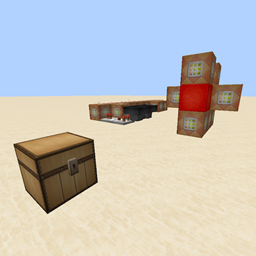
Gunpowder Fuses
Place Gunpowder on the ground to create fuses that can be used to guide fire from one point to another.
介绍
Initial setup:
/scoreboard objectives add GFGunpowder dummy
/scoreboard objectives add GFEmptyFuse dummy
/scoreboard objectives add GFLitFuse dummy
Placing gunpowder to create fuses is done by simply throwing a piece of gunpowder on the ground.
The following commands should be connected to a fairly fast clock and should all be executed in the same tick:
/scoreboard players set @e[type=Item] GFGunpowder 1 {Item:{id:minecraft:gunpowder},OnGround:1b}
/execute @e[score_GFGunpowder_min=1] ~ ~ ~ /summon ItemFrame ~ ~-1 ~ {CustomName:GFTemp}
/execute @e[name=GFTemp] ~ ~ ~ /summon ArmorStand ~0.2 ~-0.5 ~0.7 {Small:1,Equipment:[{id:minecraft:gunpowder,Count:1},{},{},{},{}],Pose:{RightArm:[160f,0f,0f]},NoGravity:1,Invisible:1,CustomName:GFFuse}
/kill @e[name=GFTemp]
/kill @e[score_GFGunpowder_min=1]
Picking fuses back up is done by right clicking on the fuse. The following commands ensure no armor stands are left behind; they should be attached to a fairly fast clock and should all be executed in the same tick:
/scoreboard players set @e[name=GFFuse] GFEmptyFuse 1
/scoreboard players set @e[name=GFFuse] GFEmptyFuse 0 {Equipment:[{Count:1b}]}
/kill @e[score_GFEmptyFuse_min=1]
To light a fuse, simply set fire to the block it appears to be placed in. The following commands will make a lit fuse spread fire to any adjacent fuses within a 3x3x3 cube around it; they should be attached to a clock that has at least a one tick delay and should be executed in the same tick:
/execute @e[name=GFFuse] ~ ~ ~ detect ~ ~1 ~ fire 0 /scoreboard players set @e[name=GFFuse,r=0] GFLitFuse 1
execute @e[score_GFLitFuse_min=1] ~-1 ~-1 ~-1 /execute @e[name=GFFuse,dx=2,dy=2,dz=2] ~ ~ ~ /setblock ~ ~1 ~ fire
/kill @e[score_GFLitFuse_min=1]
TNT that is below or adjacent to a lit fuse along the x or z axis can become primed immediately, by attaching the following commands to the previous clock before the last command:
/execute @e[score_GFLitFuse_min=1] ~ ~ ~ detect ~ ~ ~ tnt 0 /summon ArmorStand ~ ~ ~ {CustomName:GFTnt,Invisible:1,Invulnerable:1,Marker:1}
/execute @e[score_GFLitFuse_min=1] ~-1 ~1 ~ detect ~ ~ ~ tnt 0 /summon ArmorStand ~ ~ ~ {CustomName:GFTnt,Invisible:1,Invulnerable:1,Marker:1}
/execute @e[score_GFLitFuse_min=1] ~1 ~1 ~ detect ~ ~ ~ tnt 0 /summon ArmorStand ~ ~ ~ {CustomName:GFTnt,Invisible:1,Invulnerable:1,Marker:1}
/execute @e[score_GFLitFuse_min=1] ~ ~1 ~-1 detect ~ ~ ~ tnt 0 /summon ArmorStand ~ ~ ~ {CustomName:GFTnt,Invisible:1,Invulnerable:1,Marker:1}
/execute @e[score_GFLitFuse_min=1] ~ ~1 ~1 detect ~ ~ ~ tnt 0 /summon ArmorStand ~ ~ ~ {CustomName:GFTnt,Invisible:1,Invulnerable:1,Marker:1}
/execute @e[name=GFTnt] ~ ~ ~ /setblock ~ ~ ~ air
/execute @e[name=GFTnt] ~ ~ ~ /playsound game.tnt.primed @a
/execute @e[name=GFTnt] ~ ~ ~ /summon PrimedTnt ~-0.2 ~ ~-0.23 {Fuse:80,Motion:[0d,0.25d,0d]}
常见问题
Gunpowder Fuses 支持哪些 Minecraft 版本?
Gunpowder Fuses 支持 Minecraft Java 版 1.8–1.8.7,共 8 个版本。下载时注意选择和你游戏版本一致的文件。
Gunpowder Fuses 怎么安装?
解压下载的文件,把里面的存档文件夹放进游戏目录的 saves 文件夹(开启了版本隔离的在 versions/版本名/saves),重新打开游戏就能在「单人游戏」里看到。请用 1.8–1.8.7 版本打开,版本不对可能导致地图损坏。
Kovolta 的其他作品
查看全部 →
Kovolta’s 60 Minute Maps
A world that contians maps built in 60 minutes.

Dream Thief
Become more powerful by stealing peoples dreams while they sleep and replacing them with nightmares!
Confessors’ Palace
Recreation the Confessors' Palace, Aydindril and Surrounding Area

3D Salty Lemonade
You've just had some salty lemonade, and now something weird has happened.
评论
登录后评论和评分