介绍
Cushion Display
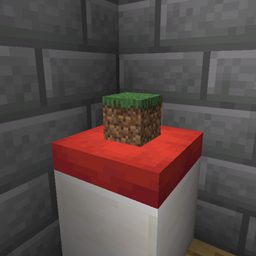
Cushions were made for sitting. Now they’re made for showing off too. Put a book on the reading nook, an apple on the kitchen bench, a sword on the throne cushion — any item, resting right on top of any cushion.
Works on NeoForge and Fabric, for Minecraft 26.3.
## Sneak + right-click. That’s the whole mod.
| In your hand | On the cushion | Sneak + right-click |
|---|---|---|
| An item | Nothing | Puts one of it on the cushion |
| Nothing | An item | Takes it back into your hand |
| An item | An item | Swaps them |
A normal right-click still does what it always did: you sit down. Sit on a cushion that’s holding something and the item politely hides while you’re there, then reappears when you stand up.
In creative mode, placing an item doesn’t use it up.
## It looks like it belongs there
-
Flat items lie flat on the fabric: apples, books, maps, swords.
-
Blocks stand upright, shrunk down to a little ornament: a furnace, a chest, a log.
-
Items turn with the cushion, so a row of cushions stays neat and tidy.
-
Items rest exactly on the cushion’s surface, wherever the cushion is: on the floor, on a slab, on snow, on stairs.
-
One item per cushion.
Nothing gets lost
-
Break the cushion and its item drops alongside it: punching it, removing the block underneath, fire, lava, lightning, explosions, pistons.
-
Stacked cushions? Sneak + right-click always acts on the top one, and the item always sits on top. Add a cushion above an occupied one and the item moves up; break the top cushion and its item drops.
-
Just like item frames, nothing drops when a creative player breaks the cushion, or when the
entity_dropsgame rule is off. -
Items are saved with the world and keep everything: enchantments, custom names, all of it.
Multiplayer ready
-
Everyone sees the same thing, instantly — including players who join later.
-
Adventure mode and spawn protection are respected: if you can’t break the cushion, you can’t change its item.
-
Install it on both the server and the clients. Clients without the mod get a clear message telling them to install it, instead of a cryptic error. A client with the mod can still join servers without it.
Details
-
No new blocks, items or entities. It works on the vanilla cushion, and no hidden entities are spawned to display items.
-
No dependencies on NeoForge. Fabric needs Fabric API, as usual.
-
Want to use the item instead? Look away from the cushion: sneak + right-click while aiming at a cushion always places the item.
-
A world moved between Fabric and NeoForge keeps its cushions, but not the items on them (each loader stores that data its own way).
A SaturnX Studios (STXS) mod.
常见问题
Cushion Display 支持哪些 Minecraft 版本?
Cushion Display 支持 Minecraft Java 版 26.3,可用的加载器:Fabric / NeoForge。下载时注意选择和你游戏版本一致的文件。
Cushion Display 怎么安装?
先用 PCL2 或 HMCL 启动器安装对应版本的 Fabric / NeoForge,再把下载的 .jar 文件放进游戏目录的 mods 文件夹,重新启动游戏即可。开启了版本隔离的,mods 文件夹在 versions/版本名 下面。
Gabriele_333 的其他作品
查看全部 →
From Magic To Tech
你可以随心所欲,从魔法到科技,想怎么玩就怎么玩。

GabrieleCore
Gabriele_333 模组的前置库。

From Magic To Tech Mod
这是 From Magic To Tech Minecraft 整合包的模组。它添加了整合包正常运行所需的各种物品、方块和图片。

ChillCraft – CC1 – Optimized
轻松惬意整合包|光影|远方地平线|陪你畅玩 Minecraft|增强原版体验|优化流畅
评论
登录后评论和评分