Damage Number Particles
Minecraft mod that displays floating number particles whenever an entity takes damage or receives healing
介绍
Damage Number Particles
Damage Number Particles is a lightweight Minecraft mod that displays floating number particles whenever an entity takes damage or receives healing.
This feature provides real-time visual feedback, helping players easily track combat effectiveness or healing output during gameplay.
Requirements
This mod requires the following dependencies to work properly:
For versions below 0.0.5+1.21.9
| Modrinth | Curseforge |
|---|---|
| Smootheez Config Lib (scl) | Smootheez Config Lib (scl) |
For versions 0.0.5+1.21.9 and above
| Modrinth | Curseforge |
|---|---|
| Smoothiez API | Smoothiez API |
| Fabric API | Fabric API |
Preview
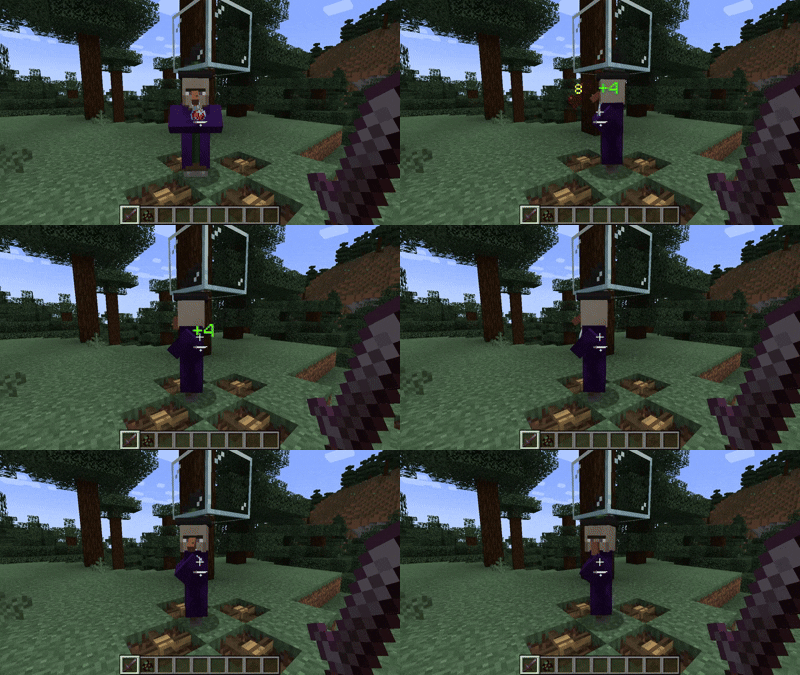
Experience floating numbers that dynamically appear above entities as they take damage or receive healing — all rendered smoothly in real time.
Configuration
Damage Number Particles can be fully customized to match your preferences.
You can modify settings either in-game (via Mod Menu) or manually through the config file.
Available Options
- Toggle particle visibility
- Adjust display radius and minimum damage threshold
- Manage an entity blacklist to prevent certain mobs from displaying particles
To blacklist an entity, add its identifier in the following format:
id:entity_identifierExample:
minecraft:allayDownload
Get the latest version from your preferred platform:
| Modrinth | Curseforge |
|---|---|
| Damage Number Particles | Damage Number Particles |
Reporting Issues
Found a bug or want to suggest a new feature?
Please open an issue on GitHub: GitHub Issues
Support My Work
If you enjoy this mod and want to support future development, consider donating:


常见问题
Damage Number Particles 支持哪些 Minecraft 版本?
Damage Number Particles 支持 Minecraft Java 版 1.20.1–1.21.11,共 18 个版本,可用的加载器:Fabric。下载时注意选择和你游戏版本一致的文件。
Damage Number Particles 怎么安装?
先用 PCL2 或 HMCL 启动器安装对应版本的 Fabric,再把下载的 .jar 文件放进游戏目录的 mods 文件夹,重新启动游戏即可。开启了版本隔离的,mods 文件夹在 versions/版本名 下面。
Smootheez 的其他作品
查看全部 →
Smootheez Config Lib
Config library mod for all of my mods

Damage Number Particles
Minecraft mod that displays floating number particles whenever an entity takes damage or receives healing

Elytra Control
Simple Mod To Control Your Elytra Such Locking Or Stop Flying In Mid Air Like In Bedrock Edition and more!

Smoothiez Api
Minecraft Mod to provide boilerplate code for all of Smootheez's Mods
评论
登录后评论和评分