
介绍

A simple mod that adds two new blocks (and items to craft it) that able to render stuff
Item Displayer
block that allows you to render item model (with some tweaks like rotation , position , brightness )

Texture Displayer
block that allows you to render item model (with some tweaks like rotation , position , brightness )
(animated imported strips are 10,000×10,000 resolution max)

Text Displayer
block that allows you to render text

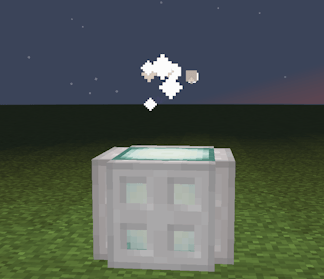
Particle Displayer [2.0.0+]
simple block that lets you customize particle emission
Entity Displayer [2.0.0+]
sligtly advanced block that lets you render entities
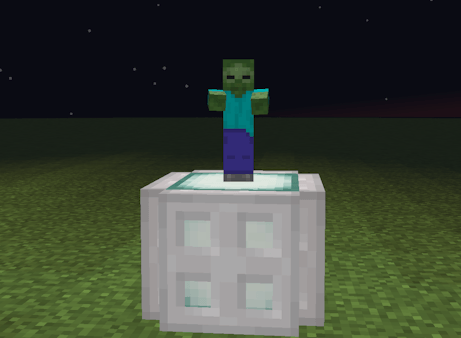
note: use 180,0,0 rotation to make entity face you
Holographic Glasses
allows you to see blocks (they are usually invisible like barrier block and will appear on screen as 2d marker if glasses are on)

How to start
to start you would need to get diamond prism with is dropped from diamond ores with 20% chance

after that all recipes would show up in MISC tab in crafting table
Web images
2.0.0+
with the new version of mod textures have become easier to use and store
now using /displayers_images you can open menu for adding images
furthermore images now stored as an actual png’s inside the world save file instead of links to images
PRE 2.0.0
texture displayers allow web imported images. For example:
/url_image image_id “url_link”
image_id : identifier for loaded image (spaces or special chars are not allowed)
image_id is also can be used to remove or get all images (REMOVE_ALL / GET_ALL )
example: /url_image GET_ALL “”
url_link : a link to an image (imgur is the best option)
can be used to remove specific image
example: /url_image [identifier] REMOVE
should work in both singleplayer and multiplayer but would require some access to server (level 2 permissions) to run this command
Admin related stuff
/maxDisplayersRenderDistance
controls the max possible distance that admins can set
(65 – 1024) (128 defult)
loaded images
[2.0.0+] in case you want to access loaded images go to saves/world/displayers_textures.json
[PRE 2.0.0] in case you want to access loaded images go to saves/world/world_files/loaded_texture_urls.json
Special thanks to Meidde for helping with testing mod and giving suggestions
常见问题
Displayers 支持哪些 Minecraft 版本?
Displayers 支持 Minecraft Java 版 1.20.1,可用的加载器:Forge。下载时注意选择和你游戏版本一致的文件。
Displayers 怎么安装?
先用 PCL2 或 HMCL 启动器安装对应版本的 Forge,再把下载的 .jar 文件放进游戏目录的 mods 文件夹,重新启动游戏即可。开启了版本隔离的,mods 文件夹在 versions/版本名 下面。

评论
登录后评论和评分