
Transporter
A mod that enables the player to create transporters to rapidly move around the Overworld in Minecraft.
截图
介绍
Version 2.0.0 released. Updated for Minecraft 1.12.2
To install:
- Install Forge for version 1.12.2.
- Download and copy the
.jarfile below to the mods directory for version 1.12.2, e.g. %appdata%\.minecraft\mods\1.12.2. - Launch Minecraft and select the Forge version for version 1.12.2.
A few usage notes:
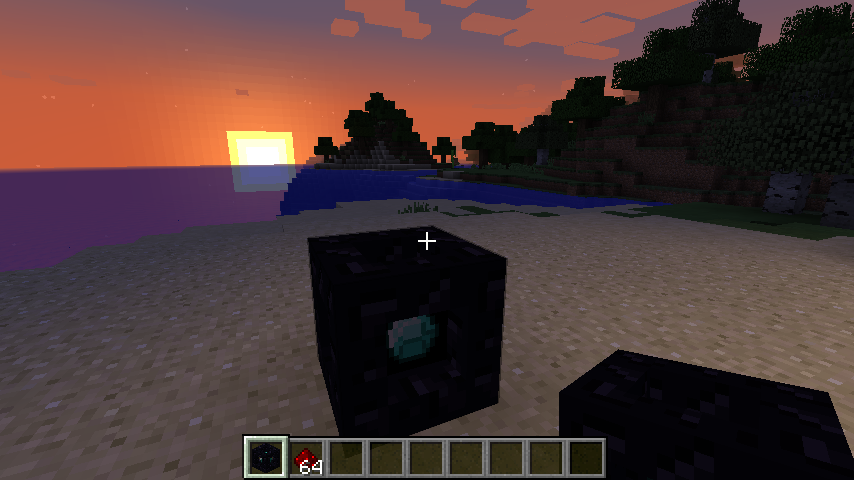
- The Transporter is found in Creative mode on the Redstone tab.
- In Survival mode, you can craft a Transporter by surrounding a diamond with 8 blocks of obsidian.
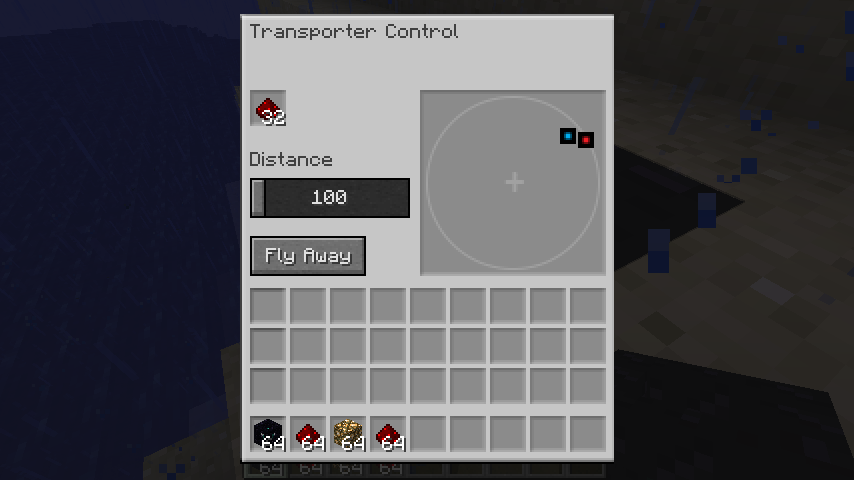
- To operate the transporter:
-
Right-click on a transporter to activate the control panel.
-
Any other transporters within range will be displayed. Note: the display is oriented with North at the top. Click one to select it as the destination; click again to deselect it.
-
Adjust the Distance slider as needed.
- Drop at least one redstone item into the fuel slot for every 100 meters of travel. The Fly Away button will be grayed out until enough has been added.
-
Press the Fly Away button.
-
If you do not select another transporter, you will be transported in the direction you were facing when you activated the control panel. The transporter will attempt to land you safely, ensuring that you do not transport into the middle of a block or standing on air. However, be careful as you may transport onto water (or worse yet…lava)!
-
Enjoy, and please post any issues you find.
Note that the sources can be found at GitHub.
常见问题
Transporter 支持哪些 Minecraft 版本?
Transporter 支持 Minecraft Java 版 1.10.2–1.12.2,共 3 个版本,可用的加载器:Forge。下载时注意选择和你游戏版本一致的文件。
Transporter 怎么安装?
先用 PCL2 或 HMCL 启动器安装对应版本的 Forge,再把下载的 .jar 文件放进游戏目录的 mods 文件夹,重新启动游戏即可。开启了版本隔离的,mods 文件夹在 versions/版本名 下面。
评论
登录后评论和评分