SKYBLOX
☁️🟫Immerse yourself in the skyblock themed world and explore the vast world of SKYBLOX!🟫☁️
介绍


Explore the vast skyblock themed world and complete quests by doing certain things that that quest requires! Be careful not to fall into the void and make bridges to reach other planet-shaped islands and more! Below I will explain step by step how to create your first island!
Other quests will be added in the future so stay tuned to not miss future updates!

Follow these steps to create your first island!:
Step 1: Activate the cheats of your world to create your island.
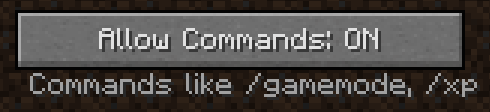
Step 2: use the command /island_create (the name of your island) to create your island!
Step 3: after creating your island you must type the command /island to teleport to your newly created island!
Step 4: To teleport every time you want to teleport to your island type the command /island and you will teleport to your island!
Step 5: After creating your personal island type the command /sethome (and the name of your island that you created) to set the spawn and every single time you type the command /island to teleport to your island it will teleport you to your island where you set the spawn, but to be on the safe side I recommend you type the command /sethome while you are already on your island to avoid bugs! REMEMBER! If you do not do the command /sethome you will lose your island and automatically all the objects placed inside it!
Step 6: If you want to delete your island you just have to type the command /island_delete (the name of your island that you want to delete) to permanently delete your deleted island and this causes that you will no longer be able to teleport to the deleted island.
PS: to create your world I recommend one of these two choices of the type of world to have a better gameplay in my opinion!



Quests
Skyblock
Create your own custom island!
and much more!

Also Direct support is available through my PayPal

By clicking the SPOILER button you will find all my socials, A heartfelt thank you to those who enter and subscribe to my socials! ♥️
Discord: https://discord.gg/ghNhPG3rX6
YouTube: https://www.youtube.com/@PRO_FAKE
TikTok: https://www.tiktok.com/@profake
Instagram: https://www.instagram.com/pro__fake/
Website: https://profake.netlify.app/


常见问题
SKYBLOX 支持哪些 Minecraft 版本?
SKYBLOX 基于 Minecraft Java 版 1.7.10,使用 Forge 加载器。
SKYBLOX 怎么安装?
点本页「前往下载」拿到整合包文件(Modrinth 的是 .mrpack,CurseForge 的是 .zip),在 PCL2 或 HMCL 启动器里选择「导入整合包」,启动器会自动装好 Minecraft、加载器和全部模组。建议在启动器里给游戏分配 4–6 GB 内存。
SKYBLOX 开服需要多大内存?
推荐服务器内存 12 GB。在线人数多、或者建了大量机器和区块加载器时,可以再加 2–4 GB。
怎么和朋友一起玩 SKYBLOX?
点本页的「一键开服」,选好配置后会自动安装 SKYBLOX 的服务端,几分钟就能开好。把服务器地址发给朋友,大家用同一个版本的整合包连进去就行。
ProFake 的其他作品
查看全部 →
Solo Leveling – Reawakening
⬆️奇异的传送门出现在 Minecraft 世界中,带来了难以言喻的力量与危险。作为一名弱小的幸存者开启旅程,不断提升实力,最终成为最强大的猎人。⬆️

Unofficial Dragon Block C
踏上一场史诗般的任务!扮演Z战士,掌握超级赛亚人的能力,施展强力的龟派气功。从你的视角重写龙珠传奇。打造属于你自己的冒险。
Amazing FPS Booster (FABRIC) (MORE POWERFUL THAN OPTIFINE)
零卡顿畅玩游戏。
Solo Leveling – Shadows
⬆️Minecraft 世界中出现了诡异传送门,随之而来的是难以言喻的力量与危险。从一名弱小的幸存者开始你的旅程,一路晋升,成为最强的猎人。⬆️
评论
登录后评论和评分