
介绍
A Light ModPack Created for My Son’s and I as we continue this Minecraft Journey, we still play My Previous ModPacks and Minecraft Versions. Those were mostly All-In-Ones and now we are getting into the groove of Creating Worlds with Purpose. The Grind gets monotonous, so I tried to touch on different aspects of play without going too Wild with the Number of Mods. Ever want to play in Peaceful and have reason to farm, Harder Natural Healing does just that!
Some of the Mods are Beta perhaps an Alpha as well, I do not imagine adding more mods, only updating as mods mature in 1.18.1
***Use Forge 39.0.17***
If you use a Newer Version of Forge, the game will crash when placing ANY Furnace – Not Sure if it is a Forge Problem or One or More of the Mods
This Compilation of Mods has been stable although I have limited variations of PCs to test on.
Recommend: Optifine Newest Release to Help less Powerful PCs – Not Required though
Terralith is the Terrain Generating Mod, Beautiful work!
It does make Exploration a requirement for gathering resources as Biomes are all spread out.
For Great Starting Spawns with Terralith;
Try These Seeds:
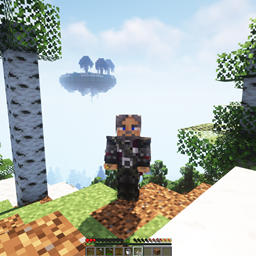
43806826348186811 – This “Should” Have You Spawning right next to where I took the screenshot
4403403274271987
Tip:
Using “Chunky” to Pre-Generate at least 500 to 1000 blocks before playing. Helps greatly with Lag/Rubber Banding
“Chunky” Needs A good amount of RAM and CPU to run, I find setting it in Smaller Sections Helps
For Example: First run it at a Radius of 250, Then 500, then 750 and so on.
Tetra:
This does Crash in Multi-Player when you Use the Holosphere, not a hard crash, log right back in and you have your item – a bit of a bother for sure.
On SIngle Player Worlds, this crash does NOT Occur.
Enjoy!
常见问题
Pheonix Dragon’s 2021 Vanilla+ 支持哪些 Minecraft 版本?
Pheonix Dragon’s 2021 Vanilla+ 基于 Minecraft Java 版 1.18.1,使用 Forge 加载器。
Pheonix Dragon’s 2021 Vanilla+ 怎么安装?
点本页「前往下载」拿到整合包文件(Modrinth 的是 .mrpack,CurseForge 的是 .zip),在 PCL2 或 HMCL 启动器里选择「导入整合包」,启动器会自动装好 Minecraft、加载器和全部模组。建议在启动器里给游戏分配 4–6 GB 内存。
Pheonix Dragon’s 2021 Vanilla+ 开服需要多大内存?
推荐服务器内存 12 GB。在线人数多、或者建了大量机器和区块加载器时,可以再加 2–4 GB。
怎么和朋友一起玩 Pheonix Dragon’s 2021 Vanilla+?
点本页的「一键开服」,选好配置后会自动安装 Pheonix Dragon’s 2021 Vanilla+ 的服务端,几分钟就能开好。把服务器地址发给朋友,大家用同一个版本的整合包连进去就行。
Pheonix69Dragon 的其他作品
查看全部 →
Pheonix Dragon’s Modded Experience II
轻量级模组体验

Pheonix Dragon’s Retro V1
A Collection of Old Favorites

Pheonix Dragon’s Modded Experience IV
A Lightwieght Modded Experience 1.12 Style
Pheonix Dragon’s Experience V7
A Lightly Modded Experience that can be Played in Peaceful
评论
登录后评论和评分