
截图



介绍
Slotted Armor HUD
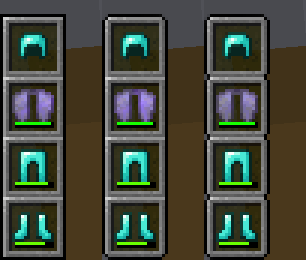
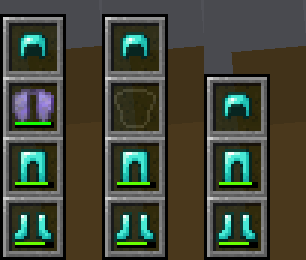
This mod adds an armor HUD that retains Minecraft’s default appearance, without the extra text and numbers, and adapts to resource packs that change the hotbar’s appearance. The armor HUD can be easily configured when paired with the Cloth Config and Mod Menu mods.
If the mod hasn’t been updated for the latest Minecraft version but you’ve found that it still works without issue, let me know with this GitHub template. _(No guarantees though, since I have shifted my focus to other work.)_

_An aesthetic that blends right in to Minecraft’s HUD_
Features
- A customizable interface
- Orient it vertically or horizontally.
- Place it to the left or right, and to the top or bottom.
- Choose when and how the armor HUD shows itself.
- Move it anywhere by offsetting it!
- Adaptive elements
- The armor HUD will shift away from the hotbar to allow room for the offhand slot.
- The chat box, boss bars, status effect icons, and subtitles will make room for the armor HUD when needed.
- Extra customization
- If resource packs do not work, try experimenting with these settings. 😀
Forked from BerdinskiyBear’s Armor HUD mod, updated and with new features.
Configuration
This mod can be configured with the Cloth Config and Mod Menu mods.\
With these mods installed, a “Mods” button will appear on the title and pause screens, and clicking on it should show a list of installed mods. This mod should appear on that list, and hovering over it should show a button that leads to the config screen.
It can also be configured via the armor_hud.json config file with a text editor. This can be found in Minecraft’s directory folder, then in the config folder.
常见问题
Slotted Armor HUD 支持哪些 Minecraft 版本?
Slotted Armor HUD 支持 Minecraft Java 版 1.18–1.21.1,共 17 个版本,可用的加载器:Fabric。下载时注意选择和你游戏版本一致的文件。
Slotted Armor HUD 怎么安装?
先用 PCL2 或 HMCL 启动器安装对应版本的 Fabric,再把下载的 .jar 文件放进游戏目录的 mods 文件夹,重新启动游戏即可。开启了版本隔离的,mods 文件夹在 versions/版本名 下面。运行环境:仅客户端。
poqbox 的其他作品
查看全部 →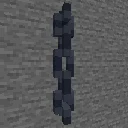
Simple 3D Chain
原版3D锁链!已更新铜锁链和灯笼,并在可行时包含悬挂告示牌的锁链。

Simple 3D Bars
原版风格3D铁栏杆!还有铜栏杆!
Slotted Armor HUD
A vanilla-like armor HUD for Minecraft!

Blocky 3D Rails
3D models to replace the paper-thin rails.
评论
登录后评论和评分