介绍
Difficulty Locker allows you to lock the difficulty of multiple worlds separately in versions prior to 1.8 (more specifically 1.7.2 & 1.7.10), where this functionality has been built into vanilla.
I made a huge derp on R-1.2, Update to R-1.2.2 to make sure you don’t crash when joining servers!!!
For downloads from different versions check the tab Files
FAQ:
What does Difficulty Locker do?
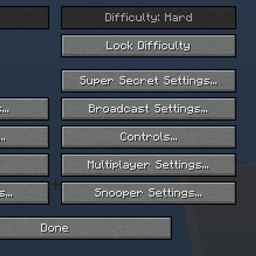
This mod adds a lock button to your game options screen that when pressed on will lock your world’s difficulty and will only be able to unlock again on change of the mod’s config.
HELP I can’t change the difficulty of Minecraft when no worlds are loaded!
I did this on purpose since the button had no use anymore.
I am a mapmaker and I want my map to lock to a certain difficulty for everyone who uses it.
Since R-1.2 the locked files get saved in the world’s folder under the file name “locked”, this file specifies what difficulty the game will be locked to on opening of that world.
I found a bug in the mod, where can i report it?
I created a repository on GitHub to keep track of the bugs in this mod, you can find it here:
https://github.com/MattsMc/Difficulty-Locker/issues
Where can I help out translating this mod into various languages?
On the GitHub repo i added the lang files, please translate and then change the file name to your corresponding country.
https://github.com/MattsMc/Difficulty-Locker/
常见问题
Difficulty Locker 支持哪些 Minecraft 版本?
Difficulty Locker 支持 Minecraft Java 版 1.7.2–1.7.10,共 2 个版本,可用的加载器:Forge。下载时注意选择和你游戏版本一致的文件。
Difficulty Locker 怎么安装?
先用 PCL2 或 HMCL 启动器安装对应版本的 Forge,再把下载的 .jar 文件放进游戏目录的 mods 文件夹,重新启动游戏即可。开启了版本隔离的,mods 文件夹在 versions/版本名 下面。

评论
登录后评论和评分