
CPS+ | cps counter
CPS Plus is a lightweight Fabric mod for Minecraft 1.21 that displays a highly customizable CPS (Clicks Per Second) counter on your screen.
截图


介绍
CPS Plus
CPS Plus is a lightweight Fabric mod for Minecraft 1.21 that displays a highly customizable CPS (Clicks Per Second) counter on your screen.
Designed for PvP players and minimalists who want full control over their HUD.
✨ Features
🖱️ Precise Tracking
- Dual Counters: Tracks Left Mouse Button (LMB) and Right Mouse Button (RMB) clicks separately.
- Accurate Calculation: Updates in real-time.
🎨 Deep Customization
Configurable via Mod Menu and Cloth Config:
- Positioning: Snap to any corner (Top-Left, Top-Right, Bottom-Left, Bottom-Right) and adjust padding.
- Visuals:
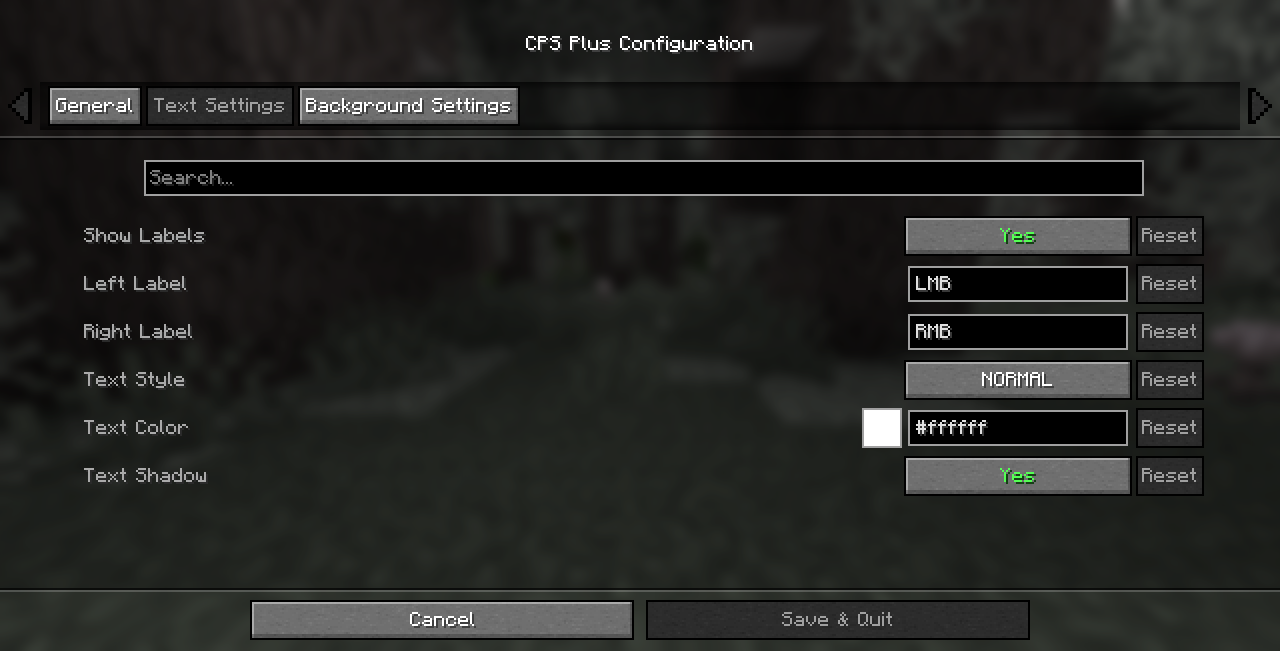
- Labels: Toggle “LMB”/”RMB” text or set your own custom labels.
- Text Styling: Toggle text shadows, choose custom text colors.
- Background:
- Toggle background box.
- Rounded Corners: Adjust the radius for a sleek modern look.
- Opacity & Color: Full ARGB support for transparent or colored backgrounds.
⚙️ Installation
- Install Fabric Loader for Minecraft 1.21.
- Download the latest
cpsplus.jarfrom this page. - Place the
.jarfile in your.minecraft/modsfolder. - Dependencies:
- Fabric API (Required)
- Cloth Config API (Required for settings)
- Mod Menu (Highly Recommended for accessing settings)
🔧 Configuration
Press ESC -> Mods -> CPS Plus -> Configure to open the settings menu.
📄 License
This mod is available under the CC0-1.0 License. Feel free to use it in modpacks.
常见问题
CPS+ | cps counter 支持哪些 Minecraft 版本?
CPS+ | cps counter 支持 Minecraft Java 版 1.20.1–26.2,共 22 个版本,可用的加载器:Fabric。下载时注意选择和你游戏版本一致的文件。
CPS+ | cps counter 怎么安装?
先用 PCL2 或 HMCL 启动器安装对应版本的 Fabric,再把下载的 .jar 文件放进游戏目录的 mods 文件夹,重新启动游戏即可。开启了版本隔离的,mods 文件夹在 versions/版本名 下面。运行环境:仅客户端。
Exenos Studio 的其他作品
查看全部 →
Emerald++
This is a mod which adds Emerald Tools & Armor into Vanilla Minecraft.

Diamond Nugget
Ever thought why they didn't add these?

Redefined Craftings
More & Improved craftings and uncraftings added into Vanilla.

Raw Diamond Emerald
Why they didn't add these?
评论
登录后评论和评分