
EmmiSkye’s Mythical Pack
Adds in a variety of mythical, fairy core, and magic/dimension mods to Minecraft!
介绍
This modpack adds in a variety of mythical and fairy core themed mods. There is also some cat mods and useful mods too!
Have questions? Look on the official Wiki for help!
IMPORTANT!
-After you download this pack you need to download and install ffmpeg into the Mythical Pack folder! (This is a requirement and is essential to playing the modpack)
INSTRUCTIONS (Taken from the ReForgedPlay Mod):
Windows
1. Download the latest FFmpeg release from ffmpeg release essentials.
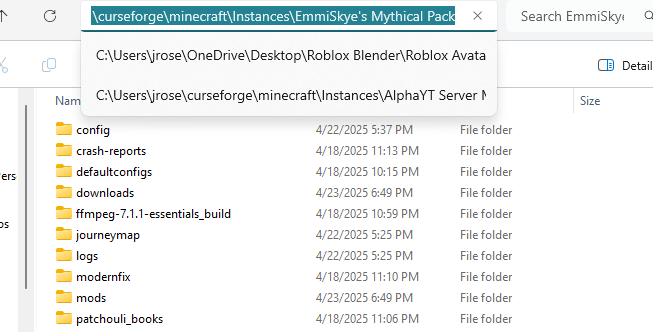
2. Extract the downloaded .zip file into the “EmmiSkye’s Mythical Pack” folder. In order to find the folder’s location open up the CurseForge app and go to “My Modpacks” under the Minecraft section. Next click on the “EmmiSkye’s Mythical Pack” Modpack and then click on the 3 dots where the play button is. Once you click on the 3 dots find the “Open Folder” button and click on it. This should bring you to the location of the “EmmiSkye’s Mythical Pack” folder where you’re going to want to click on the first search bar and copy it (1). Finally go to the “ffmpeg release essentials” folders that you download, right click on the folder, click on “Extract all”, and then paste the folder location for “EmmiSkye’s Mythical Pack” into the browse bar (2). (You can put ffmpeg.exe anywhere inside the EmmiSkye’s Mythical Pack folder)
(The “EmmiSkye’s Mythical Pack” folder is located in “instances”)
1.
Notes for alternative launchers
Twitch launcher by default installs Minecraft instances in C:\Users\username\Twitch\Minecraft\Instances\instancename
GD Launcher by default installs Minecraft instances in C:\Users\username\AppData\Roaming\gdlauncher_next\instances\instancename
MultiMC by default installs Minecraft instances in C:\Program Files (x86)\MultiMC\instances\Instancename.minecraft
For these launchers, make sure FFmpeg exists inside the corresponding folder.
Mac OSX
On OSX, you can install FFmpeg with Homebrew using brew install ffmpeg.
Alternatively, you can download the latest static build from ffmpeg website and copy the FFmpeg executable to /usr/local/bin.
1.3 Linux
On Linux, you can install FFmpeg using your system’s package manager, for example using apt install ffmpeg. If in doubt, consult the documentation of your distribution.
常见问题
EmmiSkye’s Mythical Pack 支持哪些 Minecraft 版本?
EmmiSkye’s Mythical Pack 基于 Minecraft Java 版 1.20.1,使用 Forge 加载器。
EmmiSkye’s Mythical Pack 怎么安装?
点本页「前往下载」拿到整合包文件(Modrinth 的是 .mrpack,CurseForge 的是 .zip),在 PCL2 或 HMCL 启动器里选择「导入整合包」,启动器会自动装好 Minecraft、加载器和全部模组。建议在启动器里给游戏分配 4–6 GB 内存。
EmmiSkye’s Mythical Pack 开服需要多大内存?
推荐服务器内存 12 GB。在线人数多、或者建了大量机器和区块加载器时,可以再加 2–4 GB。
怎么和朋友一起玩 EmmiSkye’s Mythical Pack?
点本页的「一键开服」,选好配置后会自动安装 EmmiSkye’s Mythical Pack 的服务端,几分钟就能开好。把服务器地址发给朋友,大家用同一个版本的整合包连进去就行。
评论
登录后评论和评分