
Simple Nicknames
A configurable nickname mod that lets players change the name above their head and in other places!
介绍
Simple Nicknames
A straightforward nickname system for your Minecraft server that allows players to customize their display names across the game.
Beta Notice
This mod is currently in beta. While it’s functional, you may encounter bugs or unexpected behavior. Please report any issues you find so I can continue improving the mod!
Installation
Both client and server installations are recommended.
You can alternatively configure the mod to be server side only, with decreased features.
!!! The Fabric version also requires Fabric API !!!
Usage
Set your nickname with a simple command (Permission: simplenicknames.nick):
/nick <nickname>
/randomnick
/randomnick can be configured to assign (former) names of random Minecraft users or generate names using the NATO phonetic alphabet.
To remove your nickname and return to your original name:
/unnickModerators are able to manage nicknames for other users or assign random nicks (Permission: simplenicknames.nick.any):
/setnick Donutello396 Leo
/randomnick @a
/unnick all
/unnick username Donutello396
/unnick nickname Leo
They can also list all usernames and nicknames of nicked users (Permission: simplenicknames.list):
/listnicknamesFeatures
Display Name Changes
Simple Nicknames changes your display name in the following locations:
- Nametag – The name displayed above your character
- Chat – Your name in chat messages
- Tab List – The player list accessible via Tab key
- Scoreboard – Your name on any scoreboards
You can configure how and where your name appears in the config file.
Colored Names
Simple Nicknames supports MiniMessage formatting. If enabled, players will be able to color/format their nickname (disabled by default).
Even without MiniMessage, your nickname will still respect existing formatting, such as team colors set for members.
Flashback
Simple Nicknames can be used with the Flashback mod on supported Fabric versions.
If you notice your nickname not appearing somewhere it should, please report it so I can add support!
Known incompatibilities
- Entity Culling – When viewing players through walls, sometimes their normal username appears as their nametag. To fix this, blacklist
minecraft:playerin the Entity Culling configs.
Third-party libraries
The mod files bundle third-party libraries using jar-in-jar:
- Kyori Adventure / MiniMessage / Option, licensed under the MIT License
- JetBrains Annotations, licensed under the Apache License 2.0
- JSpecify, licensed under the Apache License 2.0
- Konfig, licensed under the MIT License
- Fabric Permissions API (Fabric only), licensed under the MIT License
Support
Found a bug or have a feature request? You can reach out through:
- CurseForge mod page comments
- Discord:
donutello_
Please make sure you have read this page, changelogs and the config file before reporting!
Please include as much detail as possible when reporting issues!
常见问题
Simple Nicknames 支持哪些 Minecraft 版本?
Simple Nicknames 支持 Minecraft Java 版 1.20.1–26.3,共 17 个版本,可用的加载器:Fabric / NeoForge。下载时注意选择和你游戏版本一致的文件。
Simple Nicknames 怎么安装?
先用 PCL2 或 HMCL 启动器安装对应版本的 Fabric / NeoForge,再把下载的 .jar 文件放进游戏目录的 mods 文件夹,重新启动游戏即可。开启了版本隔离的,mods 文件夹在 versions/版本名 下面。运行环境:客户端和服务端都要装。
donutello 的其他作品
查看全部 →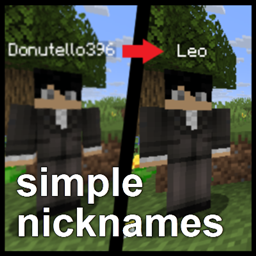
Simple Nicknames
A configurable nickname mod that lets players change the name above their head and in other places!
Hardcore LAN Commands
Allows enabling commands/cheats when opening a hardcore world to LAN, reverting the 26.2+ changes!
Hardcore LAN Commands
Allows enabling commands/cheats when opening a hardcore world to LAN, reverting the 26.2+ changes!
评论
登录后评论和评分