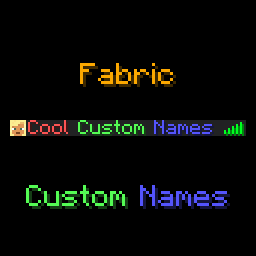
Fabric Custom Names
Custom names (prefixes, suffixes and nicknames) for Fabric servers
介绍
Custom Names






This mod adds a /name, a /itemname and a /itemlore command to Minecraft, which players can use to set a prefix, suffix, or nickname,
or give their items colourful names and lore. Mostly designed to be used in small, private servers, although through the
use of name groups you can also limit which players can use which prefixes/suffixes/nicknames.
Optionally, the mod also has a feature to display custom names in-game, above a player’s head. This also features options
to customise the style (background colour and text opacity), as well as customising the lines of text shown.
Supports prefixes/suffixes set with LuckPerms as well!
Feel free to report any bugs, or suggest new features, at the issue tracker.
License
This mod is licensed under GNU LGPLv3.
Donating
If you like this mod, consider donating.
Discord
For support and/or any questions you may have, feel free to join my discord.
Version support
| Minecraft Version | Status |
|——————-|————–|
| 26.3.x | ✅ Current |
| 26.2.x | ✔️ Available |
| 26.1.x | ✔️ Available |
| 1.21.11 | ✔️ Available |
| 1.21.9+10 | ✔️ Available |
| 1.21.6+7+8 | ✔️ Available |
| 1.21.5 | ✔️ Available |
| 1.21.4 | ✔️ Available |
| 1.21.2+3 | ✔️ Available |
| 1.21+1 | ✔️ Available |
| 1.20.5+6 | ✔️ Available |
| 1.20.4 | ✔️ Available |
| 1.20.1 | ✔️ Available |
| 1.19.4 | ✔️ Available |
| 1.19.2 | ✔️ Available |
I try to keep support up for the latest drop of Minecraft. Updates to newer Minecraft
versions may be delayed from time to time, as I do not always have the time to immediately update my mods.
Unsupported versions are still available to download, but they won’t receive new features or bugfixes.
NeoForge ports are available for Minecraft 26.1 onwards.
Usage
Mod builds can be found on the releases page, as well as on Modrinth.
This mod is oriented at Fabric Minecraft servers, but works on the client as well. This mod requires the Fabric API.
The /name command can be used as follows:
/name prefix– sets a prefix for your name, or when no prefix is given, clears your prefix.- Requires operator or the
customname.prefixpermission. /name suffix– sets a suffix for your name, or when no suffix is given, clears your suffix.- Requires operator or the
customname.suffixpermission. /name nickname– sets a nickname that will appear instead of your IGN, or when no nickname is given, clears your nickname.- Requires operator or the
customname.nickpermission. /name other <prefix|suffix|nickname> <player>- Same syntax as their respective
/name <prefix|suffix|nickname>commands, but to set another player’s prefix/suffix/nickname. Requires operator or thecustomname.otherpermission on top of the respectivecustomname.<nametype>permission.
When hovering over a player’s name with advanced tooltips enabled, their real name will show up.
The /itemname command can be used to rename the item you’re currently holding. Requires operator or the customname.itemname permission.
Similarly, the /itemlore can be used to set the lore of an item you’re holding. Requires operator or the customname.itemlore permission.
\n can be used to create new lines, \\ can be used to escape a backslash.
Similar to the /name commands, running these commands without arguments resets the item name/lore of the item you’re holding.
Minecraft’s formatting codes can be used to format your prefix, suffix, nickname, or your item names/lores.
Instead of the § character, use & (to use & in an (item)name, type &&).
Alongside Minecraft’s default formatting codes, the &#<hex code> format can be used as well.
Useful tools to easily create formatted names are available here and here.
Usage of formatting codes in names can be disabled in the config file.
Alongside the /name command, this mod also supports reading prefixes and suffixes from the LuckPerms mod.
API
Other Fabric or NeoForge mods can read names managed by Custom Names through the CustomNameApi class:
import net.minecraft.network.chat.Component;
import net.minecraft.server.level.ServerPlayer;
import xyz.eclipseisoffline.eclipsescustomname.api.CustomNameApi;
import xyz.eclipseisoffline.eclipsescustomname.api.CustomNameType;

Component prefix = CustomNameApi.getName(player, CustomNameType.PREFIX);
Component nickname = CustomNameApi.getName(player, CustomNameType.NICKNAME);
Component displayNickname = CustomNameApi.getDisplayNickname(player);
Component suffix = CustomNameApi.getName(player, CustomNameType.SUFFIX);
Component fullName = CustomNameApi.getFullName(player);
getName returns null when there is no value set for that name type. getDisplayNickname
falls back to the player’s vanilla name, and getFullName returns the complete display name used by Custom Names.
On Fabric, if Patbox’s Placeholder API is installed, Custom Names also registers these player placeholders:
%eclipsescustomname:prefix%, %eclipsescustomname:nickname%, %eclipsescustomname:suffix%,
%eclipsescustomname:luckperms_prefix%, %eclipsescustomname:luckperms_suffix%, and %eclipsescustomname:full_name%.
Config file
The mod’s configuration file is present in {root config directory}/eclipsescustomname.json.
By default, the configuration file looks like this:
{
  "enable_formatting": true,
  "require_permissions": true,
  "blacklisted_names": [],
  "max_name_length": 16,
  "operators_bypass_restrictions": false,
  "display_above_player": {
    "enabled": false,
    "text_opacity": 255,
    "background_color": "#40000000",
    "lines": [
      "luckperms_prefix prefix nickname suffix luckperms_suffix"
    ]
  },
  "name_groups": {
    "prefix": {},
    "nickname": {},
    "suffix": {}
  }
}enable_formattingcan be used to disable the use of Minecraft formatting codes in names.require_permissionscan be used to disable the permission requirement. When set tofalse, the/name,/itemnameand/itemlorecommands are available to everyone.blacklisted_namesis a list of regexes that are blacklisted. When a prefix, suffix or nickname matches one of these regexes, they won’t be able to be used.max_name_lengthcontrols how long a player prefix/nickname/suffix can be, which can be 32 at most.operators_bypass_restrictionscan be used to disable name restrictions for operators. When this is enabled, operators and people with the permissioncustomname.bypass_restrictionscan use spaces in nicknames, bypass the max length restriction, and more.display_above_playercontrols whether the player’s custom name should display above their head in game. This is currently not compatible with hiding name tags using teams. The appearance can be further configured using the following options:text_opacity: controls the opacity of the text.255is fully visible,0is transparent.background_color: the HEX-background colour of the name. This is in ARGB format, so the first 2 digits indicate the alpha value.lines: controls the lines shown above a player’s head. You can use this option to customise on which lines which name types are displayed. By default, all name types are displayed on a single line. All possible name types are listed in the example above.name_groupscan be used to create name groups for each name type. Name groups consist of a list of names, which follow the same format used in name commands. You can assign players to one or more name groups by giving them permissions to the respective groups. They will then be able to use names listed in those groups.
For example, consider this name groups config:
"name_groups": {
  "prefix": {
    "vip": [
      "&f&l[&7VIP&f&l]",
      "&f&l[&9VIP&f&l]",
      "&f&l[&aVIP&f&l]",
      "&f&l[&bVIP&f&l]",
      "&f&l[&cVIP&f&l]"
    ],
    "legendary": [
      "&f&l[&7Legendary&f&l]",
      "&f&l[&9Legendary&f&l]",
      "&f&l[&aLegendary&f&l]",
      "&f&l[&bLegendary&f&l]",
      "&f&l[&cLegendary&f&l]"
    ]
  },
  "nickname": {},
  "suffix": {}
}
You can then give players the customname.group.prefix.vip permission to allow them to use prefixes from the vip group,
and the customname.group.prefix.legendary permission to allow them to use prefixes from the legendary group. Players
will see these prefixes suggested when entering the /name prefix command, and, when running /name prefix without any
arguments, a chat menu will allow them to select a prefix.
Note that granting players the customname.prefix permission will still allow them to use any prefix. Everything said above
also applies to nicknames and suffixes.
常见问题
Fabric Custom Names 支持哪些 Minecraft 版本?
Fabric Custom Names 支持 Minecraft Java 版 1.19.2–26.3,共 23 个版本,可用的加载器:Fabric / NeoForge。下载时注意选择和你游戏版本一致的文件。
Fabric Custom Names 怎么安装?
先用 PCL2 或 HMCL 启动器安装对应版本的 Fabric / NeoForge,再把下载的 .jar 文件放进游戏目录的 mods 文件夹,重新启动游戏即可。开启了版本隔离的,mods 文件夹在 versions/版本名 下面。运行环境:仅服务端。
eclipseisoffline 的其他作品
查看全部 →
Geyser
一个允许你使用 Minecraft 基岩版连接 Minecraft Java 版服务器的桥接/代理。

Jukebox Custom Disc Fix
这个模组修复了 MC-260346 漏洞:自定义音乐唱片在唱片机中播放时,会在原版唱片本该结束的位置被截断。
Modify Player Data
This mod allows Minecraft's data commands (/data, /execute store, etc.) to modify player data

Floodgate
Hybrid mode mod to allow for connections from Geyser to join online mode servers.
评论
登录后评论和评分