
Simple Voice Chat Group Player Names
作者:greeenman999
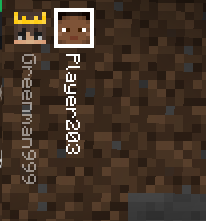
This mod displays the player names of the players in your voice chat group next to the player heads in the hud.
截图

介绍
中文介绍正在准备中,下面暂时显示原文。
Simple Voice Chat Group Player Names
Simple Voice Chat Group Player Names is a Fabric mod that shows player names next to group player heads in the HUD for users of the Simple Voice Chat mod. It enhances visibility of who is in a voice group by rendering the display names beside the group icons.
Features
- Displays player names next to group player heads in the HUD
- Lightweight and unobtrusive
- Works alongside Simple Voice Chat to improve group identification
Requirements
- Fabric Loader (compatible version for your Minecraft instance)
- Fabric API
Simple Voice ChatmodCloth ConfigmodMod Menumod (optional for configuration GUI)- Java (as required by Fabric / Minecraft)
Installation
- Install Fabric Loader and Fabric API for your Minecraft version.
- Place the mod JAR into the
modsfolder of your Minecraft instance. - Ensure
Simple Voice ChatandCloth Configis also installed. - Launch Minecraft with the Fabric profile.
Building from source
- Build with Gradle:
- Linux / macOS:
./gradlew build - Windows (PowerShell):
.\gradlew.bat build - The built JAR will be under
build/libsand can be copied to themodsfolder.
Configuration
- For configuration install
Cloth ConfigandMod Menumod. - You can access the configuration screen via the Mod Menu in-game.
- Options include only showing names for group members who are speaking.
License & Contributions
- Check the project repository for license details.
- Contributions and issues are welcome via the project’s issue tracker and pull requests.
Support
- Ensure compatibility between Fabric Loader, Fabric API,
Simple Voice Chat, and this mod. - For bugs or feature requests, open an issue in the repository.
常见问题
Simple Voice Chat Group Player Names 支持哪些 Minecraft 版本?
Simple Voice Chat Group Player Names 支持 Minecraft Java 版 1.21.8–26.3,共 4 个版本,可用的加载器:Fabric。下载时注意选择和你游戏版本一致的文件。
Simple Voice Chat Group Player Names 怎么安装?
先用 PCL2 或 HMCL 启动器安装对应版本的 Fabric,再把下载的 .jar 文件放进游戏目录的 mods 文件夹,重新启动游戏即可。开启了版本隔离的,mods 文件夹在 versions/版本名 下面。运行环境:仅客户端。


评论
登录后评论和评分