
截图
介绍
The 1.16.2 version also works for 1.16.3 to 1.16.5!
Starting with ModMenu 1.15.0, this mod is obsolete, and will crash if you try to load it.
To get this style, go into ModMenu’s settings and change Button Style to Adjacent
Fixes the location of ModMenu’s Mod Button. Since this moves ModMenu’s Button, then ModMenu is required.

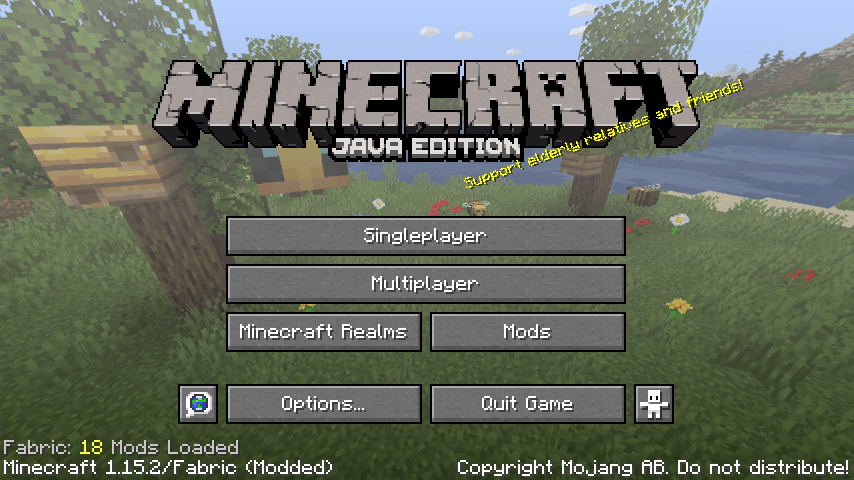
Title Screen:
– The Realms Button has been shorten and the Mods Button has been moved next to it
– The amount of mods loaded has been moved from the button to above the version

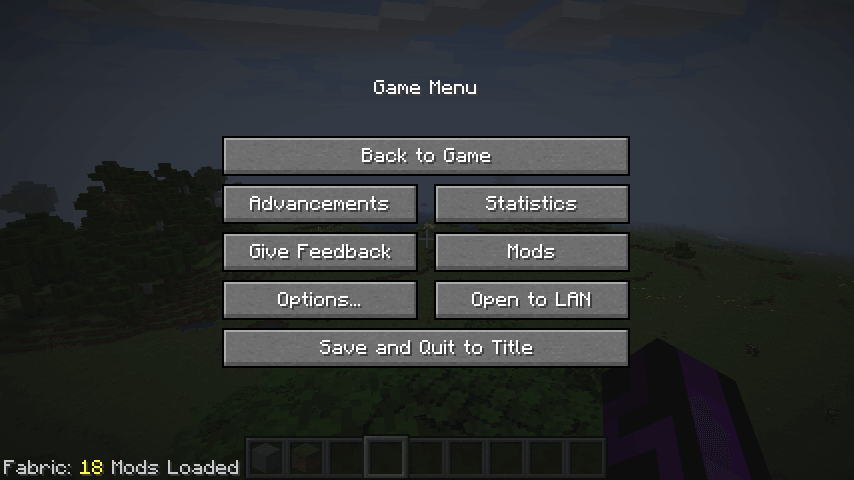
Game Menu / Pause Screen:
– The Report Bugs Button has been replaced with the Mods Button. If you still want to report a bug, click on Give Feedback and hit the Report Bugs Button
– The amount of mods loaded has been moved from the button to the bottom left
常见问题
Better Mod Button 支持哪些 Minecraft 版本?
Better Mod Button 支持 Minecraft Java 版 1.15.2–1.16.5,共 7 个版本,可用的加载器:Fabric。下载时注意选择和你游戏版本一致的文件。
Better Mod Button 怎么安装?
先用 PCL2 或 HMCL 启动器安装对应版本的 Fabric,再把下载的 .jar 文件放进游戏目录的 mods 文件夹,重新启动游戏即可。开启了版本隔离的,mods 文件夹在 versions/版本名 下面。
Minenash 的其他作品
查看全部 →
Monsters in the Closet
高亮显示阻止你睡觉的怪物
Enhanced Attack Indicator
将攻击指示器用于近战攻击以外的更多场景

Seamless Loading Screen
离开世界或服务器时截取游戏画面,并在重新加入时显示。

CustomHud
自定义HUD - 一个高度可定制的基于变量的文本HUD
评论
登录后评论和评分